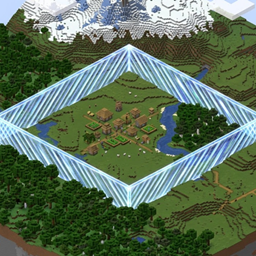
介绍
Borderline
One world size for every dimension.
Borderline reads the overworld world border and applies scaled borders to the Nether and End, so a
single world size governs all three dimensions. It runs entirely on the server, needs no client mod,
and uses only vanilla world-border packets, so unmodded players see the correct border wherever they
are.
What it does
- Treats the overworld border as the source of truth.
- Derives the Nether border at one eighth of the overworld size, and the End border at one half
(both configurable). - Matches the overworld border center in every dimension, letting vanilla apply the Nether’s 8:1
coordinate scale. - Re-derives the Nether and End borders on server start, whenever the overworld border changes
(including a plain/worldborder set), and on demand with a command. - Pushes each player the border of the dimension they are in, using vanilla packets, so clients
without the mod render the right border in the Nether and End as well. - Remembers the last world size set through the mod and re-imposes it on the overworld at every start.
For example, with an overworld size of 10000 blocks:
| Dimension | Border size |
|---|---|
| Overworld | 10000 |
| Nether | 1250 |
| End | 5000 |
Why
Vanilla links the overworld border to every other dimension at a 1:1 scale: set it to 10000 and the
Nether border is also 10000, which is eight times larger than the Nether’s coordinate scale implies.
Vanilla also only ever tells clients about the overworld border, so a per-dimension border needs the
server to send the right one to each player.
Borderline fixes both: it derives proportional borders and keeps every client in sync, without
requiring anyone to install anything.
It only manages the world border. It does not generate, delete, or otherwise alter terrain, and it
adds no blocks, items, entities, or registry entries.
Installation
- Install Fabric (with Fabric API) or NeoForge for Minecraft 1.21.1 or 26.3.
- Put the mod jar in the server’s
mods/folder. - Start the server.
Use the universal jar on either loader, or the matching loader-specific jar if you prefer. The mod
is server-side only: clients do not need it, and vanilla clients can see and honour the borders it
sets.
Single-player works too, because the integrated server runs the same code. The commands need cheats
enabled (permission level 2), just like vanilla /worldborder.
Commands
All commands require permission level 2 (operator).
| Command | What it does |
|---|---|
/borderline set <diameter> [seconds] |
Sets the overworld world size, optionally lerping over seconds, derives the Nether and End borders, and saves the size to the config. |
/borderline sync |
Re-derives from the live overworld border and saves its current size. |
/borderline status |
Prints the current size and center of each dimension. |
/borderline set takes a diameter, exactly like vanilla /worldborder set.
Configuration
The config lives at config/borderline.json and is created with defaults on first run.
{
  "enabled": true,
  "skipWhenUnbounded": true,
  "worldSize": null,
  "nether": { "enabled": true, "sizeScale": 0.125, "centerScale": 1.0 },
  "end": { "enabled": true, "sizeScale": 0.5, "centerScale": 1.0 }
}| Key | Meaning |
|---|---|
enabled |
Master switch for the whole mod. |
skipWhenUnbounded |
When no worldSize is saved, leave the Nether and End alone if the overworld border is still at the vanilla default (unbounded). |
worldSize |
The last overworld size set through the mod, or null. When set, it is re-imposed at every start. |
nether / end |
Per-dimension enabled, sizeScale (border size multiplier) and centerScale (center multiplier in overworld coordinates). |
The default scales are 0.125 for the Nether and 0.5 for the End. Set a dimension’s enabled to
false to leave its border untouched.
How it works
- The overworld border is the input. Borderline attaches to its changes, so any overworld border
update is reflected in the other dimensions immediately. - The Nether and End borders are not persisted by vanilla, so Borderline re-applies them at every
start, and from the savedworldSizewhen one is present. - Because vanilla only sends the overworld border to clients, Borderline sends each player the border
of their current dimension with vanilla packets on change, on join, on respawn, and on dimension
change.
Notes
- A plain
/worldbordercommand still edits the overworld border; Borderline picks up the change and
re-scales the Nether and End. - Do not run another mod or plugin that also owns the world border for the same dimensions, or the two
will fight over it. - The mod changes the border only. It does not pre-generate chunks inside it.
Compatibility
- Minecraft 1.21.1 and 26.3
- Fabric and NeoForge
- Server-side only; no client installation required
Links
- Source and issues: https://github.com/retiredroca/Borderline
License
All Rights Reserved (ARR). Copyright (c) 2026 Retired Roca. See the LICENSE file in the repository.
常见问题
BorderLine 支持哪些 Minecraft 版本?
BorderLine 支持 Minecraft Java 版 1.21.1–26.3,共 2 个版本,可用的加载器:Fabric / NeoForge。下载时注意选择和你游戏版本一致的文件。
BorderLine 怎么安装?
先用 PCL2 或 HMCL 启动器安装对应版本的 Fabric / NeoForge,再把下载的 .jar 文件放进游戏目录的 mods 文件夹,重新启动游戏即可。开启了版本隔离的,mods 文件夹在 versions/版本名 下面。
RetiredRoca 的其他作品
查看全部 →
MC Storage Area Network
Centralized Storage access
MC Personas
Single Account, multiple player instances
Simple Voice Web
Simple Voice Chat Add-on

Redstone PCBs
Build, save and share
评论
登录后评论和评分