
BluePAC
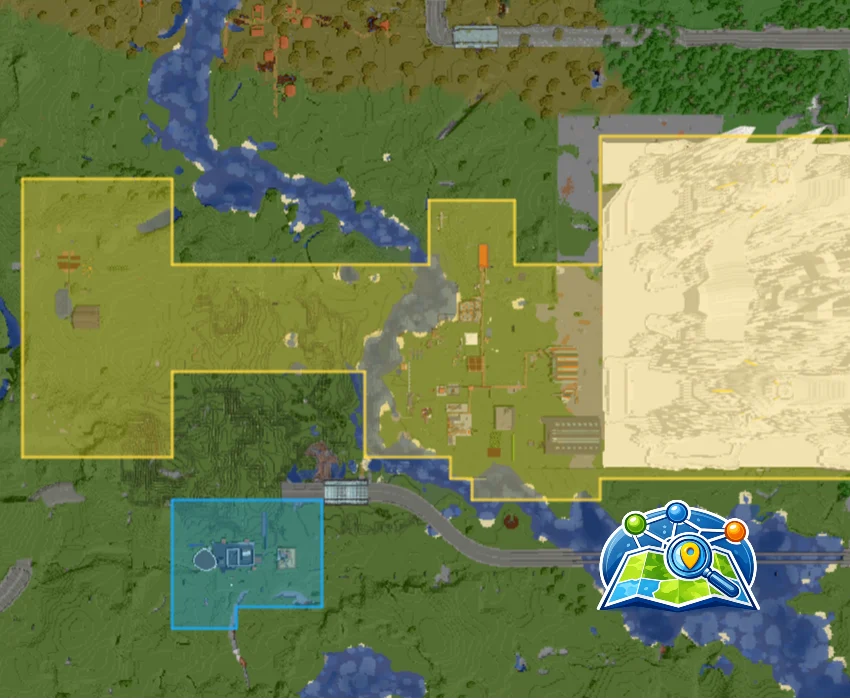
直接在 BlueMap 上显示你服务器的已认领区块。BluePAC 将 Open Parties and Claims(OpenPAC)与 BlueMap 连接起来,在网页地图上渲染带颜色编码的认领覆盖层,让你一眼就能看清谁拥有什么。
介绍
BluePAC – BlueMap + OpenPAC Integration
Display your server’s claimed chunks directly on BlueMap. BluePAC bridges
Open Parties and Claims (OpenPAC) with BlueMap to render color-coded claim
overlays on the web map, making it easy to see who owns what at a glance.
Features:
- Automatically displays all claimed chunks as colored regions on BlueMap
- Each player’s claims use their OpenPAC-configured color
- Adjacent chunks from the same player are merged into clean polygonswith no internal borders
- Live updates — claims appear on the map within moments of being made
- Sub-claim support with distinct colors per sub-configuration
- Configurable marker appearance (fill/line opacity, line width, marker height)
- Per-dimension support (Overworld, Nether, End, and modded dimensions)
Configuration (bluepac-common.toml):
- fillOpacity (default: 0.3) — Fill transparency of claim regions
- lineOpacity (default: 0.8) — Border transparency of claim regions
- lineWidth (default: 2) — Border width in pixels
- markerYHeight (default: 64) — Y level at which markers are drawn
Disclaimer
BluePAC is an independent, third-party mod and is not affiliated with, endorsed by, or associated with the BlueMap or Open Parties and Claims projects. BlueMap and Open Parties and Claims are the property of their respective authors. All trademarks and registered trademarks are the property of their respective owners.

常见问题
BluePAC 支持哪些 Minecraft 版本?
BluePAC 支持 Minecraft Java 版 1.20.1–1.21.1,共 2 个版本,可用的加载器:Fabric / Forge / NeoForge。下载时注意选择和你游戏版本一致的文件。
BluePAC 怎么安装?
先用 PCL2 或 HMCL 启动器安装对应版本的 Fabric / Forge / NeoForge,再把下载的 .jar 文件放进游戏目录的 mods 文件夹,重新启动游戏即可。开启了版本隔离的,mods 文件夹在 versions/版本名 下面。
saunhardy 的其他作品
查看全部 →
Climbable Ropes for Create Aeronautics
为 Create Aeronautics 的垂直绳索添加空手攀爬模式。空手右键抓住绳索,按 W/S 攀爬,按空格跳下,按潜行松手。

AFKStatus
一个简单实用的挂机检测指令,提升游戏体验。

Dyeable Ropes for Create Aeronautics
为 Create: Aeronautics 添加 16 种染料颜色的绳索。用染料给任意绳索染色,或对已放置的绳索段右键即可即时改色。

Createrington Currency
可与外部 API 通信的自定义货币模组。
评论
登录后评论和评分