
介绍
BlockTuner (Forge Mod)
About
This is the forge version of BlockTuner.
If you want a fabric version, please visit this page.
If you want the data pack for older versions of Minecraft, please visit this page.
Instructions
Installation
Put this mod in your mods folder. You also need to install Forge API if you haven’t installed it yet.
Server need to install the mod for it working.
How to Use BlockTuner
Ctrl + Right clock on a note block to open up tuning UI. Placing a note block while holding Ctrl also opens the UI automatically.
Ctrl to show the note of the note block at crosshair.
Ctrl + middle click on note blocks to pick up readily tuned note blocks.
Right click note blocks with blaze rods to play with right clicks without tuning.
Tuning UI
Top-right corner (from left to right)
 Play mode – toggle whether the GUI will turn off immediately upon clicking a note on the piano keyboard.
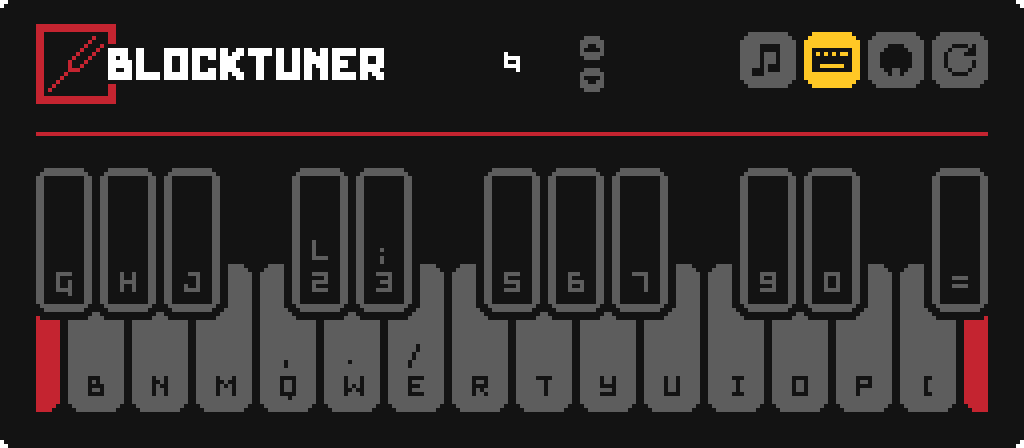
 Typing keyboard to piano keyboard – toggle whether you want to play the piano keyboard using your computer keyboard.
 MIDI Device – Click to cycle through available MIDI input devices. The icon shows red if the device is currently unavailable. This usually means it is being used by another program.
Keyboard Mapping:
Credits
Original author
- Fabric version original author – xwjcool
Localization
- Russian – Felix14-v2 (Currently outdated)
- Japanese – misaka10843 & hakkaku
常见问题
BlockTuner-forge 支持哪些 Minecraft 版本?
BlockTuner-forge 支持 Minecraft Java 版 1.20–1.20.4,共 5 个版本,可用的加载器:Forge。下载时注意选择和你游戏版本一致的文件。
BlockTuner-forge 怎么安装?
先用 PCL2 或 HMCL 启动器安装对应版本的 Forge,再把下载的 .jar 文件放进游戏目录的 mods 文件夹,重新启动游戏即可。开启了版本隔离的,mods 文件夹在 versions/版本名 下面。运行环境:客户端和服务端都要装。


评论
登录后评论和评分