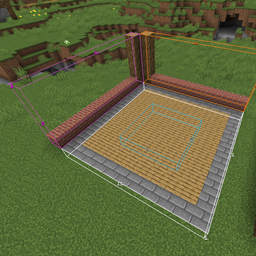
截图


介绍
Requires Fabric API
Requires Fabric 1.16.2
A simple mod to measure your blocks!
Choose an item from your hotbar like a stick, then type the command /blockmeter or /meter and right click a block to start measuring your blocks! (Right-click again to lock the measurement)
To remove your last measurement, crouch and hold your block meter tool then right click a block
To open the options menu, crouch and hold your block meter tool then right click the air
This is a client side only mod! So don’t install the mod on a server
Command List:
– /blockmeter to select your blockmeter tool
– /meter undo to undo your last measurement
– /meter config to open the config screen
TODO:
– Add more shapes
常见问题
Block Meter 支持哪些 Minecraft 版本?
Block Meter 支持 Minecraft Java 版 1.14–1.16.3,共 7 个版本,可用的加载器:Fabric / Forge。下载时注意选择和你游戏版本一致的文件。
Block Meter 怎么安装?
先用 PCL2 或 HMCL 启动器安装对应版本的 Fabric / Forge,再把下载的 .jar 文件放进游戏目录的 mods 文件夹,重新启动游戏即可。开启了版本隔离的,mods 文件夹在 versions/版本名 下面。
评论
登录后评论和评分