
Bitop Perimeter
This is a mod used to create perimeters and obtain all the items. It's a great way to avoid building TNT flying machines or mining everything by hand.
介绍
What is Perimeter?
Perimeter is a simple mod designed primarily to create perimeters for technical farms that require them.
** This is NOT a Quarry-style mod for automatically collecting resources**. Its purpose is to save you the time and effort of building TNT flying machines, which can be tedious to set up and may cause performance issues on low-end computers.
However, a small selection of blocks will be stored automatically when mined. Only the blocks included in the whitelist can be retrieved.
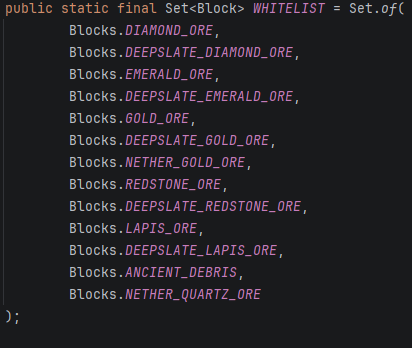
How to use it
Open the block’s GUI by right-clicking it.
First, enter the size of the perimeter. For example:
- Entering 5 will create a 5×5 perimeter.
- Entering 257 will create a 257×257 perimeter.
Then, press “Confirmar” to start excavating the perimeter.
The “Retirar Objetos” button allows you to collect all stored blocks that are included in the whitelist.
Important: If you don’t want to collect the stored items, simply break the block. Destroying the block will permanently delete all stored contents.
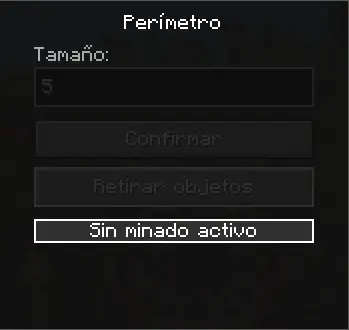
Crafting
The crafting recipe is simple.
1 Red Shulker Box
1 Redstone Block
2 Gold Blocks
2 Diamond Blocks
3 Iron Blocks
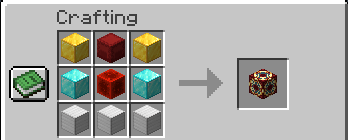
Creative Mode
In Creative Mode, the block can be obtained with the following command:
/give @a perimeter:perimeter
The block can only be obtained through this command or by crafting it.

常见问题
Bitop Perimeter 支持哪些 Minecraft 版本?
Bitop Perimeter 支持 Minecraft Java 版 26.2,可用的加载器:Fabric。下载时注意选择和你游戏版本一致的文件。
Bitop Perimeter 怎么安装?
先用 PCL2 或 HMCL 启动器安装对应版本的 Fabric,再把下载的 .jar 文件放进游戏目录的 mods 文件夹,重新启动游戏即可。开启了版本隔离的,mods 文件夹在 versions/版本名 下面。运行环境:客户端和服务端都要装。
评论
登录后评论和评分