
BiomeInfo (Fabric)
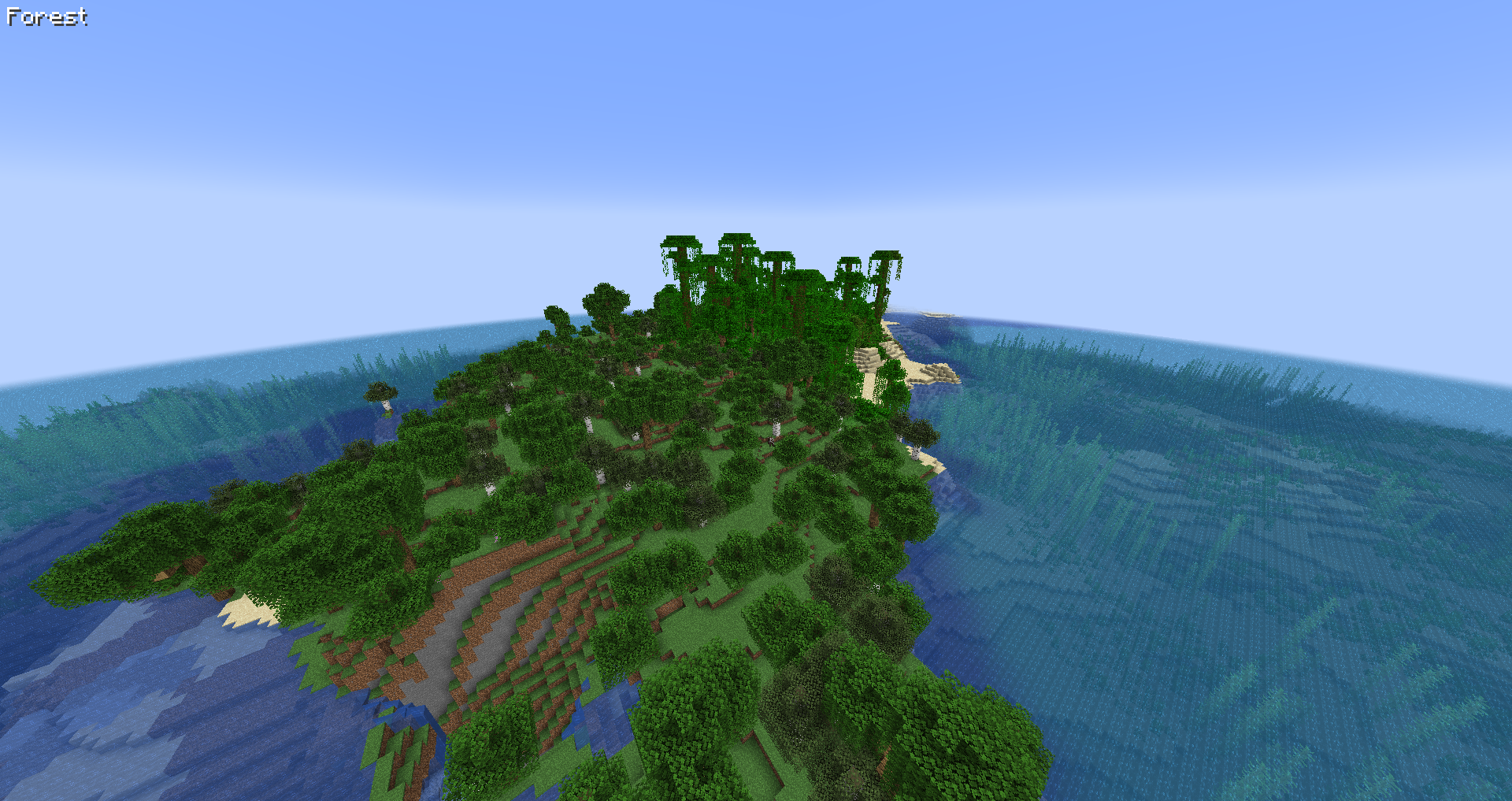
Adds a configurable text to the top left corner (by default) saying what biome the player is in.
截图

介绍
Functionality
This mod will show a simple text containing the name of the biome the player is currently in.
This is useful if you’d like to have constant information about which biome you’re currently traveling in, but don’t want your screen to be cluttered with other information.
The info will show once for 1.5 seconds after you entered a new biome. It will then fade out. You can change the time the info appears, or have it shown all the time via the mod’s configuration options. To turn the display off completely, toggle the corresponding option.
Config
The text will show at the top left corner of Minecraft by default, however you can completely customize its position and color with the configuration file. There are a few position presets that make it easier for you to choose a position you like without needing to fiddle with the config settings.
To change the text’s color, copy the hexadecimal value of a color into the configuration field. For instance, the hex value of white is ffffff (you can use an online tool to get the value of other colors).
Other configuration options include scaling the text, making the text render with a shadow (true by default), and changing the text alignment
Further Info
– This mod is compatible with any other biome mod, like Biomes o’ Plenty.
– Should the debug screen (F3) be open, the biome info will not be rendered (configurable).
– This mod is a client side mod. It will not do anything if installed on a server.
– Please be careful if you use this on a public server, the rules may not allow its usage.
– You are allowed to use this mod in any modpack.


Come join me on Discord! https://discord.gg/kgZUAxK

Follow me on Twitter for mod updates and other shenanigans! https://twitter.com/bl4ckscor3
常见问题
BiomeInfo (Fabric) 支持哪些 Minecraft 版本?
BiomeInfo (Fabric) 支持 Minecraft Java 版 1.14.2–26.3,共 38 个版本,可用的加载器:Fabric / Quilt。下载时注意选择和你游戏版本一致的文件。
BiomeInfo (Fabric) 怎么安装?
先用 PCL2 或 HMCL 启动器安装对应版本的 Fabric / Quilt,再把下载的 .jar 文件放进游戏目录的 mods 文件夹,重新启动游戏即可。开启了版本隔离的,mods 文件夹在 versions/版本名 下面。
bl4ckscor3 的其他作品
查看全部 →
AI Improvements: Performance Tuning
优化原版 AI 的性能,并可关闭某些 AI 行为

Security Craft
增加大量方块和物品,帮助你防御并加固基地。

XP Tome
添加一本可存储可配置经验值的书。
Get It Together, Drops!
添加标签和配置选项,用于定义掉落物品的合并方式。
评论
登录后评论和评分