
Bio book
Give your character a backstory, read other players' bios, and keep personal notes in an in-game journal.
截图
介绍


Bio Book
Character bios and personal journals for Minecraft
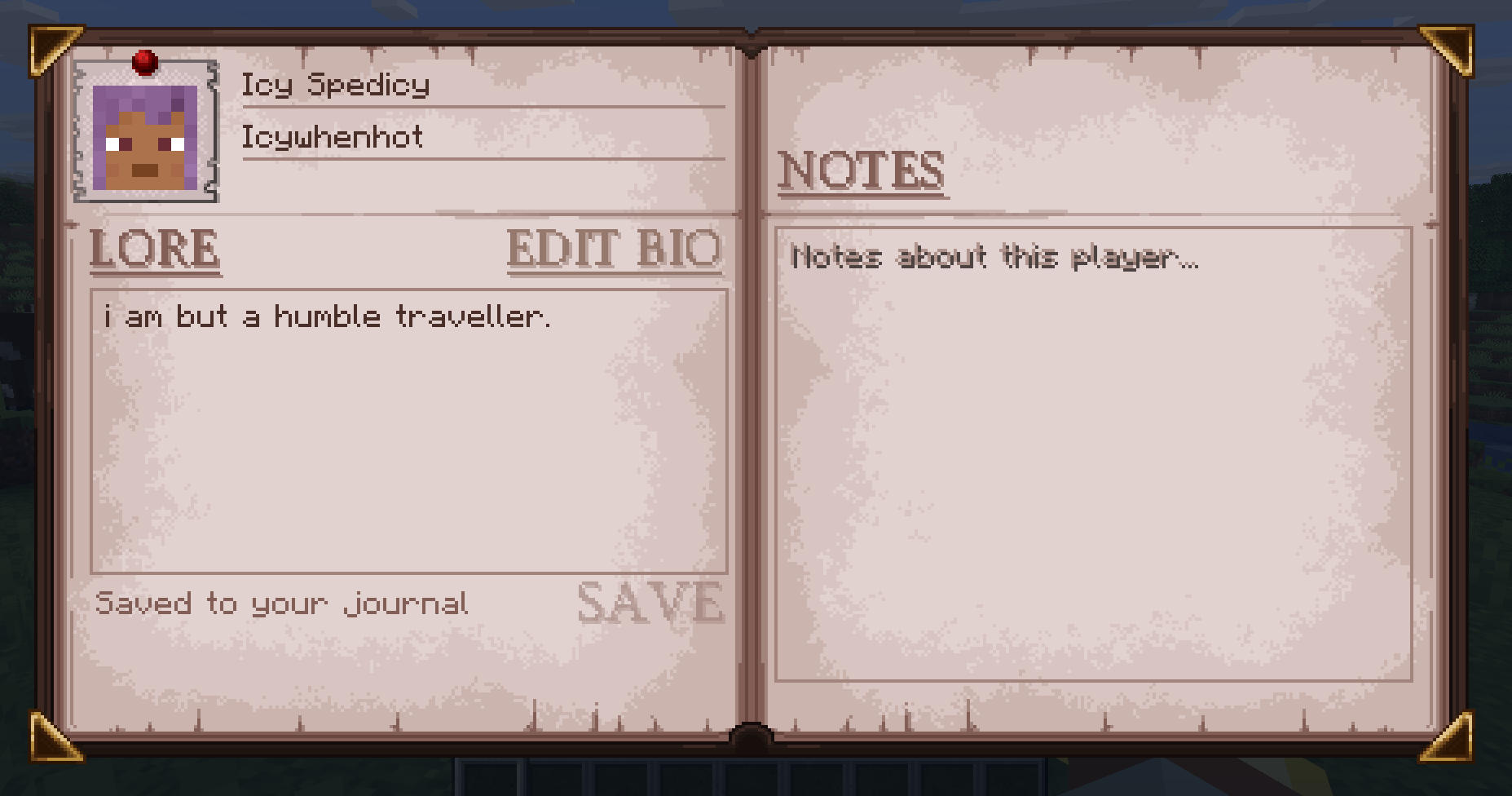
Bio Book gives your character a place to tell their story. Set a character name, add a short tagline, and write a public bio that other players can read straight from chat.
Click the skin portrait beside a player’s message to open their journal. Read their backstory, then use My notes to keep your own notes about them. Saved bios and notes stay with the world between sessions.
Bio Book is required on both the server and each player’s client. Singleplayer works too, if you want to open lan worlds etc.
Using your journal
Press B or type /bio to open your own journal. You can change the keybind in Controls.
- Lore: Read a character’s public bio.
- Edit bio: Change your own character name, tagline, and backstory.
- My notes: Write personal notes about that character, separate from their public bio.
Click Save changes or press Ctrl + S to save. If you opened a journal from chat, closing it takes you back with your unfinished message still there.
You can close and reopen the journal without losing a draft during the same connection. Save before disconnecting, though: unsaved drafts are cleared when you leave.
Public stories, personal notes
Your bio is public, and only you can edit it. Notes belong to the player who wrote them and are not shared with other players.
Notes are stored in the world save, so server owners with access to those files can read them.
Character names can contain up to 48 characters, taglines up to 96, and each backstory or note up to 4,096.

This version is for Minecraft 1.21.1 with NeoForge 21.1.243 or newer in the 21.1 series.
Install Bio Book in the mods folder on the server and each player’s client. No additional mods are required.

Q: Do I need this on the server?
Yes. Install it on both the server and your client so bios and notes can be saved and loaded.
Q: How do I read another player’s bio?
Open chat and click the skin portrait beside one of their messages.
Q: Can other players read my notes about them?
No. Players only receive their own notes. Server owners can still inspect notes through the world save.
Q: Will my writing survive a server restart?
Yes, once saved. Bios and notes are stored with the world. Unsaved drafts do not survive disconnecting.
Q: Does it work with other chat mods?
Chat replacement mods need compatibility testing. Messages need a player identity for Bio Book to attach a portrait, so anonymous system messages will not have one. Other mods that add chat heads may also cause duplicate portraits or conflicts.
Q: Does opening the journal pause the game?
No. The world keeps running while you read or write.


常见问题
Bio book 支持哪些 Minecraft 版本?
Bio book 支持 Minecraft Java 版 1.20.1–26.3,共 3 个版本,可用的加载器:Fabric / Forge / NeoForge。下载时注意选择和你游戏版本一致的文件。
Bio book 怎么安装?
先用 PCL2 或 HMCL 启动器安装对应版本的 Fabric / Forge / NeoForge,再把下载的 .jar 文件放进游戏目录的 mods 文件夹,重新启动游戏即可。开启了版本隔离的,mods 文件夹在 versions/版本名 下面。
Icywhenhot 的其他作品
查看全部 →
Icy’s Better Horses
Better Horses 通过改进移动、成长和实用功能,让马匹成为能长期陪伴玩家的伙伴。

Wavify
为沙滩、海洋和河流添加环境波浪!

Take a Seat!
20多种坐姿动画,带来沉浸式体验!
Wavify
为海滩、海洋和河流添加环境波浪效果!
评论
登录后评论和评分