Big Tooltip Window
Allows you to open a seperate window to display to tooltips of hovered and held items.
截图
介绍
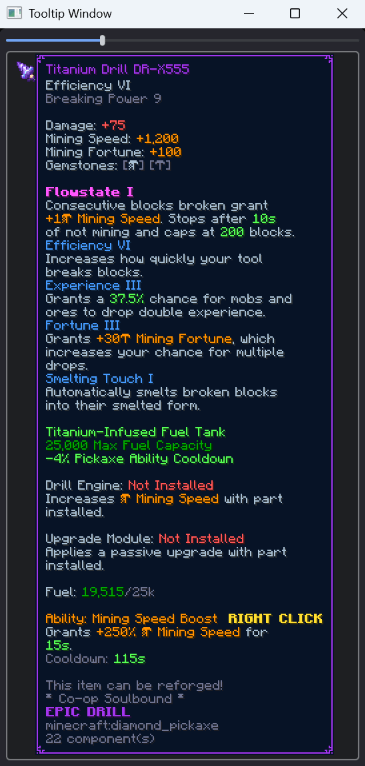
Allows you to open a separate window that can display the tooltip of the item you are holding in your hand, hovering in an inventory, or holding with your cursor in your inventory. Open the window with /tooltip_window. Ideal for multi monitor gaming. Particularly on game modes like Hypixel’s Skyblock, where item descriptions are taller than your screen, you can now show them in a second window!
常见问题
Big Tooltip Window 支持哪些 Minecraft 版本?
Big Tooltip Window 支持 Minecraft Java 版 1.21.1–26.3,共 6 个版本,可用的加载器:NeoForge。下载时注意选择和你游戏版本一致的文件。
Big Tooltip Window 怎么安装?
先用 PCL2 或 HMCL 启动器安装对应版本的 NeoForge,再把下载的 .jar 文件放进游戏目录的 mods 文件夹,重新启动游戏即可。开启了版本隔离的,mods 文件夹在 versions/版本名 下面。
Tcathebluecreper 的其他作品
查看全部 →
Jak and Daxter map
The world of Jak and Daxter in Minecraft, while fully functioning!

Wireless Chest Accessor (WCA)
adds a few items to get your items wirelessly

Cheapslate – Instant mine deepslate with a Netherite Pickaxe!
Instant-mine deepslate with Efficiency 5, Haste 2, Netherite Pickaxe, also with configs!

Rails +
a pack about transportation and trains (NO MINECARTS ALOWED)
评论
登录后评论和评分