
Better Crosshair Indicator
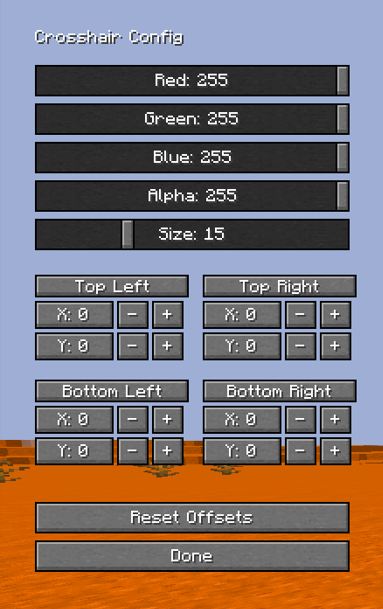
This mod causes the crosshair to display differently when you can hit a player's hitbox. It is possible to change the color and size of the crosshair indicator.
截图


介绍
# How does it work?
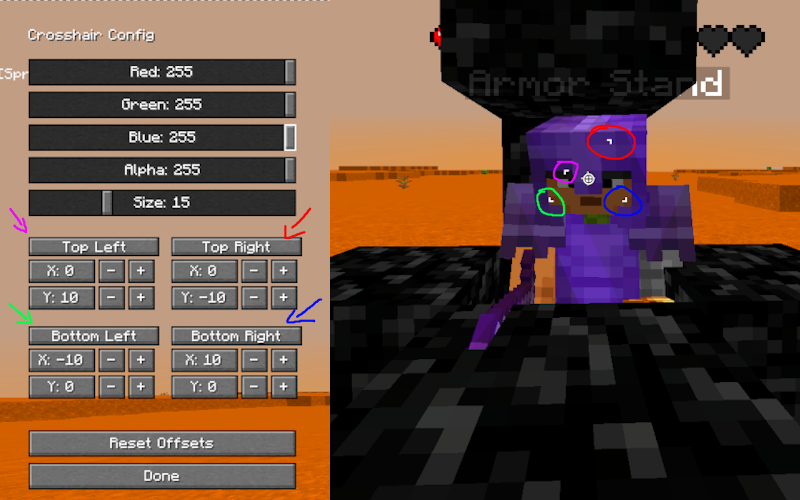
Better Crosshair Indicator displays visual markers around your crosshair when aiming at other players. this mod provides clear, centered feedback directly on your crosshair.
The indicator appears as four corner brackets that frame your crosshair.
How does it differ from the original version?
### Visual customization
- RGBA color control
- Adjustable indicator size
### Advanced
- Per-corner offsets – Each corner (Top-Left, Top-Right, Bottom-Left, Bottom-Right) can be positioned independently with X/Y offsets
- (Mostly) Pixel-perfect alignment for any crosshair style
- Bind you can customize this in the keybinds settings (Default G)
### If you like my work, give it a ❤ it helps
### Original project
Thanks to @Regenitive for supporting project
常见问题
Better Crosshair Indicator 支持哪些 Minecraft 版本?
Better Crosshair Indicator 支持 Minecraft Java 版 1.20.1–26.3,共 16 个版本,可用的加载器:Fabric。下载时注意选择和你游戏版本一致的文件。
Better Crosshair Indicator 怎么安装?
先用 PCL2 或 HMCL 启动器安装对应版本的 Fabric,再把下载的 .jar 文件放进游戏目录的 mods 文件夹,重新启动游戏即可。开启了版本隔离的,mods 文件夹在 versions/版本名 下面。运行环境:仅客户端。
uokik 的其他作品
查看全部 →
Better Crosshair Indicator
This mod causes the crosshair to display differently when you can hit a player's hitbox. It is possible to change the color and size of the crosshair indicator.

Pearl Trajectories
ender pearl trajectory visualization
Pearl Trajectories
ender pearl trajectory visualization

BetterTotemHighlight
Shows a color box around your totems in your inventory.
评论
登录后评论和评分