Better Nether Stars
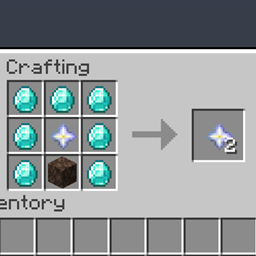
Adds a crafting recipe for nether stars similar to that of smithing templates.
介绍
Craftable Nether Stars!
You know how smithing templates are really hard to get? That’s why you’re able to duplicate them with a crafting recipe. This mod allows you to do the same, but with nether stars.
What’s the point?
Most people only need 1 or 2 in their world, since in vanilla Minecraft, the only purpose of nether stars is to craft beacons. However, I was playing a modpack with my friends, and we needed a lot of nether stars for late-game recipes. It just doesn’t make sense to have to kill a wither hundreds of times for a few items, and so we figured it would be best if nether stars had a crafting recipe.
Why this mod?
Yeah, there’s other mods that add crafting recipes for nether stars, but this one is more fair. Most of them allow you to make nether stars without ever spawning the wither, which defeats the purpose of the boss. This recipe is different, however, as you need to acquire at least one nether star before you’re able to craft more. This is way better because you still have to defeat the wither at least once before you can craft more nether stars.
What’s the recipe?
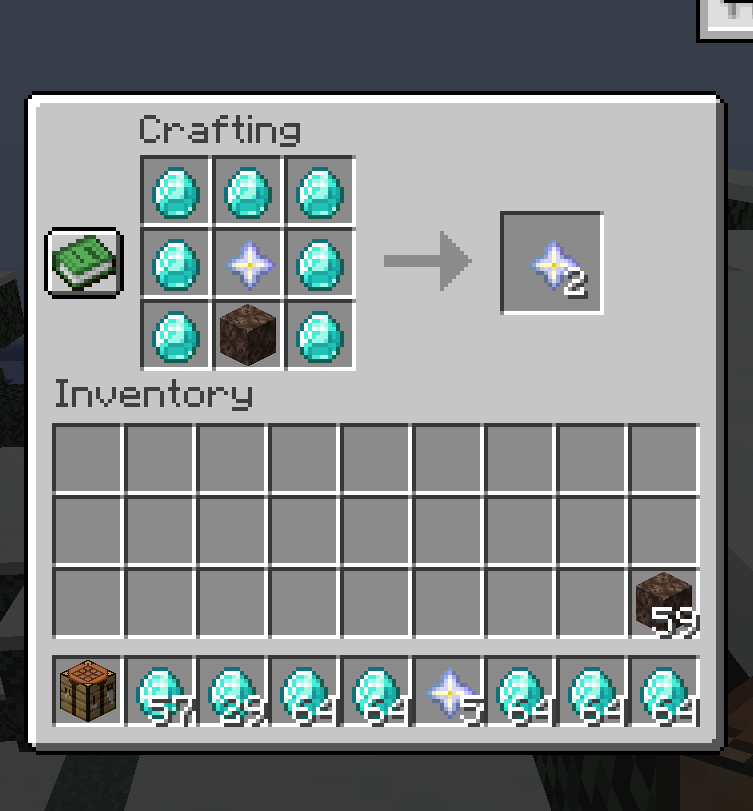
The recipe is relatively simple. All you need is 7 diamonds, one soul sand, and most importantly, an already existing nether star. This will give you 2 nether stars in return, allowing you to duplicate them at the cost of a few diamonds and soul sand.
FAQ
Can I use this in my modpack?
This mod is mainly made for modpacks that add more uses for nether stars, so of course you are free to use this in any modpack. You are not allowed to upload this modpack to other sites or claim this mod as your own.
Is this mod server side?
Yes, this mod is server side, so if it is installed on the server, other players will not need to download it as well.
常见问题
Better Nether Stars 支持哪些 Minecraft 版本?
Better Nether Stars 支持 Minecraft Java 版 1.20.1,可用的加载器:Forge。下载时注意选择和你游戏版本一致的文件。
Better Nether Stars 怎么安装?
先用 PCL2 或 HMCL 启动器安装对应版本的 Forge,再把下载的 .jar 文件放进游戏目录的 mods 文件夹,重新启动游戏即可。开启了版本隔离的,mods 文件夹在 versions/版本名 下面。
评论
登录后评论和评分