
Better Mipmaps
Unlocks mipmap levels higher than 4 to reduce visual arifacts with high resolution resource packs
截图
介绍
Overview
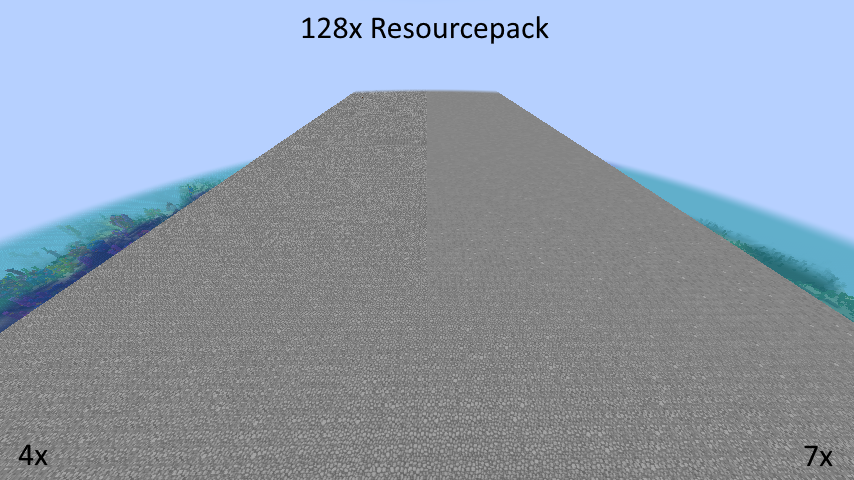
Have you ever noticed how noisy Minecraft looks in the distance when using a high-resolution resource pack?The reason is that by default, Minecraft only supports full mipmaps for 16×16 textures and below.
Anything higher than that will have incomplete mipmaps.
This mod fixes this by increasing the maximum level of mipmaps to 10 (1024×1024).
The optimal mipmap level depends on the resolution of your resource pack and can be found in the table below:
| Texture Resolution | Optimal Mipmap Level |
|——————–|———————-|
| 1 | 0 |
| 2 | 1 |
| 4 | 2 |
| 8 | 3 |
| 16 | 4 |
| 32 | 5 |
| 64 | 6 |
| 128 | 7 |
| 256 | 8 |
| 512 | 9 |
Technical Details
The problem with generating a full mipmap pyramids for Minecraft textures is that Minecraft combines all block textures into one big texture atlas. The maximum mipmap level of this atlas is a smallest maximum mipmap level of any individual texture.
So even when using a 99% complete resource pack, a single left-over 16×16 texture will limit the atlas to 4 mipmap levels. To work around this, this mod will automatically attempt to upscale smaller textures before the stitching process.
常见问题
Better Mipmaps 支持哪些 Minecraft 版本?
Better Mipmaps 支持 Minecraft Java 版 1.20.1–1.21.11,共 17 个版本,可用的加载器:Fabric。下载时注意选择和你游戏版本一致的文件。
Better Mipmaps 怎么安装?
先用 PCL2 或 HMCL 启动器安装对应版本的 Fabric,再把下载的 .jar 文件放进游戏目录的 mods 文件夹,重新启动游戏即可。开启了版本隔离的,mods 文件夹在 versions/版本名 下面。运行环境:仅客户端。

评论
登录后评论和评分