
Better Creative Search – Smarter, Faster, Easier!
Are you tired of struggling to remember exact item names when searching in the creative inventory? Do you use multiple mods and wish searching was more intuitive? Better Creative Search is here to revolutionize the way you find items!
截图
介绍
Better Creative Search – Smarter, Faster, Easier!
Are you tired of struggling to remember exact item names when searching in the creative inventory? Do you use multiple mods and wish searching was more intuitive? Better Creative Search is here to revolutionize the way you find items!
🔎 How This Mod Improves Your Search Experience:
- ✅ No More Exact Matches Needed – Instead of remembering the exact order of words in an item’s name, you can now search using multiple keywords in any order!
- ✅ Works with All Mods – Perfect for modded Minecraft! Find items across multiple mods without guessing exact names.
- ✅ Faster & Smarter Search – Uses multi-token substring matching, so you can search for parts of an item’s name in any order.
- ✅ Simple & Lightweight – No performance impact, just a smarter way to search.
- ✅ Toggle On/Off via Config – Enable or disable the enhanced search anytime with a simple config file.
🎯 How It Works
Minecraft’s default creative search only looks for a single continuous substring in item names. This means partial matches work, but you must type the words in the exact order they appear.
🔄 What This Mod Changes
Better Creative Search completely replaces this logic! Instead of searching for just one substring, it now:
- ✔️ Splits your search into multiple keywords (tokens).
- ✔️ Finds all items that contain ALL keywords, in ANY order.
- ✔️ Works across all vanilla and modded items without needing to type the full name.
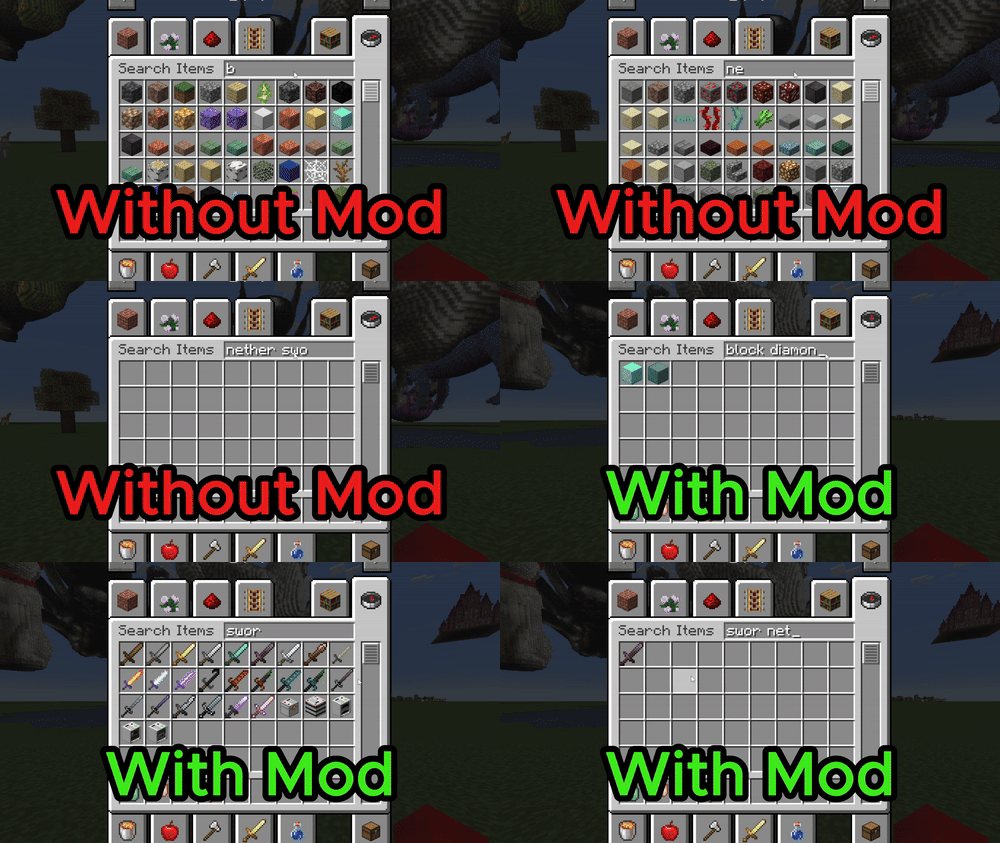
🔹 Example Without the Mod (Default Minecraft Search)
- Searching “oak plank” won’t show “Oak Wood Planks”, because the words aren’t in the exact order.
- Searching “sword nether” won’t show “Netherite Sword”, because the words aren’t in the exact order.
- Searching “modname tool” won’t find a modded tool, unless you type its name exactly as it appears.
🔹 Example With This Mod (Multi-Word Substring Matching)
- Searching “oak plank” ✅ will show “Oak Wood Planks”, even though “Planks” comes last.
- Searching “sword nether” ✅ will find “Netherite Sword”, no matter the word order.
- Searching “modname tool” ✅ will match any modded tool with “modname” and “tool” in the name.
- This makes searching faster and more flexible, especially when using many content-adding mods!
⚙ Easy to Enable or Disable
Want to toggle the feature? Simply edit the mod’s config file!
📂 Location: config/bettercreativesearch-client.toml
📝 Setting: enableBetterSearch = true/false
💡 Default: Enabled
🚀 Download now and experience the power of better searching in Minecraft!
Never get lost in your creative inventory again! 🎨🔍
Future development
_Currently the mod is only created for forge mc version 1.19.2. This is becuase I want to first see the initial interest for this mod. So if it gains a lot of attraction I will publish it for other versions!_
常见问题
Better Creative Search – Smarter, Faster, Easier! 支持哪些 Minecraft 版本?
Better Creative Search – Smarter, Faster, Easier! 支持 Minecraft Java 版 1.19.2,可用的加载器:Forge。下载时注意选择和你游戏版本一致的文件。
Better Creative Search – Smarter, Faster, Easier! 怎么安装?
先用 PCL2 或 HMCL 启动器安装对应版本的 Forge,再把下载的 .jar 文件放进游戏目录的 mods 文件夹,重新启动游戏即可。开启了版本隔离的,mods 文件夹在 versions/版本名 下面。运行环境:仅客户端。
评论
登录后评论和评分