Better Books
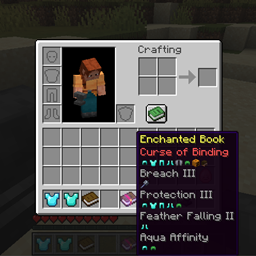
Provides an improved tooltip for enchanted books -> you can see what types of items they can be applied to.
介绍
Description
This add on enhances the tooltips for enchanted books. It adds icons representing what items the enchantment can be applied to under the enchantment. Enchantments can be sorted alphabetically optionally with curses at the end. The enchantment max level can also be displayed. Lastly, if desired a brief description of the enchantment effect can also be shown if the shift key is held down. This is all configurable.
Can be run on the client side only. Requires Fabric API and Cloth Config API. ModMenu is optional.
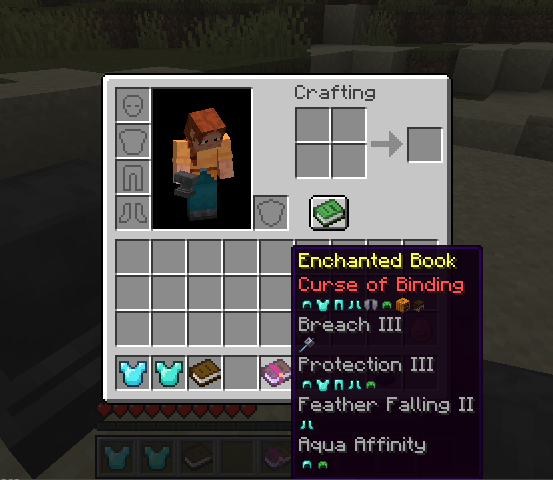
Combine it with the Clear Enchanted Books mod to get enhanced book textures.
Compatibility
If this mod is incompatible with your mod or a mod you like to use, please comment and I’ll try to resolve the problem.
If you have a mod that has a custom enchantment and you’d like the enchantment description to appear in the tooltip, add the key “enchantment.betterbooks.<your-enchantment-id>” to your lang file. Or message me and i can add it to this mod.
If you have a custom item that accepts enchantments and you’d like it to appear in the list of icons that an enchantment can be applied to, let me know and I’ll setup a registry to make this work.
Version History
Version 1.0.3 adds a short description of the enchantment effect to the tooltip. This is configurable to the shift key.
Version 1.0.2 fixes a problem with the AppleSkin mod.
New version 1.0.1 now provides:
- sorting alphabetically and placing curses at the bottom
- showing the max enchantment level
- removing the glint
- ModMenu integration so it can be configured in game – requires ModMenu and Cloth API.
Developed and tested in MC 1.21.7 -> MC 1.21.4
- Craftable Bronze Armor and Tools
- Craftable Chainmail Armor
- Craftable Copper Armor and Tools
- Craftable Horse Armor Plus
- The Dark Tower – Generates a large tower with a deep unground maze with mob spawners and loot.
- Small Tower
- Tin Ore with WorldGen
- Turtle Wolf Armor
常见问题
Better Books 支持哪些 Minecraft 版本?
Better Books 支持 Minecraft Java 版 1.21.4–1.21.7,共 4 个版本,可用的加载器:Fabric。下载时注意选择和你游戏版本一致的文件。
Better Books 怎么安装?
先用 PCL2 或 HMCL 启动器安装对应版本的 Fabric,再把下载的 .jar 文件放进游戏目录的 mods 文件夹,重新启动游戏即可。开启了版本隔离的,mods 文件夹在 versions/版本名 下面。
uglyrunt 的其他作品
查看全部 →
Craftable Copper Armor and Tools
Adds Copper Armor and Tools to minecraft.

Better Enchantment Tooltips
Adds enhanced tool tips to enchanted books and items.

Wild Wonders
A Beta mod that improves world generation and adventure!
评论
登录后评论和评分