
Belph Chat
Customizable, role‑colored chat for Forge 1.20.1 with in‑game templates for join/leave, death, advancements, and player chat.
截图

介绍
Belph Chat – role‑aware, fully customizable chat (Forge 1.20.1)
Belph Chat lets you take full control of Minecraft chat. Replace vanilla join/leave, death (with or without killer), advancement, and normal player chat with template-driven messages and role tags that have their own colors.
Includes an in-game template editor, live preview, roles manager, users screen for quick role assignment, and now Default Role support.
Built to be lightweight, server-friendly, and designed to work smoothly in any modpack.

Highlights
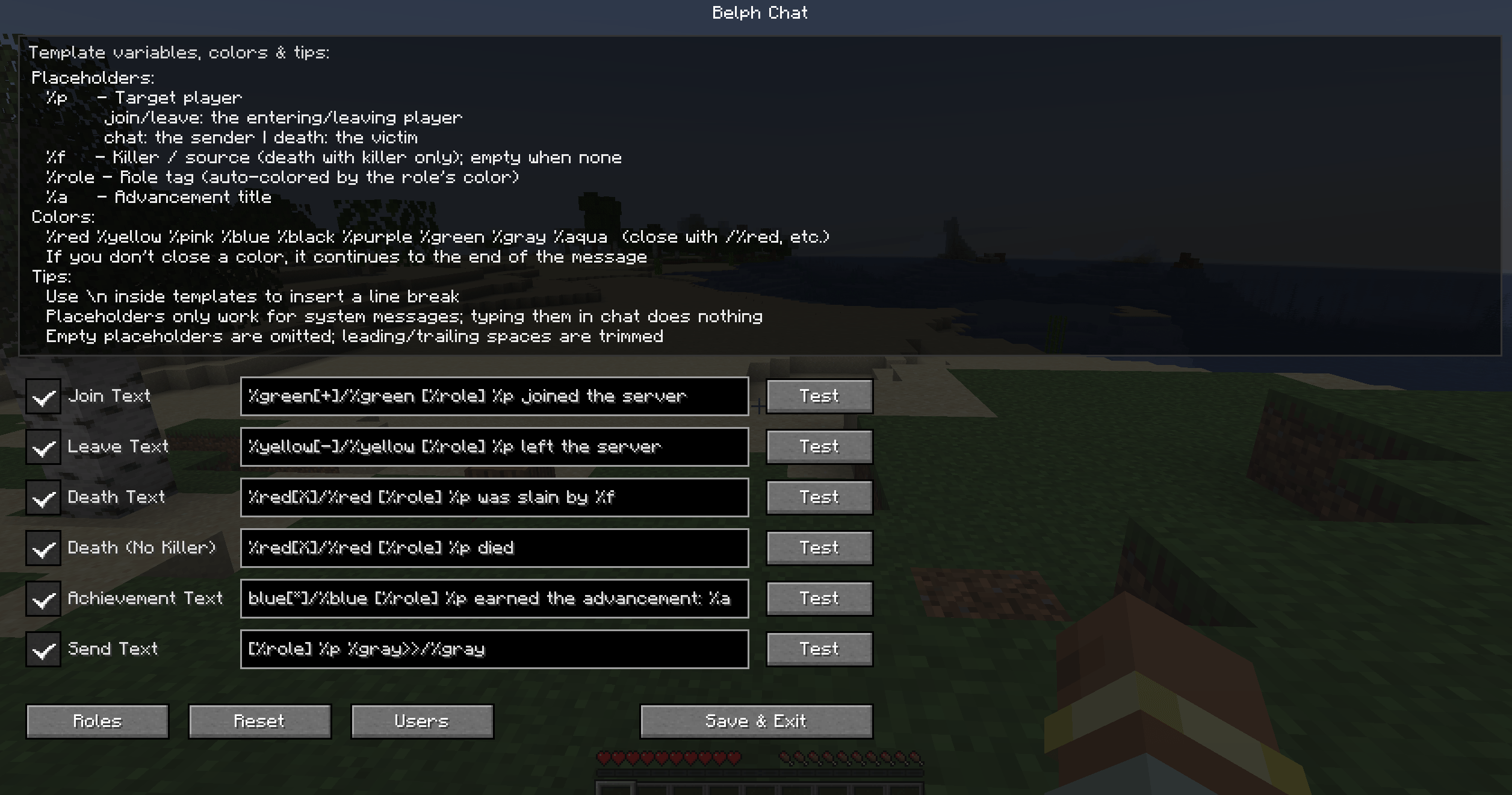
- Template editor in-game – Toggle each message type on/off, live “Test” preview (OP-only), and a one-click Reset to defaults.
- Role system – Create roles, pick a color, and assign one role per player from the Users screen. Role tags are auto-colored.
- Default Role support –
-
- Comes with a built-in
Memberrole (white) automatically assigned to new players. - Only one default role can exist at a time.
- Comes with a built-in
-
- Message types covered – Join, Leave, Death (killer), Death (no killer), Advancement, and Player chat (
%mplaceholder for message body). - Clean display – When a type is enabled, Belph Chat replaces vanilla messages; when disabled, the message is hidden entirely.
- Client & server support – Works on both; install on the server so everyone sees the same formatting.
Template placeholders & colors
- Placeholders:
%p– Target player%f– Killer / source%role– Role tag%a– Advancement title%m– Player chat message
Placeholders work only in system messages – typing them in chat does nothing.
- Colors:
%red%yellow%pink%blue%black%purple%green%gray%aqua%white%orange%dark_red%dark_green%dark_blue%dark_aqua
(Close with/%%color%e.g./%%red%. If not closed, the color continues until the end of the message.)
Tip: Use \\n in templates to add a line break.
Feedback & requests
Have a complaint, feature request, or an idea for a management/admin mod you’d like to see? Reach out freely I’m happy to take suggestions and build what the community needs.
Requirements
- Forge 1.20.1
- Client & server recommended (server install ensures everyone sees the same formatting)
常见问题
Belph Chat 支持哪些 Minecraft 版本?
Belph Chat 支持 Minecraft Java 版 1.20.1,可用的加载器:Forge。下载时注意选择和你游戏版本一致的文件。
Belph Chat 怎么安装?
先用 PCL2 或 HMCL 启动器安装对应版本的 Forge,再把下载的 .jar 文件放进游戏目录的 mods 文件夹,重新启动游戏即可。开启了版本隔离的,mods 文件夹在 versions/版本名 下面。
Blaxor 的其他作品
查看全部 →
Belph Tab(Player List)
Belph Tab: a sleek, role‑aware TAB overlay with colored names, role chips, skins, ping/TPS, server‑synced roles
Belph Trade & Shops
Belph Trade & Shops – A lightweight Forge mod adding secure player trading and personal shop blocks for simple, server-friendly item exchange.
评论
登录后评论和评分