
Belike’s Pearl & Windcharge counter
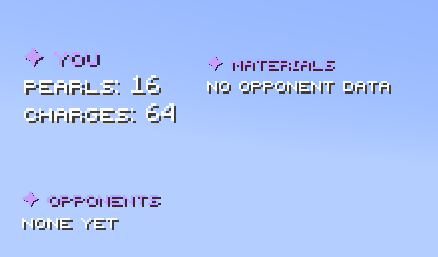
This mod adds a pearl & windcharge counter to Minecraft!
截图


介绍
Belike’s Pearl & Windcharge Counter
A lightweight, client-side HUD that tracks your Ender Pearls and Wind Charges in real time — built for competitive PvP where knowing your resource count at a glance can win the fight.
No server-side installation required. Drop it in, and the counter shows up on your screen.
✦ Features
- Live pearl & wind charge counter — always know exactly how many you have left without opening your inventory
- Fully movable HUD — reposition the counter anywhere on your screen
- Sneak + click to move — hold sneak and click anywhere on screen to grab and drag the HUD (no need to click a specific spot)
- Clean, readable design — minimal overlay that stays out of your way mid-fight
- Client-side only — works on any server, no permissions or plugins needed
- Optimized for PvP — negligible performance impact, built for fast-paced mace and combat gameplay
✦ How to Use
- Install the mod (see requirements below)
- Launch the game — the counter appears automatically on your HUD
- Edit the keybind in your keybinds to pick up and reposition the counter wherever you like
- Jump into a fight and keep an eye on your pearl and wind charge counts
✦ Compatibility
This is a client-side mod — it does not need to be installed on the server. It works in singleplayer and on any multiplayer server, including anticheat-protected PvP servers, since it only reads information already available to your client.
✦ Support
Found a bug or have a feature request? Leave it in the issues or reach out on Discord. Feedback is always welcome.
Built by Celestial Plugins ✦
Credits to TheFatCatXD for the idea
常见问题
Belike’s Pearl & Windcharge counter 支持哪些 Minecraft 版本?
Belike’s Pearl & Windcharge counter 支持 Minecraft Java 版 1.21.11,可用的加载器:Fabric。下载时注意选择和你游戏版本一致的文件。
Belike’s Pearl & Windcharge counter 怎么安装?
先用 PCL2 或 HMCL 启动器安装对应版本的 Fabric,再把下载的 .jar 文件放进游戏目录的 mods 文件夹,重新启动游戏即可。开启了版本隔离的,mods 文件夹在 versions/版本名 下面。运行环境:仅客户端。
评论
登录后评论和评分