
Battle Music
Plays your imported music during intense mob/PVP battles. No resource pack needed. Easy drag and drop setup!
截图

介绍
Minecraft Battle Music Mod
This mod plays your imported music during mob/PVP battles. No resource pack needed!
Check the Setup section to see how to get started.
Features
- Configurable everything: detection range, thresholds, fade times, pools, and more, editable in-game (req. ModMenu and Cloth Config) or via the JSON config.
- Mob battles: starts when 5 hostile mobs are aggroed on you.
- Heavy mode: changes to a separate “heavy” playlist when the health drops low, many mobs are attacking or fighting a boss. Smoothly crossfades from the regular playlist!
- PvP trigger: Taking a set number damage from another player starts combat music (by default plays the Heavy playlist).
- Boss detection: Starts playing the heavy playlist when bosses are in range, plus optional mini-bosses (Elder Guardian, Ravager, Evoker, Piglin Brute) and any extra entity IDs configured.
- Battle resume: if a new fight starts right after the last, it picks the track back up where it faded.
Dependencies
Fabric
- Fabric Loader
- Fabric API
- (optional, very recommended) Mod Menu with Cloth Config – lets you edit settings in-game.
Forge / NeoForge
- (optional, very recommended) Cloth Config – lets you edit settings in-game.
Setup

Adding your music
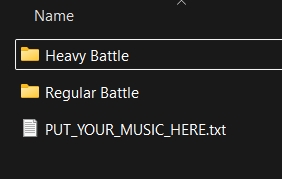
On first launch the mod makes a battlemusic folder inside your Minecraft instance directory with two subfolders:
Regular Battle/
Heavy Battle/
Add your music corresponding to the folder (see below what both of these folders mean.) No restart needed. Requires Vorbis (.ogg) audio files. Vorbis!!!!!
This folder can be opened from ModMenu too!
You can tweak the settings to your liking further in the Modmenu. Below are the default settings.
Music play conditions
- Regular battle starts when a number of mobs (default 5) in the detection radius (default 25) are attacking the player.
- Heavy battle crossfades when your health is at/below a threshold (default 6HP / 3 hearts), or a boss is nearby. Once heavy, it stays heavy until the whole fight ends.
- PvP: receiving damage (default 6HP / 3 hearts) within a time windows (default 5 seconds) plays combat music (the default music pool is heavy, configurable to regular, heavy or both). The timer resets every hit + the configured timeout for all battles (default 15s)
- When there is no detected battle activity, the music continues to play for a set amount of time (default 15s) before beginning to fade out.
Please submit any issues on the mod’s Github issue tracker!
License
MIT
常见问题
Battle Music 支持哪些 Minecraft 版本?
Battle Music 支持 Minecraft Java 版 1.16–26.3,共 37 个版本,可用的加载器:Fabric / Forge / NeoForge。下载时注意选择和你游戏版本一致的文件。
Battle Music 怎么安装?
先用 PCL2 或 HMCL 启动器安装对应版本的 Fabric / Forge / NeoForge,再把下载的 .jar 文件放进游戏目录的 mods 文件夹,重新启动游戏即可。开启了版本隔离的,mods 文件夹在 versions/版本名 下面。运行环境:仅客户端。
评论
登录后评论和评分