
Bapel Slimefun Mod
Automate Slimefun machines with smart recipe selection, auto-input/output, multiblock detection, and performance monitoring. Press R to start!
截图
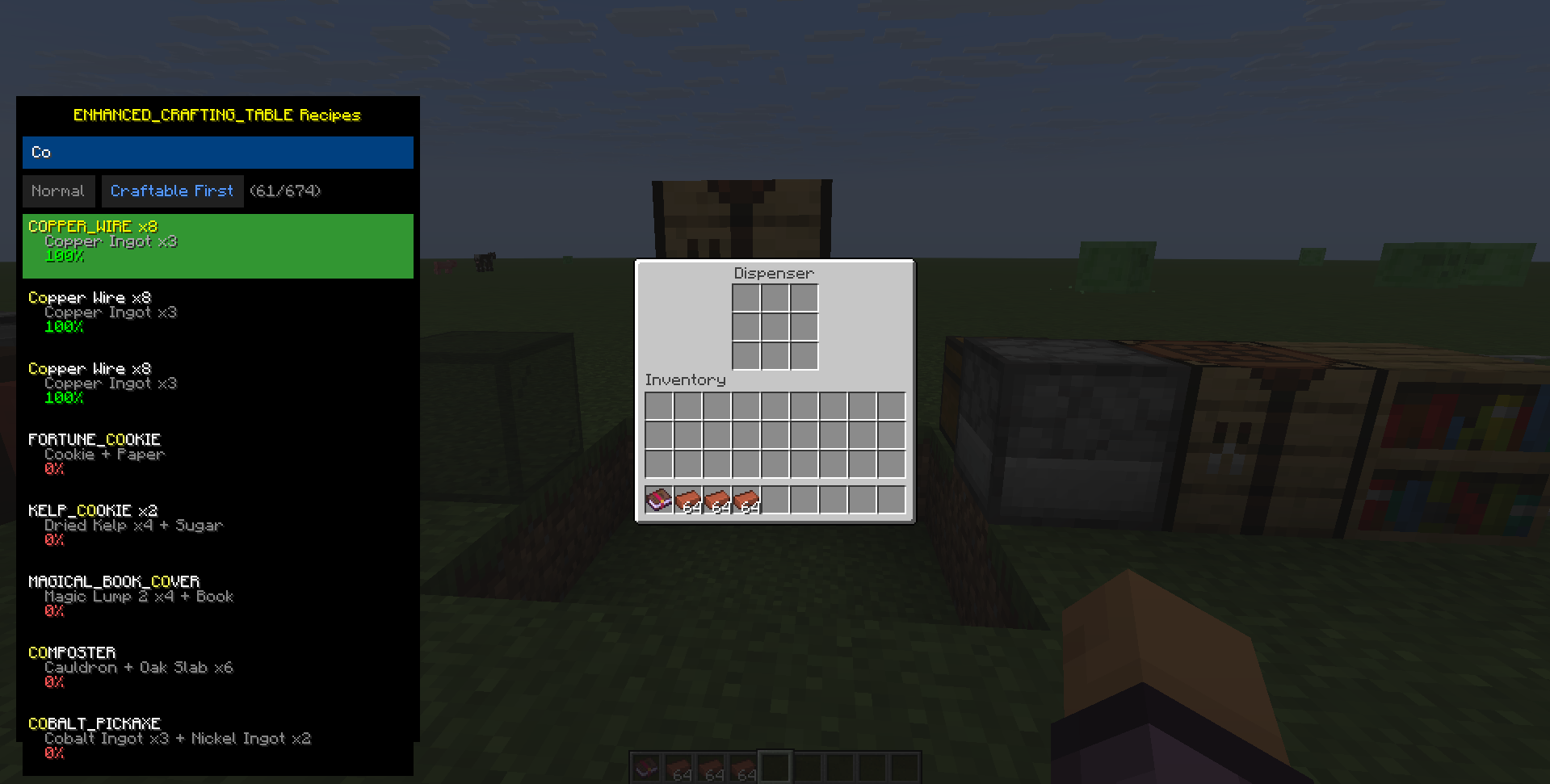
介绍
🎯 Bapel Slimefun Mod
Automate your Slimefun workflow with intelligent automation, recipe overlay, and performance monitoring!
✨ Features
🤖 Intelligent Automation
- Auto-Input/Output: Automatically insert ingredients and extract outputs
- Recipe Memory: Remember last used recipe per machine (Auto Mode)
- Smart Slot Management: Optimal slot filling for both electric and multiblock machines
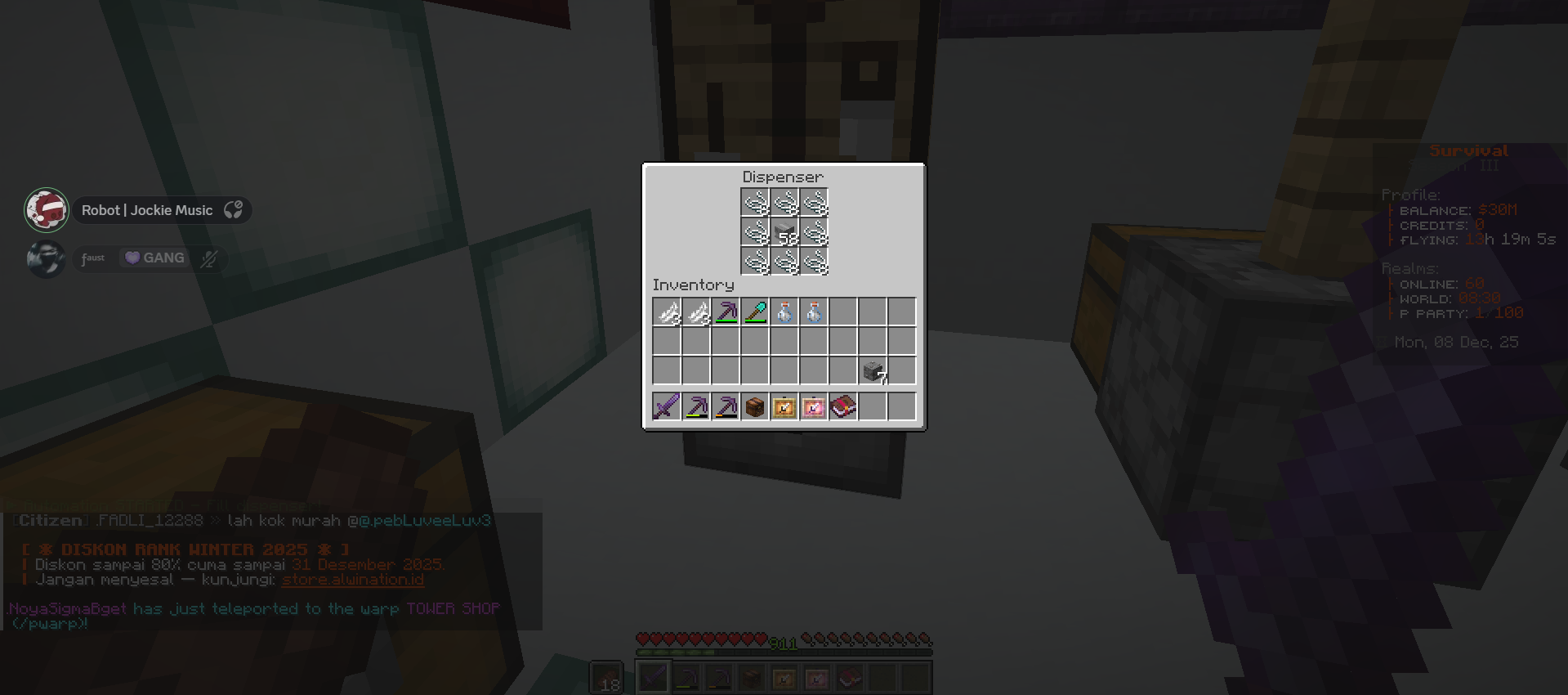
- Auto-Clicker: Automatic multiblock activation after dispenser is filled
📋 Recipe Overlay
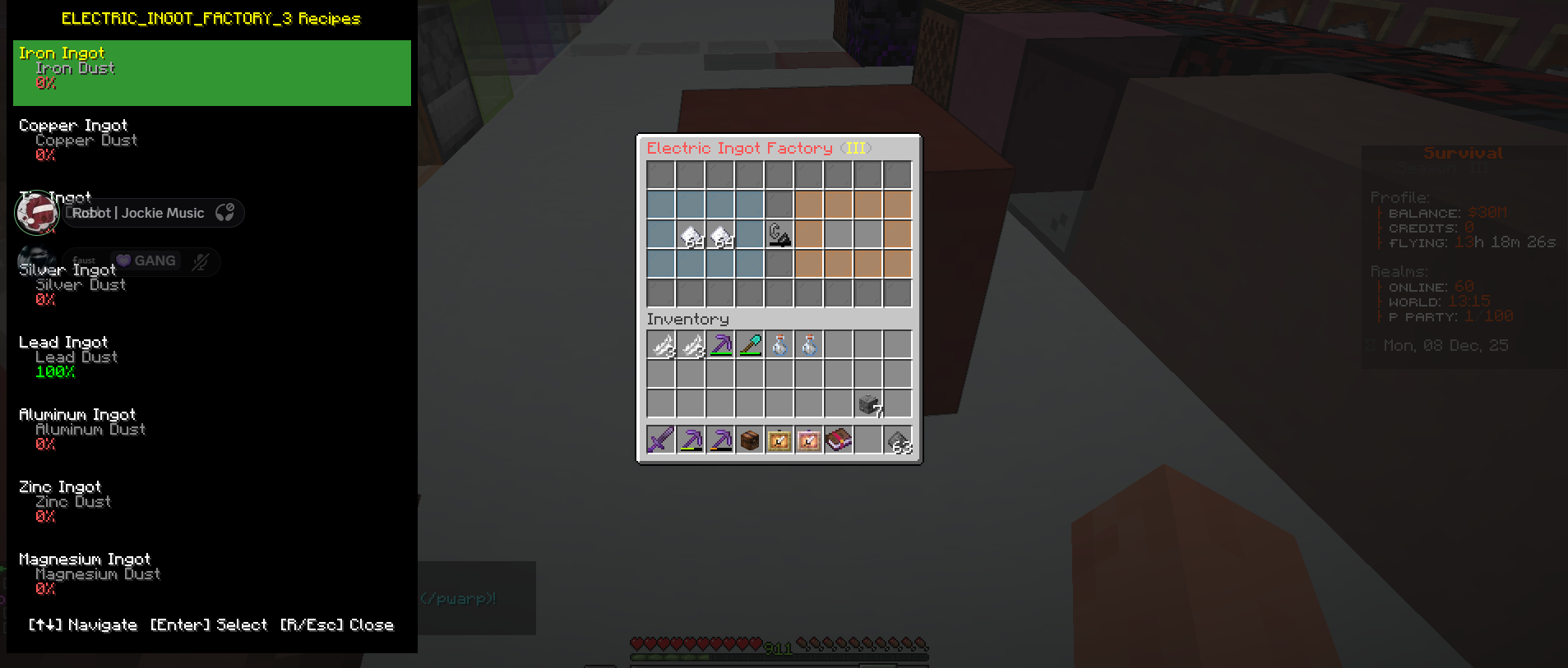
- Press R to open recipe selection overlay
- Visual Completion: See which recipes you can craft based on inventory
- Navigation: Use ↑↓ to browse, Enter to select
- Mouse Support: Click recipes directly or scroll with mouse wheel
- Smart Sorting: Craftable recipes appear first
🏗️ Multiblock Support
- Auto-Detection: Automatically detects 13+ multiblock structures
- Position Caching: Remembers multiblock locations for quick access
- Machine Detector: Verify and manage cached multiblocks (Press M)
- Supported Types:
- Enhanced Crafting Table
- Grind Stone
- Armor Forge
- Ore Crusher
- Compressor
- Smeltery
- Pressure Chamber
- And more!
⚡ Performance Monitor
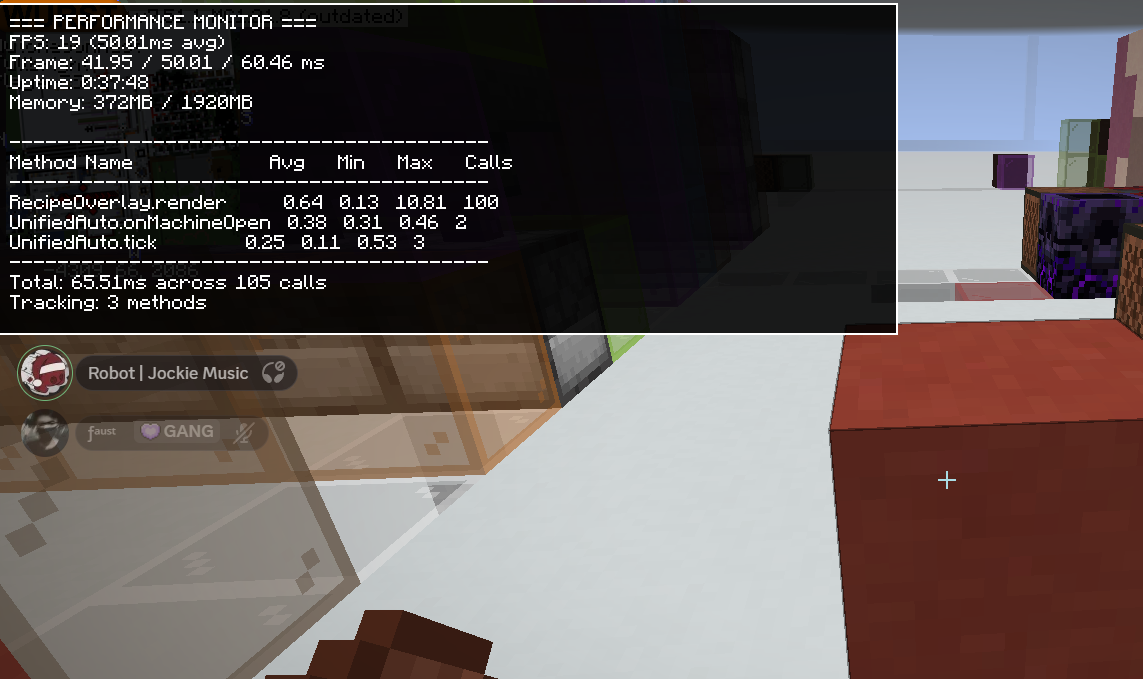
- Press F8 to toggle real-time performance overlay
- FPS & Frame Time: Monitor game performance
- Method Profiling: See which operations take the most time
- Memory Usage: Track RAM consumption
- Optimized: Only 10 FPS overhead
🎮 Operation Modes
Auto Mode (Default)
- Recipes are remembered per machine
- Automatically loads last recipe when returning
- Perfect for repetitive crafting
Manual Mode
- Select recipe each time
- Recipe overlay shows automatically
- Best for varied crafting sessions
🎹 Controls
| Key | Action |
|—–|——–|
| R | Toggle Recipe Overlay |
| K | Toggle Automation On/Off |
| M | Open Settings & Detector |
| F8 | Toggle Performance Monitor |
| ↑↓ | Navigate recipes |
| Enter | Select recipe |
| Esc | Close overlay |
🚀 Quick Start
Electric Machines
- Open machine GUI
- Press R to select recipe
- Mod automatically:
- Inserts ingredients from inventory
- Extracts outputs to inventory
- Monitors recipe completion
Multiblock Machines
- Right-click multiblock dispenser
- Press R to select recipe
- Mod automatically:
- Fills dispenser with ingredients
- Calculates possible crafts
- Auto-clicks signature block after filling
- Collect output from dispenser
🔧 Configuration
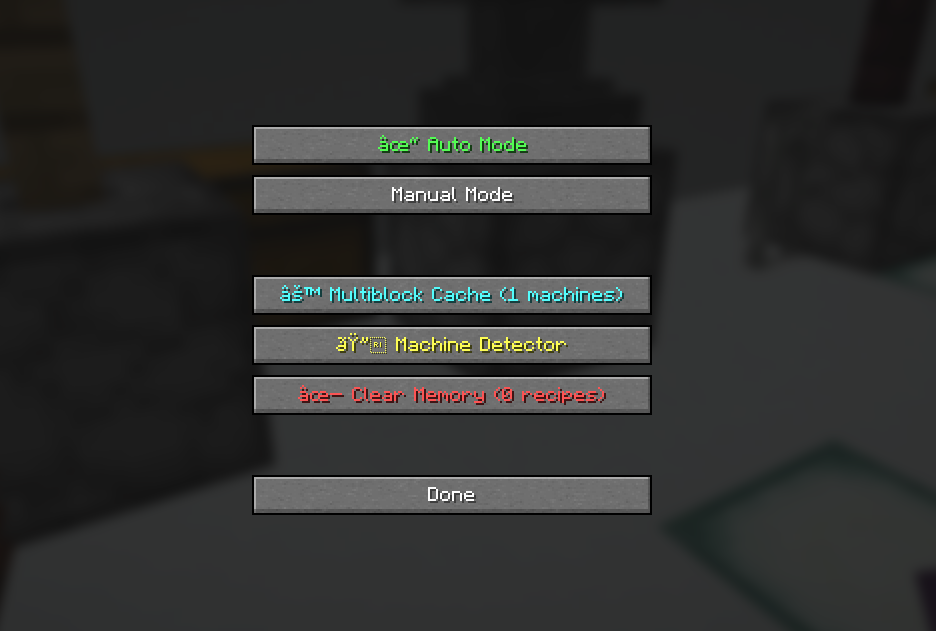
Press M in-game to access settings:
- Auto/Manual Mode: Toggle recipe memory
- Multiblock Cache: View/manage cached structures
- Machine Detector: Verify multiblock detection
- Recipe Memory: Clear saved recipes
Configuration saved to: config/bapel-slimefun-mod.json
📊 Technical Details
Performance
- Smart tick throttling (20 TPS automation)
- Cached inventory scanning (100ms cache)
- Batched rendering operations
- Pre-validated slot indices
- Lazy recipe loading
Detection System
- Pattern-based multiblock recognition
- Fuzzy material matching (handles variants)
- Structure validation (2-9 block patterns)
- Position caching system
Safety Features
- No localStorage usage
- Try-finally error handling
- Recipe validation (prevents machine mismatch)
- Graceful failure handling
📋 Requirements
- Minecraft: 1.21.8
- Fabric Loader: 0.17.2+
- Fabric API: 0.136.1+1.21.8
- Java: 21+
- Slimefun: Any version with standard machines
🐛 Known Issues
- Recipe overlay may not show for custom Slimefun addons (uses JSON database)
- Auto-detection works best with standard Slimefun multiblocks
- Performance monitor shows only client-side metrics
💡 Tips & Tricks
- Recipe Not Working?: Press M → Machine Detector → Verify Multiblock
- Automation Stuck?: Press K to toggle automation off/on
- Want Speed?: Reduce delay in config (min 50ms, default 200ms)
- Too Many Caches?: Press M → Multiblock Cache → Clear All
- Performance Issues?: Press F8 to see bottlenecks
📝 Changelog
v1.0.0
- ✅ Full electric machine automation
- ✅ Multiblock detection & automation
- ✅ Recipe overlay system
- ✅ Performance monitor
- ✅ Auto/Manual modes
- ✅ Position caching system
- ✅ 13+ multiblock support
🤝 Credits
Developer: Bapel
Framework: Fabric
Inspired by: Slimefun’s automation needs
📞 Support
Found a bug? Have a suggestion?
- Report issues on GitHub
- Include logs from
logs/latest.log - Describe your Slimefun version
⭐ If you find this mod helpful, please star it on Modrinth!~~~~
常见问题
Bapel Slimefun Mod 支持哪些 Minecraft 版本?
Bapel Slimefun Mod 支持 Minecraft Java 版 1.21.8–26.1.2,共 2 个版本,可用的加载器:Fabric。下载时注意选择和你游戏版本一致的文件。
Bapel Slimefun Mod 怎么安装?
先用 PCL2 或 HMCL 启动器安装对应版本的 Fabric,再把下载的 .jar 文件放进游戏目录的 mods 文件夹,重新启动游戏即可。开启了版本隔离的,mods 文件夹在 versions/版本名 下面。运行环境:仅客户端。
bapelindo 的其他作品
查看全部 →
Bapel AutoBot
A powerful, highly-configurable client-side automation utility for Minecraft Fabric designed to streamline inventory management, custom hotkeys, scheduled tasks, and intelligent Slimefun machine operations with advanced anti-conflict sharding.

Bapel Auto Slimefun
Client-side Fabric automation toolkit for Slimefun-style crafting: recipe scraping, recursive planning, Network Grid search, backpack handling, and a missing-material HUD.
评论
登录后评论和评分