
介绍
Bannerpoint
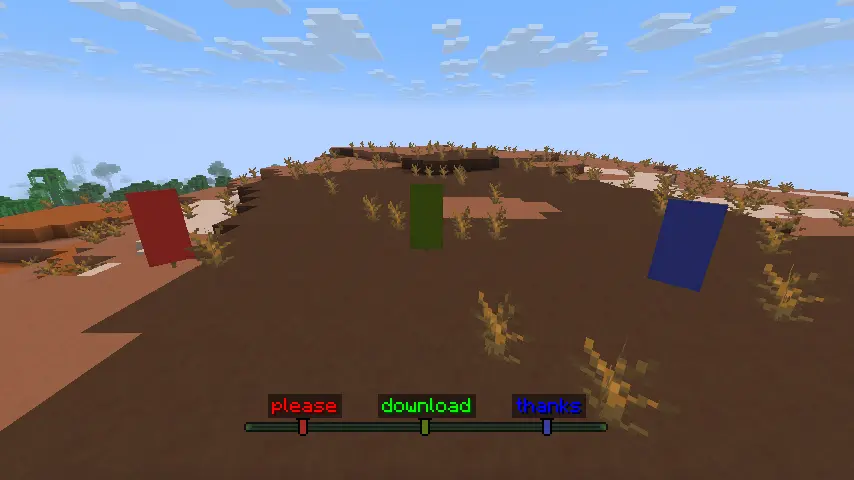
Bannerpoint allows turning banners into waypoints that show up in the locator bar. Waypoints can be made by either naming the banner in an anvil and placing it, or by binding it to a map. Both methods can be toggled in the config. Waypoints made this way have unique icons with a color matching the banner’s base color. Hold Tab to show all banner names above their icons in the locator bar, or Shift to show only the name of the banner you’re looking towards. To deactivate the waypoint, simply break the banner or remove it from the map it’s bound to. The maximum range of banner waypoints can be configured, with the default being the same as the maximum range of player waypoints (60 million blocks).
Bannerpoint requires Fzzy Config and all of its dependencies.
Bannerpoint can be used as a fully server-side mod, but requires a resource pack on the client for banner waypoint icons. The resource pack can be installed either by simply downloading it and enabling it on in the client, or if running a Fabric server, by installing Polymer on the server and turning on Auto Host, which will automatically prompt connecting clients to download the resource pack. Showing banner names using Tab and Shift requires having the mod installed on the client.
Additional recommended locator bar mods:
常见问题
Bannerpoint 支持哪些 Minecraft 版本?
Bannerpoint 支持 Minecraft Java 版 1.21.6–26.3,共 9 个版本,可用的加载器:Fabric / NeoForge。下载时注意选择和你游戏版本一致的文件。
Bannerpoint 怎么安装?
先用 PCL2 或 HMCL 启动器安装对应版本的 Fabric / NeoForge,再把下载的 .jar 文件放进游戏目录的 mods 文件夹,重新启动游戏即可。开启了版本隔离的,mods 文件夹在 versions/版本名 下面。运行环境:客户端 / 服务端。
pajic 的其他作品
查看全部 →
MiscTweaks
轻量级模组,新增一些提升体验的功能,并修复游戏中的烦人问题

Accessorify
利用 Accessories 前置库,让一些原版物品变得更实用

Enchantment Disabler
禁用你不喜欢的附魔,并通过丰富的配置选项从多个方面削弱附魔系统。支持原版和模组附魔。

Rewithered
添加凋灵药水和凋灵箭,并将其融入世界。
评论
登录后评论和评分