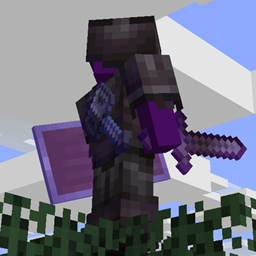
截图


介绍
BackSlot
One more equipment slot, on your back.
Using it
Drag something into the slot in your inventory, just above the shield slot. Or press G
to swap it with whatever you’re currently holding; the key is rebindable under
Controls → Inventory, sitting next to vanilla’s own offhand swap.
The slot takes any item and holds a full stack, exactly like the offhand does. There’s no
restriction on what goes in it. A sword, a shulker box, a stack of dirt, whatever you want
on your back.
How it behaves
Nothing here is new to learn, because the back slot follows the same rules as the rest of
your inventory:
- drops on death, and stays with you when keepInventory is on
- survives logging out, respawning, and coming back through the end portal
- destroyed by Curse of Vanishing, the same as any other equipment
- reachable in creative, in the survival inventory tab
Since other players see your back item, the mod has to be on
the server too, not only on the clients.
No dependencies
Not even Fabric API. Drop the jar into “/mods” alongside Fabric Loader.
| Minecraft | 26.2 |
| Fabric Loader | 0.19.3 or newer |
| Java | 25 |
Limits
The keybind is labelled in English whatever your game language is set to. Translation can be added via the Github page.
常见问题
Backslot: Reimagined 支持哪些 Minecraft 版本?
Backslot: Reimagined 支持 Minecraft Java 版 26.2,可用的加载器:Fabric。下载时注意选择和你游戏版本一致的文件。
Backslot: Reimagined 怎么安装?
先用 PCL2 或 HMCL 启动器安装对应版本的 Fabric,再把下载的 .jar 文件放进游戏目录的 mods 文件夹,重新启动游戏即可。开启了版本隔离的,mods 文件夹在 versions/版本名 下面。

评论
登录后评论和评分