
截图
介绍
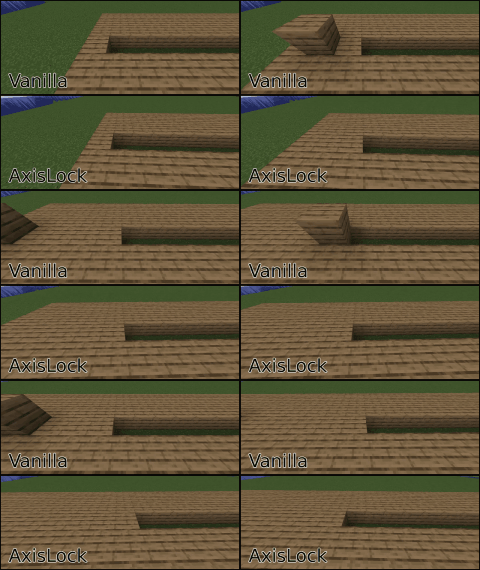
_Tired of wobbly lines and uneven floors? This client-side mod lets you lock block placement to the X, Y, or Z axis for perfectly straight walls, flat floors, and aligned structures._
How to Use:
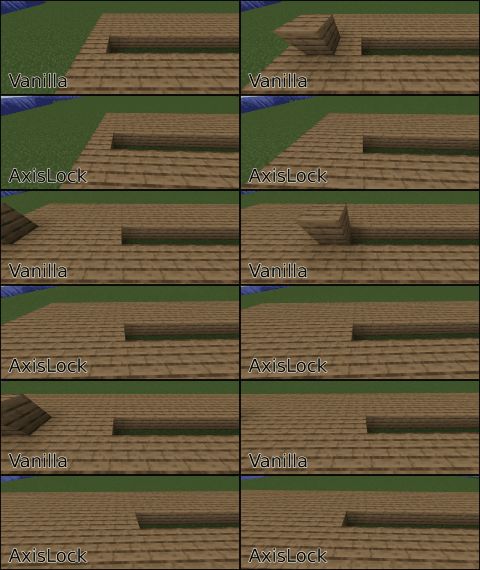
- Activate AxisLock: Press R (default) to toggle the mod on/off. Or, assign a key in settings to hold for temporary lock.
- Select Axis: Press Y (default) to cycle through X, Y, or Z.
- Place First Block: This sets the reference point on your chosen axis.
- Build Straight: While holding your “place block” key (right-click), axislock will prevent you from placing blocks out of the selected axis coordinate!
This mod uses Architectury API and Cloth Config API. If you’re using fabric or quilt, you may also need Mod Menu
Manual Reference Point
- AxisLock now allows you to manually set a specific block as the reference point by pressing the assigned key (default: B). Once set, this block will remain as the fixed reference point even after releasing the mouse button, allowing for more precise and consistent locking. To update the reference point, press the reference point key again.
- You can reset the reference point, look at the air and press the key or press the key quickly twice.
AxisLock Modes
- By using the Cycle Mode Key (default: N) you can choose to block block placement, block breaking or both.
Client-side only. Before using this mod on servers check the server rules or ask a moderator. Use at your own risk.
It is recommended to use this mod together with accurate block placement or an autoclicker.
AxisLock is now feature complete. This doesn’t mean It won’t get any more features anymore. But by now I will only update It to fix bugs or when new Minecraft versions come out.
常见问题
AxisLock 支持哪些 Minecraft 版本?
AxisLock 支持 Minecraft Java 版 1.21.5–26.2,共 4 个版本,可用的加载器:Fabric / Forge / NeoForge / Quilt。下载时注意选择和你游戏版本一致的文件。
AxisLock 怎么安装?
先用 PCL2 或 HMCL 启动器安装对应版本的 Fabric / Forge / NeoForge / Quilt,再把下载的 .jar 文件放进游戏目录的 mods 文件夹,重新启动游戏即可。开启了版本隔离的,mods 文件夹在 versions/版本名 下面。运行环境:仅客户端。
评论
登录后评论和评分