
截图
介绍
中文介绍正在准备中,下面暂时显示原文。
AXHud
This mod is a HUD mod for some of my plugins.
Features:
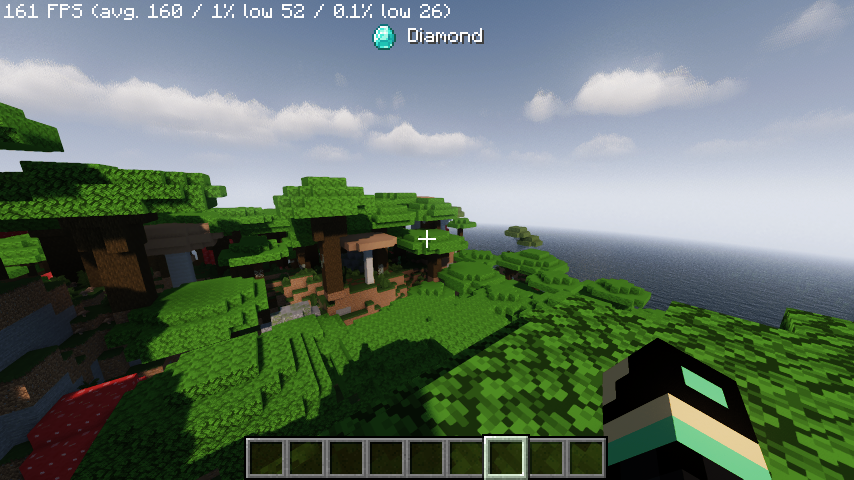
- Currently the mod can display a text next to an item at the top of the users screen
Commands
/axhud test diamond: Test the display/axhud clear: Clear the display
Required for:
You can use this mod for your own mods/plugins.
See how
[Paper/Spigot 1.21.x]
package <your_package>;

import org.bukkit.entity.Player;
import org.bukkit.plugin.java.JavaPlugin;

import java.io.ByteArrayOutputStream;
import java.io.DataOutputStream;
import java.io.IOException;

public class CommunicationInterface {
    private final JavaPlugin plugin;

    /**
     * Constructor - pass your plugin instance
     *
     * Usage in your main plugin class:
     *
     * public class <your_plugin> extends JavaPlugin {
     *     private CommunicationInterface commInterface;
     *
     *     @Override
     *     public void onEnable() {
     *         this.getServer().getMessenger().registerOutgoingPluginChannel(this, "axhud:display_item");
     *         this.commInterface = new CommunicationInterface(this);
     *     }
     *
     *     public CommunicationInterface getCommInterface() {
     *         return commInterface;
     *     }
     * }
     *
     */
    public CommunicationInterface(JavaPlugin plugin) {
        this.plugin = plugin;
    }

    /**
     * Send item display data to a player's client
     *
     * @param player The player to send to
     * @param itemId The item ID (e.g., "minecraft:diamond", "minecraft:emerald")
     * @param displayName The name to display next to the item (supports color codes like §a, §b, etc.)
     */
    public void sendItemDisplay(Player player, String itemId, String displayName) {
        ByteArrayOutputStream byteStream = new ByteArrayOutputStream();
        DataOutputStream out = new DataOutputStream(byteStream);

        try {
            // Write item ID string
            writeString(out, itemId);

            // Write display name string
            writeString(out, displayName);

            // Send the plugin message
            player.sendPluginMessage(plugin, "axhud:display_item", byteStream.toByteArray());
        } catch (IOException e) {
            plugin.getLogger().warning("Failed to send item display to player: " + e.getMessage());
        }
    }

    /**
     * Write a string to DataOutputStream in Minecraft's format
     * (VarInt length + UTF-8 bytes)
     */
    private void writeString(DataOutputStream out, String str) throws IOException {
        byte[] bytes = str.getBytes(java.nio.charset.StandardCharsets.UTF_8);
        writeVarInt(out, bytes.length);
        out.write(bytes);
    }

    /**
     * Write a VarInt to DataOutputStream (Minecraft protocol format)
     */
    private void writeVarInt(DataOutputStream out, int value) throws IOException {
        while ((value & 0xFFFFFF80) != 0) {
            out.writeByte((value & 0x7F) | 0x80);
            value >>>= 7;
        }
        out.writeByte(value & 0x7F);
    }
}
常见问题
AXHud 支持哪些 Minecraft 版本?
AXHud 支持 Minecraft Java 版 1.21.7,可用的加载器:Fabric。下载时注意选择和你游戏版本一致的文件。
AXHud 怎么安装?
先用 PCL2 或 HMCL 启动器安装对应版本的 Fabric,再把下载的 .jar 文件放进游戏目录的 mods 文件夹,重新启动游戏即可。开启了版本隔离的,mods 文件夹在 versions/版本名 下面。运行环境:仅客户端。


评论
登录后评论和评分