
AvM Staff API
A mod that adds a staff capable of controlling the block's abilities from Animations vs Minecraft animation! A user with this API is subject to add support for his block himself and add his characteristic ability!
截图
介绍
Проект закрыт, будет открыт с новым модом!
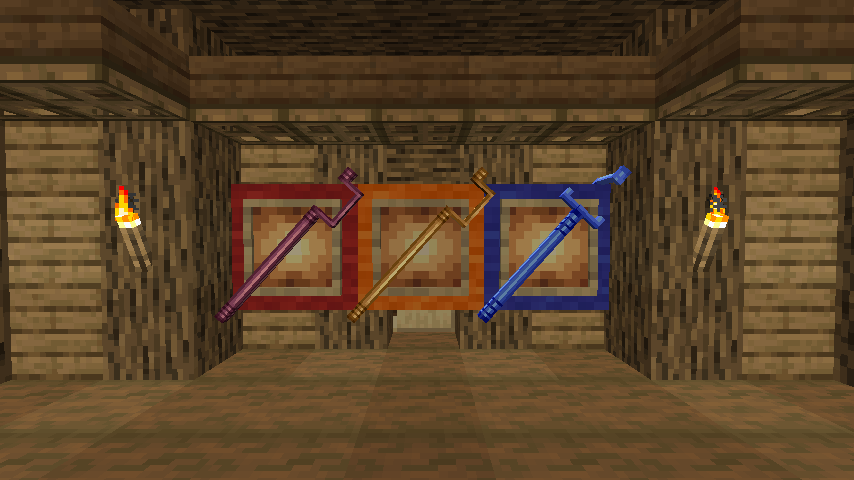
Hello everyone, this mod was created to simplify the addition of staffs from Animation vs Minecraft directly into the game! The mod adds three new staffs, and in order to add support for your block directly to the game, you need to know java programming or basic knowledge of MCreator!
The folder with this documentation contains three staff textures, three staff models, a block texture, an API mod, and 2 files named “AddSupportBlock.ptpl” and “AddSupportBlockCode.txt “. The file “AddSupportBlock.ptpl” is a procedure for MCreator, you only need to import this procedure and set the Event to “On player tick update”. After adding it, you will need to select your block in “BlockID”, “CustomStuff” for your regular staff, “CustomBlueStuff” for your blue staff, and “CustomBlueStuff” for your cloned staff! In the second file, “AddSupportBlockCode.txt” the code is written, it will be required for those who do not work for MCreator. In fact, you will only have to write the block ID and the staff ID in the same way as for the MCreator method!
In models, it is important to set the texture of the staff first, and the texture of the block second… If you are not sure what the model looks like, open the model in Blockbench.
Here is the mod data:
- Mod display name = AvM Stuff API
- Mod ID / namespace = avm_stuff_api
- Mod package name = net.ignitesizzle.avmstuffapi
- Author = IgniteSizzle
Here are the values of the numbers on the block texture:
- 1 = front
- 2 = left
- 3 = back
- 4 = right
- 5 = down
- 6 = up
Support me with a coin: DonationAlerts
常见问题
AvM Staff API 支持哪些 Minecraft 版本?
AvM Staff API 支持 Minecraft Java 版 1.20.1–1.20.4,共 2 个版本,可用的加载器:Forge / NeoForge。下载时注意选择和你游戏版本一致的文件。
AvM Staff API 怎么安装?
先用 PCL2 或 HMCL 启动器安装对应版本的 Forge / NeoForge,再把下载的 .jar 文件放进游戏目录的 mods 文件夹,重新启动游戏即可。开启了版本隔离的,mods 文件夹在 versions/版本名 下面。运行环境:客户端和服务端都要装。
评论
登录后评论和评分