
截图
介绍
AutoGG (Fabric)
AutoGG is a lightweight and highly configurable Fabric mod for Minecraft that automatically sends a “GG” or a customizable message in chat after a game round ends or when specific conditions are met.
Designed especially for multiplayer servers and mini-game environments, AutoGG helps you maintain good sportsmanship without requiring manual input after every match.
✨ Features
- Automatic GG Messages Sends “GG” or a custom message automatically when a round ends.
- Configurable Delay Set a delay before the message is sent to make it feel natural and human-like.
- Fully Customizable Messages Use your own text instead of a simple “GG” to match your playstyle or server rules.
- Fabric Mod Loader Support Built for modern Minecraft versions using the Fabric ecosystem.
- Lightweight & Client-Side Minimal performance impact and easy to install.
🛠️ Use Cases
- Mini-game servers (BedWars, SkyWars, PvP arenas)
- Competitive multiplayer sessions
- Players who want to show sportsmanship automatically
- Streamers who want consistent end-of-round behavior
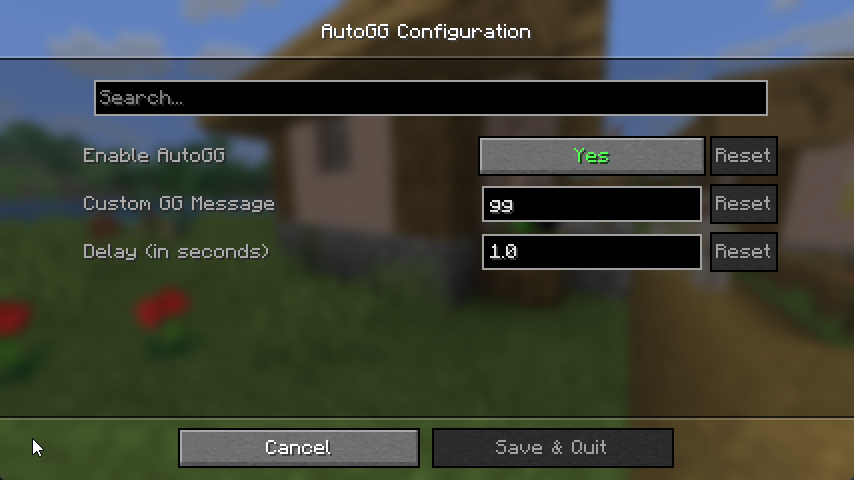
⚙️ Configuration
AutoGG uses an in-game configuration menu that allows you to:
- Enable or disable
- Adjust message delays
- Customize the sent message
The configuration menu is accessible via Mod Menu.
📦 Installation
- Install Fabric Loader for your Minecraft version.
- Install the required dependencies:
- Download the AutoGG (Fabric) mod.
- Place all
.jarfiles into yourmodsfolder. - Launch Minecraft and configure AutoGG via Mod Menu.
⚠️ Note:
Cloth Config API and Mod Menu are required for AutoGG to work correctly.
🔗 Source Code
GitHub Repository:
https://github.com/EinsLucaaa/AutoGG-Fabric
🧩 Compatibility
- Minecraft (Fabric)
- Client-side mod
- Works on most multiplayer servers (no server-side installation required)
AutoGG is perfect for players who want to keep chat friendly and respectful — automatically.
常见问题
AutoGG-Fabric 支持哪些 Minecraft 版本?
AutoGG-Fabric 支持 Minecraft Java 版 1.21.10–26.3,共 5 个版本,可用的加载器:Fabric。下载时注意选择和你游戏版本一致的文件。
AutoGG-Fabric 怎么安装?
先用 PCL2 或 HMCL 启动器安装对应版本的 Fabric,再把下载的 .jar 文件放进游戏目录的 mods 文件夹,重新启动游戏即可。开启了版本隔离的,mods 文件夹在 versions/版本名 下面。运行环境:仅客户端。
评论
登录后评论和评分