
截图
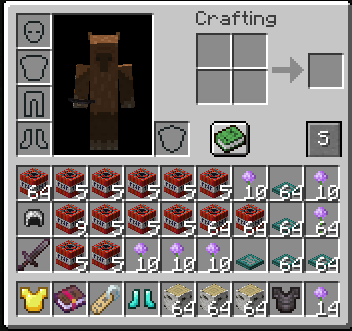
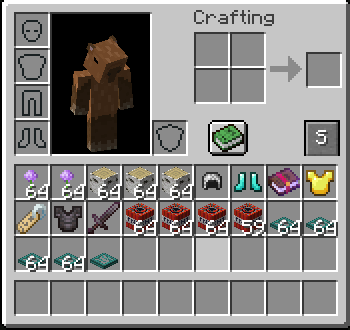
介绍
中文介绍正在准备中,下面暂时显示原文。
Auto-Sorter Inventory
Adds a button to your inventory that sorts all items with a single click!
Features
- One-Click Sorting: No more messy inventories.
- Smart Merging: Automatically merges incomplete stacks.
- Minecraft Style: The “Sort” button fits perfectly into the default UI.
- Fast and Efficient: Sorting logic is handled on the server for maximum reliability.
Installation
- Install Minecraft Forge for version 1.16.5.
- Download the mod
.jarfile. - Place the file in your
.minecraft/modsfolder. - Launch the game and enjoy!
常见问题
Auto-Sorter Inventory 支持哪些 Minecraft 版本?
Auto-Sorter Inventory 支持 Minecraft Java 版 1.16.5,可用的加载器:Forge。下载时注意选择和你游戏版本一致的文件。
Auto-Sorter Inventory 怎么安装?
先用 PCL2 或 HMCL 启动器安装对应版本的 Forge,再把下载的 .jar 文件放进游戏目录的 mods 文件夹,重新启动游戏即可。开启了版本隔离的,mods 文件夹在 versions/版本名 下面。运行环境:客户端和服务端都要装。
SigmaStudios 的其他作品
查看全部 →
Mobs Optimized Render
by SigmaStudios
Prevents rendering of mobs behind blocks to reduce lag.
426
6 个月前
Modrinth

Your Dog Stats
by SigmaStudios, perusi
See your dog's health, mood, hunger and more with a premium HUD overlay!
348
6 个月前
Modrinth

Pet Your Dog
by SigmaStudios
Pet your tamed dogs! Press F to pet your dog and watch hearts fly.
185
6 个月前
Modrinth

Dog Talent Tree
by SigmaStudios
A mod that adds a talent tree and progression system for tamed dogs.
126
6 个月前
Modrinth
评论
登录后评论和评分