
AST-Tweaks
A lightweight Fabric 1.19.4 client tweaks mod with 13+ toggleable QoL features: auto eat, auto totem, auto repair, mass grindstone, inventory sort, entity culling, lava highlight, custom scoreboard, notepad and more. Sodium-compatible.
截图
介绍
AST-Tweaks
A client-side Fabric mod packed with quality-of-life and automation tweaks for survival and technical play.
Originally built for the ASTRAL SMP community. Available for 1.19.4 / 1.20.1 / 26.1.2 / 26.2 / 26.3.
AST-Tweaks bundles 20+ independent features into one lightweight client mod.
Every feature can be toggled and configured on its own, so you only use what
you need. It runs entirely on the client, so nothing needs to be installed
on the server.
Note: Some servers don’t allow automation features such as Auto Totem,
Auto Restock, Auto Drop or Void Trade. Check the server’s rules before
enabling them. Every feature can be turned off individually.
✨ Features
Automation
- Auto Eat: Eats automatically when hunger drops to a configurable threshold, optionally even while sprinting or doing other actions. Per-food blacklist.
- Auto Totem: Puts a new Totem of Undying in your off-hand after one pops.
- Auto Repair: Rapidly repairs Mending items by throwing Experience Bottles from your off-hand (Tweakeroo style). Can also repair the armor you’re wearing without unequipping it. Whitelist/blacklist and adjustable speed.
- Auto Move: Keeps walking in any of 8 directions (diagonals included), with a keybind for each. Also works while freecam is active.
- Auto Restock: Keeps chosen slots topped up from the rest of your inventory, and from chests or shulker boxes you open. Protected slots and pull order are configurable.
- Auto Drop: Drops everything except protected slots and items, on a key press or as soon as you open a container. Armor is never dropped.
- Void Trade (1.19.4 / 1.20.1): Automates void trading with a looping step-by-step workflow (move, open trade, wait for unload, trade, close, …). Includes ready-made templates, savable presets, and copy/paste sharing as text. Can trade your ItemScroller favorites.
Inventory & Items
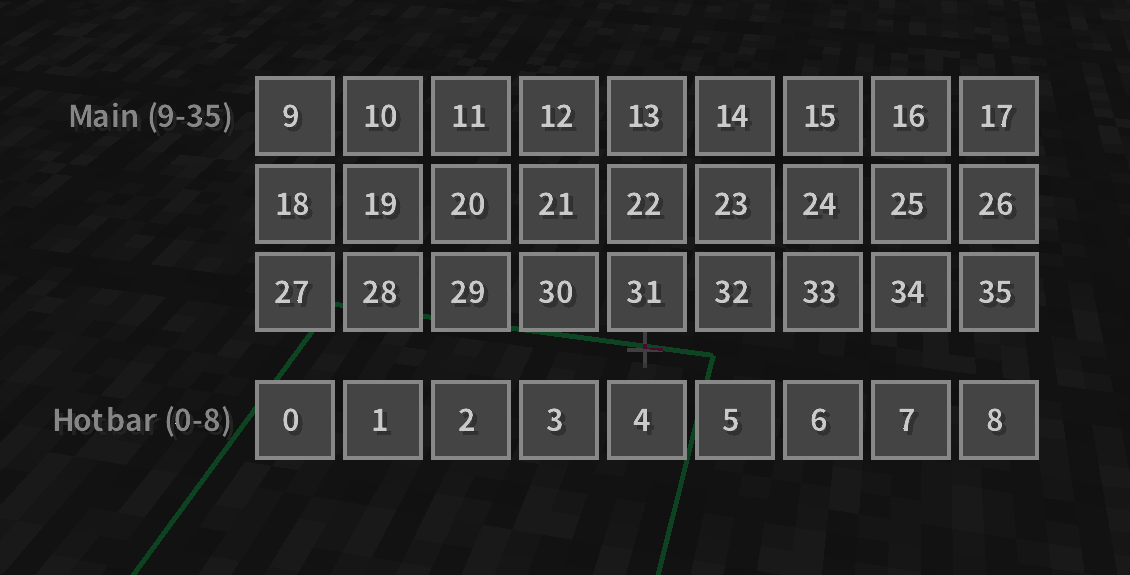
- Inventory Sort: Sort your inventory or an open container with a key (IPN style). Five sort modes (Item ID / Name / Category / Stack count / Total count), excluded slots, and optional sort buttons.
- Mass Grindstone: Strips enchantments in bulk with a grindstone (ItemScroller / MassCraft style). Whitelist/blacklist, adjustable speed, and a drop-results mode.
- Bone Meal Filter: Only lets bone meal be used on whitelisted blocks.
- Silk Touch Switch: Swaps to a Silk Touch tool when you start mining a target block (coral included). Requires Tweakeroo.
- Pick Protect: Stops Pick Block from overwriting protected hotbar slots. The picked item goes to the nearest unprotected slot instead.
Building
- Portal Protect: Cancels block placements that would trigger a nether portal’s validity check, so you don’t break portals by accident. The thin front/back sides stay placeable for rails and other suppression blocks.
- Litematica Schematic Drop: Drag and drop
.litematic/.schematic/.schem/.nbtfiles onto Litematica’s Load Schematics screen. Files are copied into the folder you’re browsing. - Litematica Coral Substitute: When a schematic needs dead coral you don’t have, Easy Place and Pick Block accept live coral instead (it dries out when placed out of water).
Rendering & Visuals
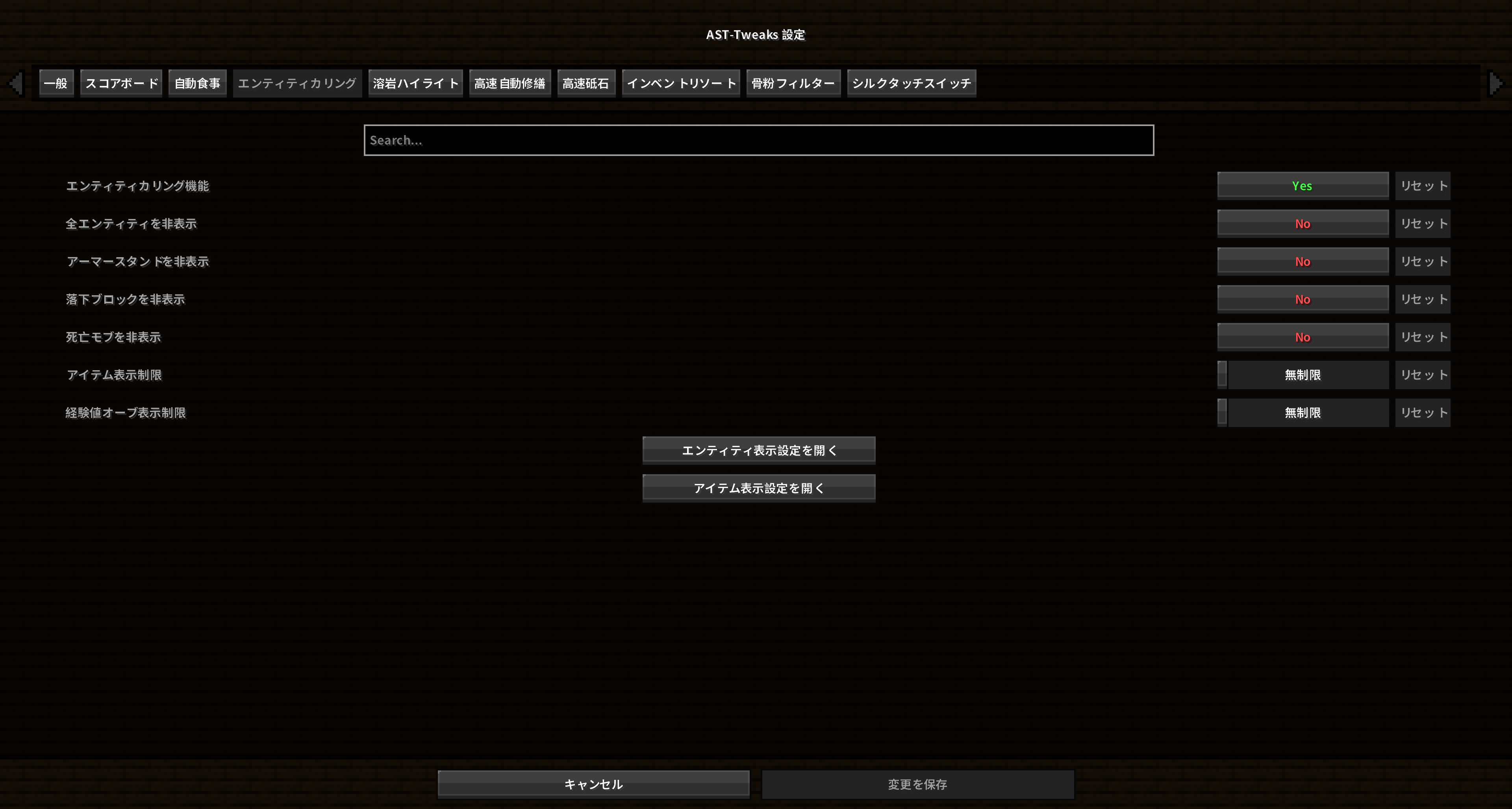
- Entity Culling: Hide armor stands, falling blocks, dead mobs, or all non-player entities; cap item entities and XP orbs per frame; set visibility per entity.
- Lava Highlight: Highlights lava sources and flowing lava in custom colors. Works with Sodium.
- Villager Link: Draws lines from nearby villagers to their job site blocks, optionally through walls. Uses real server data in singleplayer, as an operator, or via Servux / TweakerMore data sync; otherwise estimates the nearest job site.
- World Border Fix (1.19.4, with Nvidium): Temporarily turns Nvidium off near the world border and at far coordinates, where it renders walls see-through or fails to load terrain.
- Nvidium Chunk Fix (1.19.4, Nvidium 0.1.12–0.1.15): Fixes terrain that goes missing and never comes back with Nvidium (especially with Bobby), and restores terrain dropped at the VRAM limit.
HUD & UI
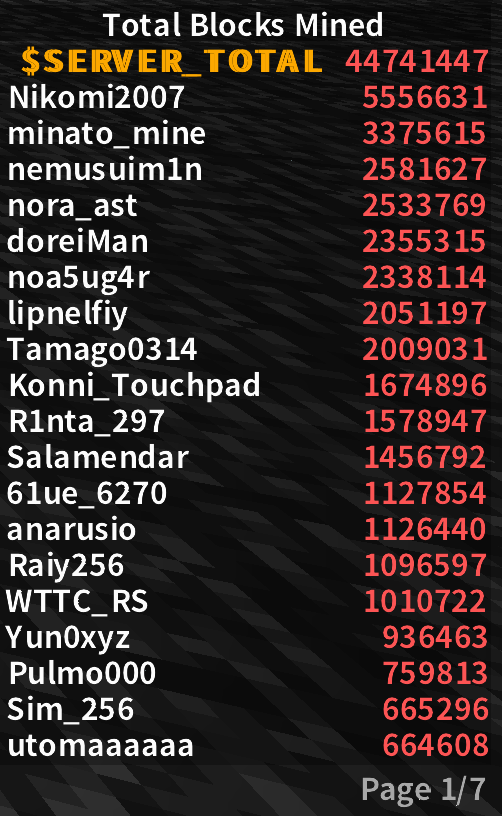
- Custom Scoreboard: Replaces the vanilla sidebar with a drag-and-drop position editor, scale, colors, paging for long boards, max lines, and optional rank numbers.
- Notepad: A simple in-game notepad that keeps your notes between sessions.
- Mouse Sensitivity Toggle: Switch to a preset sensitivity (e.g. for bow sniping) with one key.
Utility
- Syncer Tune: Adjusts TweakerMore’s server data syncer query rate based on how many block entities are nearby, reducing load in dense areas. Requires TweakerMore.
- Update Checker: Checks for new releases for your Minecraft version on startup, daily or weekly, and notifies you with a toast or a title-screen prompt. One click downloads the new jar into your mods folder and removes the old one (restart to finish).
⚙️ Configuration
Open the settings screen with L + K, or from Mod Menu.
Settings are saved to config/asttweaks.json.
| Default key | Action |
|—|—|
| L + K | Open settings |
| R | Sort inventory |
| O | Toggle scoreboard |
| ↑ / ↓ | Scoreboard pages |
Every keybind can be changed, including key combos and mouse buttons.
Press ESC while binding to unbind.
📦 Requirements
| | 1.19.4 / 1.20.1 | 26.1.2 / 26.2 / 26.3 |
|—|—|—|
| Fabric Loader | 0.14.21+ | 0.18.4+ |
| Java | 17+ | 25+ |
| Fabric API | Required | Required |
Cloth Config is bundled. Mod Menu is optional.
Optional integrations
| Mod | Used by |
|—|—|
| Tweakeroo | Silk Touch Switch (required), Auto Repair, Villager Link |
| TweakerMore | Syncer Tune (required), Villager Link, Auto Restock |
| ItemScroller | Void Trade (trade favorites) |
| Litematica | Schematic Drop, Coral Substitute |
| Sodium | Lava Highlight |
| Nvidium | World Border Fix, Nvidium Chunk Fix (1.19.4) |
📥 Installation
- Install Fabric Loader and Fabric API for your Minecraft version.
- Download the AST-Tweaks file for the same version (
ast-tweaks-<version>+mc<Minecraft version>.jar). - Put it in your
modsfolder.
🌐 Languages
English · 日本語
🔗 Links
- Source code:
- Bug reports:
- X: · YouTube:
📜 License
Licensed under the Apache-2.0 License.
日本語
AST-Tweaks は、サバイバルやテクニカル寄りのプレイを快適にする便利機能・自動化機能をまとめた、
Fabric 向けのクライアントサイド Mod です。元々は ASTRAL SMP コミュニティ向けに作りました。
1.19.4 / 1.20.1 / 26.1.2 / 26.2 / 26.3 に対応しています。
20以上の機能をすべて個別にオン/オフ・設定できるので、必要なものだけ使えます。
完全にクライアントサイドで動作するため、サーバー側へのインストールは不要です。
注意: サーバーによっては Auto Totem・Auto Restock・Auto Drop・Void Trade などの
自動化機能が禁止されています。使う前にサーバーのルールを確認してください。
機能はすべて個別にオフにできます。
✨ 機能一覧
自動化
- Auto Eat(自動食事): 空腹度が設定値まで下がると自動で食事します。ダッシュ中などほかの操作中でも食べる設定あり。食べ物ごとのブラックリスト対応。
- Auto Totem(トーテム補充): 不死のトーテムが発動したら、オフハンドに次のトーテムを補充します。
- Auto Repair(高速自動修繕): オフハンドの経験値の瓶を連続で投げて、修繕付きアイテムを高速修理します(Tweakeroo 風)。装備中の防具も外さずに修理可能。ホワイトリスト/ブラックリスト、速度調整あり。
- Auto Move(自動移動): 斜めを含む8方向に歩き続けます。方向ごとにキーバインドを設定でき、freecam 中も使えます。
- Auto Restock(自動補充): 指定したスロットを、インベントリの残りや開いたチェスト・シュルカーボックスから自動で補充します。保護スロットや取り出す順番も設定可能。
- Auto Drop(自動ドロップ): 保護したスロット・アイテム以外をまとめて捨てます。キーを押したとき、またはコンテナを開いた瞬間に発動。防具は捨てません。
- Void Trade (1.19.4 / 1.20.1 のみ): 移動 → 取引画面を開く → アンロード待ち → 取引 → 閉じる…といった座標指定のステップを繰り返し実行して、ボイドトレードを自動化します。テンプレート、プリセット保存、テキストでのコピー/貼り付け共有に対応。ItemScroller のお気に入り取引も使えます。
インベントリ・アイテム
- Inventory Sort(インベントリソート): キー1つでインベントリやコンテナをソート(IPN 風)。アイテム ID / 名前 / カテゴリ / スタック数 / 合計数の5モード、除外スロット、ソートボタン表示に対応。
- Mass Grindstone(高速砥石): 砥石でエンチャントを一括で外します(ItemScroller / MassCraft 風)。ホワイトリスト/ブラックリスト、速度調整、結果をドロップする高速モードあり。
- Bone Meal Filter(骨粉フィルター): 骨粉をホワイトリストのブロックにだけ使えるようにします。
- Silk Touch Switch(シルクタッチスイッチ): 対象ブロックを掘り始めると、シルクタッチ付きツールに自動で持ち替えます(サンゴ系にも対応)。Tweakeroo が必要です。
- Pick Protect(ピックブロック保護): ピックブロックで保護したホットバースロットが上書きされないようにし、近くの保護されていないスロットに入れます。
建築
- Portal Protect(ポータル保護): ネザーポータルの判定を起こす面へのブロック設置をキャンセルして、うっかりポータルを壊すのを防ぎます。薄い表裏の面には置けるので、レールなどの抑制ブロックはそのまま使えます。
- Litematica: Schematic のドラッグ&ドロップ:
.litematic/.schematic/.schem/.nbtファイルを Litematica の Load Schematics 画面にドラッグ&ドロップで取り込めます。開いているフォルダにコピーされます。 - Litematica: 死サンゴの代用設置: Schematic が死サンゴを要求していて手持ちにないとき、Easy Place やピックブロックで生サンゴを代わりに使えます(水の外に置くと死サンゴになります)。
描画
- Entity Culling(エンティティカリング): 防具立て / 落下ブロック / 死亡 mob / プレイヤー以外の全エンティティを非表示にしたり、アイテム・経験値オーブのフレームあたり描画数を制限したりできます。エンティティごとの表示設定あり。
- Lava Highlight(溶岩ハイライト): 溶岩のソースブロックと流れを好きな色でハイライト。Sodium と併用できます。
- Villager Link(村人リンク表示): 近くの村人と職業ブロックを線で結んで表示します(壁越し表示可)。シングルプレイ・OP 権限・Servux / TweakerMore のデータ同期があれば実データを、なければ最寄りの職業ブロックを推定して使います。
- World Border Fix(ワールドボーダー描画修正) (1.19.4・Nvidium 使用時): ワールドボーダー付近や遠い座標で起きる、Nvidium の壁が透ける・地形が読み込まれない問題を、一時的に Nvidium を切ることで回避します。
- Nvidium Chunk Fix(Nvidium チャンク抜け修正) (1.19.4・Nvidium 0.1.12〜0.1.15): Nvidium(特に Bobby と併用時)で地形が抜けたまま戻らない不具合を修正し、VRAM 上限で破棄された地形も復元します。
HUD・UI
- Custom Scoreboard(スコアボード): バニラのサイドバーを置き換えます。ドラッグ&ドロップでの位置調整、スケール、色、長いボードのページ送り、最大行数、順位番号表示に対応。
- Notepad(メモ帳): ゲーム内で使えるシンプルなメモ帳。内容はセッションをまたいで保存されます。
- Mouse Sensitivity Toggle(マウス感度切替): キー1つで、指定した感度(弓のスナイプ用など)に切り替えます。
ユーティリティ
- Syncer Tune(Syncer 自動調整): 周囲のブロックエンティティの数に応じて TweakerMore の serverDataSyncer の問い合わせ頻度を切り替え、密集地での負荷を減らします。TweakerMore が必要です。
- Update Checker(アップデートチェッカー): 起動時 / 毎日 / 毎週のいずれかで、使っている Minecraft バージョン向けの新しいリリースを確認し、トーストやタイトル画面で通知します。ボタン1つで新しい jar を mods フォルダにダウンロードし、古い jar を削除します(再起動で完了)。
⚙️ 設定
L + K で設定画面を開けます(Mod Menu からも開けます)。
設定は config/asttweaks.json に保存されます。
| 初期キー | 動作 |
|—|—|
| L + K | 設定画面を開く |
| R | インベントリソート |
| O | スコアボード表示切替 |
| ↑ / ↓ | スコアボードのページ送り |
キーバインドはすべて変更でき、キーの組み合わせやマウスボタンにも割り当てられます。
割り当て中に ESC を押すと解除できます。
📦 動作環境
| | 1.19.4 / 1.20.1 | 26.1.2 / 26.2 / 26.3 |
|—|—|—|
| Fabric Loader | 0.14.21 以降 | 0.18.4 以降 |
| Java | 17 以降 | 25 以降 |
| Fabric API | 必須 | 必須 |
Cloth Config は同梱済みです。Mod Menu は任意です。
連携できる Mod(任意)
| Mod | 使う機能 |
|—|—|
| Tweakeroo | Silk Touch Switch(必須)、Auto Repair、Villager Link |
| TweakerMore | Syncer Tune(必須)、Villager Link、Auto Restock |
| ItemScroller | Void Trade(お気に入り取引) |
| Litematica | Schematic のドラッグ&ドロップ、死サンゴの代用設置 |
| Sodium | Lava Highlight |
| Nvidium | World Border Fix、Nvidium Chunk Fix(1.19.4) |
📥 インストール
- 使う Minecraft バージョン用の Fabric Loader と Fabric API を導入する
- 同じバージョン向けの AST-Tweaks(
ast-tweaks-<バージョン>+mc<Minecraft バージョン>.jar)をダウンロードする modsフォルダに入れる
🌐 対応言語
English・日本語
🔗 リンク
- ソースコード:
- 不具合報告:
- X: ・YouTube:
📜 ライセンス
Apache-2.0 License で公開されています。
常见问题
AST-Tweaks 支持哪些 Minecraft 版本?
AST-Tweaks 支持 Minecraft Java 版 1.19.4–26.3,共 5 个版本,可用的加载器:Fabric。下载时注意选择和你游戏版本一致的文件。
AST-Tweaks 怎么安装?
先用 PCL2 或 HMCL 启动器安装对应版本的 Fabric,再把下载的 .jar 文件放进游戏目录的 mods 文件夹,重新启动游戏即可。开启了版本隔离的,mods 文件夹在 versions/版本名 下面。运行环境:仅客户端。

评论
登录后评论和评分