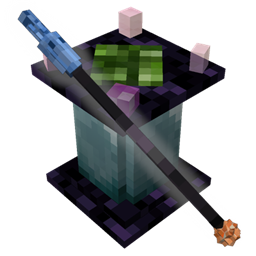
Artificial Artificing
A fresh take on the fantasy/tech genre, Artificial Artificing brings you in-depth spellcasting and volatile crystal networks. Wits sold seperately.
截图


介绍

Artificial Artificing brings you a fresh take on the fantasy/tech genre of modding, where magic meets mechanics and you’ll have to put some thought into progressing.
The mod adds an in-depth spellcasting system, with around 50 spells to discover through active research!
As you strive to master the art of magecraft, you must wrangle with an intriguingly fickle energy form known as lattice instability, which governs the networks of arcane crystals you will link together.
With a focus on immersion and creativity, the systems introduced by this mod are sure to keep you wanting to uncover more.
Not for the faint of heart; this mod will pose a significant challenge and is meant as a slow-burn. More than just wealth, it will take a bit of cunning and experimentation to progress through the ranks and take the title of Master Artificer. Wits sold separately.
Starting Out
To get started with the mod, you will need an Artificer’s Journal. You can craft it from a book and a crystal shard (found underground), or you can find the Journal in dungeon chests. Read the first couple of sections, and it will guide you on the progression.
If something is giving you trouble, I recommend trying it out in creative mode, since that way you can avoid wasting your riches and gain a better understanding of the mod.
Beta
The mod is currently in a very functional beta form; meaning it should be stable, but there is the possibility of bugs or poorly balanced features and recipes.
If you run into such trouble, please do post an issue on the Codeberg page where the mod is developed!
常见问题
Artificial Artificing 支持哪些 Minecraft 版本?
Artificial Artificing 支持 Minecraft Java 版 1.16.5–1.20.1,共 2 个版本,可用的加载器:Forge。下载时注意选择和你游戏版本一致的文件。
Artificial Artificing 怎么安装?
先用 PCL2 或 HMCL 启动器安装对应版本的 Forge,再把下载的 .jar 文件放进游戏目录的 mods 文件夹,重新启动游戏即可。开启了版本隔离的,mods 文件夹在 versions/版本名 下面。
Serpent_Dagger 的其他作品
查看全部 →
Graphing Calculator 3D
高品质、高性能的 3D 图表,支持多种坐标系,多到你大概数不过来。

The TNT Games Minigame Park
The TNT Games is a set of 50 two-player minigames and “attractions” that cover four basic categories, TNT related, Puzzle, Parkour, and General. Each game has an instruction booklet to let you know how to play. In most of the games, there is competition be
评论
登录后评论和评分