介绍
Armor Bundles
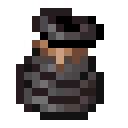
Small mod that adds an item to allow quickly swapping between armour sets.
Using an Armor Bundle
To use an Armor Bundle, you need to fill it with armour. This can be done either through the inventory like a regular
bundle,
or by crouch right-clicking with an armour set equipped. To then equip the armour in the bundle, you can either press
one of the two
keybinds to cycle between Armor Bundles in your inventory, or you can right-click while holding one. The bundle will
attempt to automatically store
any currently equipped armour items into a relevant bundle if possible.
Each bundle can store 4 individual stacks of items.
常见问题
Armour Bundles 支持哪些 Minecraft 版本?
Armour Bundles 支持 Minecraft Java 版 1.19–26.3,共 21 个版本,可用的加载器:Fabric。下载时注意选择和你游戏版本一致的文件。
Armour Bundles 怎么安装?
先用 PCL2 或 HMCL 启动器安装对应版本的 Fabric,再把下载的 .jar 文件放进游戏目录的 mods 文件夹,重新启动游戏即可。开启了版本隔离的,mods 文件夹在 versions/版本名 下面。运行环境:客户端和服务端都要装。

评论
登录后评论和评分