
ArmorHudOverlay
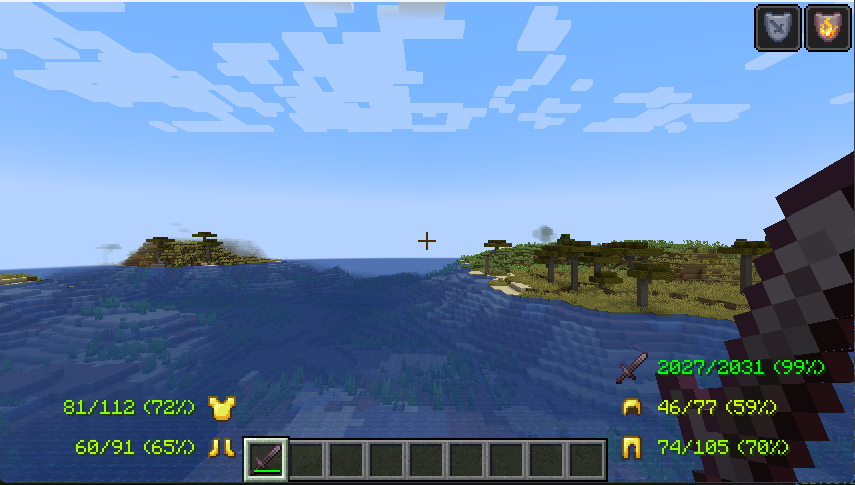
A simple and highly customizable HUD overlay that displays your current armor and its durability directly on the screen.
截图
介绍
ArmorHudOverlay
ArmorHudOverlay is a lightweight and efficient client-side mod designed to enhance your survival experience by providing real-time information about your equipped gear.
🛡️ Features:
- Live HUD: View your current armor pieces (helmet, chestplate, leggings, and boots) directly on your main screen.
- Durability Tracking: Clearly see the remaining durability of each item so you never break your gear unexpectedly.
- Minimalist Design: The overlay is designed to be non-intrusive and fits perfectly with the vanilla Minecraft aesthetic.
- Optimized Performance: Built for Fabric, ensuring zero impact on your FPS.
⚙️ Compatibility:
- Loader: Fabric & Quilt.
- Version: Compatible with the latest Minecraft versions.
- Client-side only: This mod does not need to be installed on the server.
🛠️ Installation:
- Make sure you have the Fabric Loader installed.
- Drop the
ArmorHudOverlay.jarfile into yourmodsfolder. - Launch the game and enjoy!
Developed by andriyt2233
常见问题
ArmorHudOverlay 支持哪些 Minecraft 版本?
ArmorHudOverlay 支持 Minecraft Java 版 1.21.4,可用的加载器:Fabric。下载时注意选择和你游戏版本一致的文件。
ArmorHudOverlay 怎么安装?
先用 PCL2 或 HMCL 启动器安装对应版本的 Fabric,再把下载的 .jar 文件放进游戏目录的 mods 文件夹,重新启动游戏即可。开启了版本隔离的,mods 文件夹在 versions/版本名 下面。运行环境:仅客户端。
andriyt2233 的其他作品
查看全部 →
ChestSorter
A lightweight utility mod that adds smart chest sorting, quick item transfer buttons, and an intuitive interface.

EffectHUD
A simple Fabric mod that displays active potion effects on the HUD.

AutoFarmCarrot
A lightweight Fabric mod designed to automate carrot farming by efficiently harvesting and replanting crops.

Simple In-Game Calculator
"A compact, easy-to-use in-game calculator for Fabric 1.21.4, accessible with a single keypress."
评论
登录后评论和评分