
Armor Chroma
A Forge mod which adds a more descriptive armor bar with material, enchantments and leather color.
介绍
If using 1.3, please report errors with mod icon configuration (icons being shown as iron armor when the mod is on the list of supported mods), by sending a private message with the mod with the error and the armor materials(s) affected (if the type is a vanilla type, item IDs). You can find out a mod ID and armor materials by pressing F3 + H while ingame and hovering over the items.
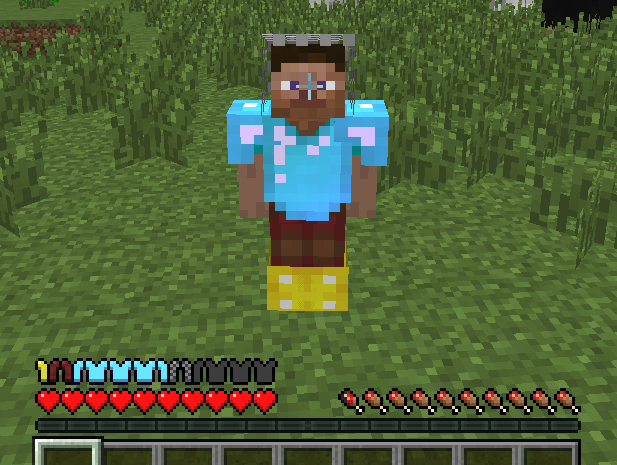
Armor Chroma is a mod which rehauls the vanilla armor bar. I will possibly be adding some other features in later versions. It adds:
- Different armor bar icons for different armor materials
- Displays glint (shine) for enchanted armor
- Displays different leather colors on the bar
This mod is based off of a suggestion by badhaloninja. It’s on GitHub too.
Screenshot:
Mod support:
- Blood Magic
- Blood Arsenal
- Botania
- Flaxbeard’s Steam Power
- IC2
- Thaumcraft
- Tainted Magic
- Thaumic Additions
- Thaumic Bases
- Witching Gadgets
- Thermal Foundation
- Twilight Forest
- Witchery
常见问题
Armor Chroma 支持哪些 Minecraft 版本?
Armor Chroma 支持 Minecraft Java 版 1.7.10–1.12.2,共 11 个版本,可用的加载器:Forge。下载时注意选择和你游戏版本一致的文件。
Armor Chroma 怎么安装?
先用 PCL2 或 HMCL 启动器安装对应版本的 Forge,再把下载的 .jar 文件放进游戏目录的 mods 文件夹,重新启动游戏即可。开启了版本隔离的,mods 文件夹在 versions/版本名 下面。

评论
登录后评论和评分