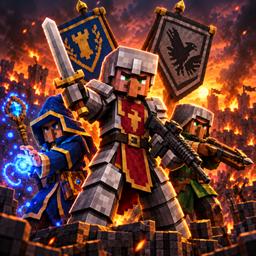
Armed Mobs Warfare: Across the Ages
TaCZ Armed Mobs 的继任者。派系战争、武装村庄守卫、商队、围攻和雇佣兵。可独立运行,搭配 TaCZ、Iron's Spells、中世纪模组和 Epic Fight 效果更佳。
截图
介绍
Armed Mobs Warfare: Across the Ages
Factions at war, settlements to defend or conquer, lords with quests, sieges in waves, mercenaries, caravans and reputation. Armed with whatever your modpack has: swords and bows, medieval gear, guns or magic. And all of it set up in a web editor in your browser.
Mods used in the trailer: Epic Fight (animations and combat moves) and Simply Swords (weapons). Both are optional; without them mobs fight with the normal Minecraft animations and weapons.
Available for NeoForge 26.1.2, NeoForge 1.21.1 and Forge 1.20.1. All three are built from the same code and get the same features, as far as the optional mods exist for that version (see Version differences).
Works on its own. No other mod is required. TaCZ, Iron’s Arms ‘n Artifice, Iron’s Spells, Epic Fight, Blades of Majestica, medieval armor and weapon mods and Guard Villagers are all optional and join in when installed.
New here? Every player gets the Armed Mobs Field Manual guidebook on first join (needs Patchouli). It explains everything below in-game.
Server owner or modpack maker? Type /armedmobs settings and a web editor with every faction and every setting opens in your browser. It is the easiest way to change factions, their mobs and their gear: you click mobs and items as pictures instead of typing IDs into config files. More about it right below.
Successor of TaCZ Armed Mobs. Coming from there? See Coming from TaCZ Armed Mobs.
New in 1.3.0: Minecraft 26.1.2 and Iron’s Arms ‘n Artifice
Minecraft 26.1.2 (NeoForge) joins as the third version, next to NeoForge 1.21.1 and Forge 1.20.1:
- Everything of 1.21.1: Faction Wars, settlements with lords and quests, sieges, mercenaries, caravans, reputation and the web editor with 3D models and item pictures.
- Guns from Iron’s Arms ‘n Artifice. TaCZ, Iron’s Spells and Epic Fight have no version for 26.1 yet; their support follows when they do.
- Worlds from 1.21.1 keep working: the mod moves its world data to the new place of 26.1 by itself the first time it is used.
Iron’s Arms ‘n Artifice (NeoForge 1.21.1 and 26.1.2): its flintlocks, muskets, revolvers, the blunderbuss and the clockwork rifle for Armed Guards, mercenaries, factions and extra mobs.
- The same gun AI as with TaCZ: combat profiles, smart fire, friendly-fire checks, repositioning and warnings before guards open fire. Or Iron’s own AI with volleys and bayonet charges, if you prefer it.
- Mobs need bullets and reload with Iron’s own animations. Some guns come with random gun modifiers, never the ones that break blocks.
- Together with TaCZ: you decide how often the guns of each mod are handed out (
mod_weightsinguns.toml). - Castle gunsmiths, caravans, siege rewards, the gear score and the web editor know its guns too.
New in 1.2.1: Blades of Majestica
With Blades of Majestica installed (NeoForge 1.21.1 or Forge 1.20.1), its weapons join your factions:
- Who spawns with them: leaders, Heavy Knights, settlement guards, Armed Guards, event mobs, caravans and bandits, each with its own chance and the rarest weapon it may get (leaders up to legendary). Any other mob through the extra mob lists.
- Who may use their abilities: charged specials (Ground Plunge, Cleave, Divine Judgement, Shadowveil, Raise the Dead) and area attacks, switchable per group and per kind. By default leaders, Heavy Knights, mercenaries and all other mobs may, guards and event mobs don’t.
- No friendly fire: the area attacks of these weapons spare your mercenaries, your team and allied factions. Servants of Raise the Dead fight for the faction of whoever raised them.
- Everything is set up in the web editor under Settings › Blades of Majestica, extra mobs with these weapons under Settings › Weapons & mobs › Extra mobs.
New in 1.2.0: the web editor
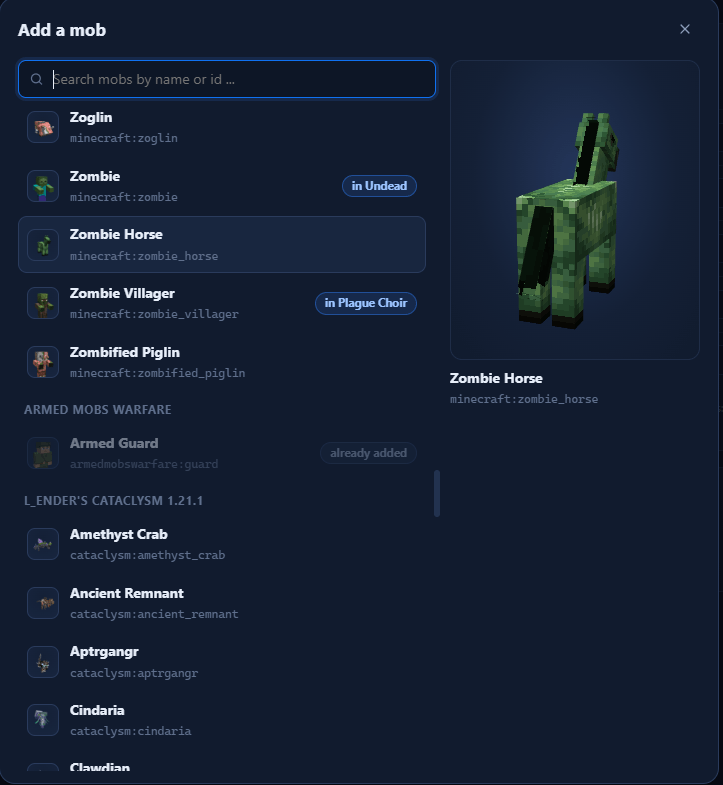
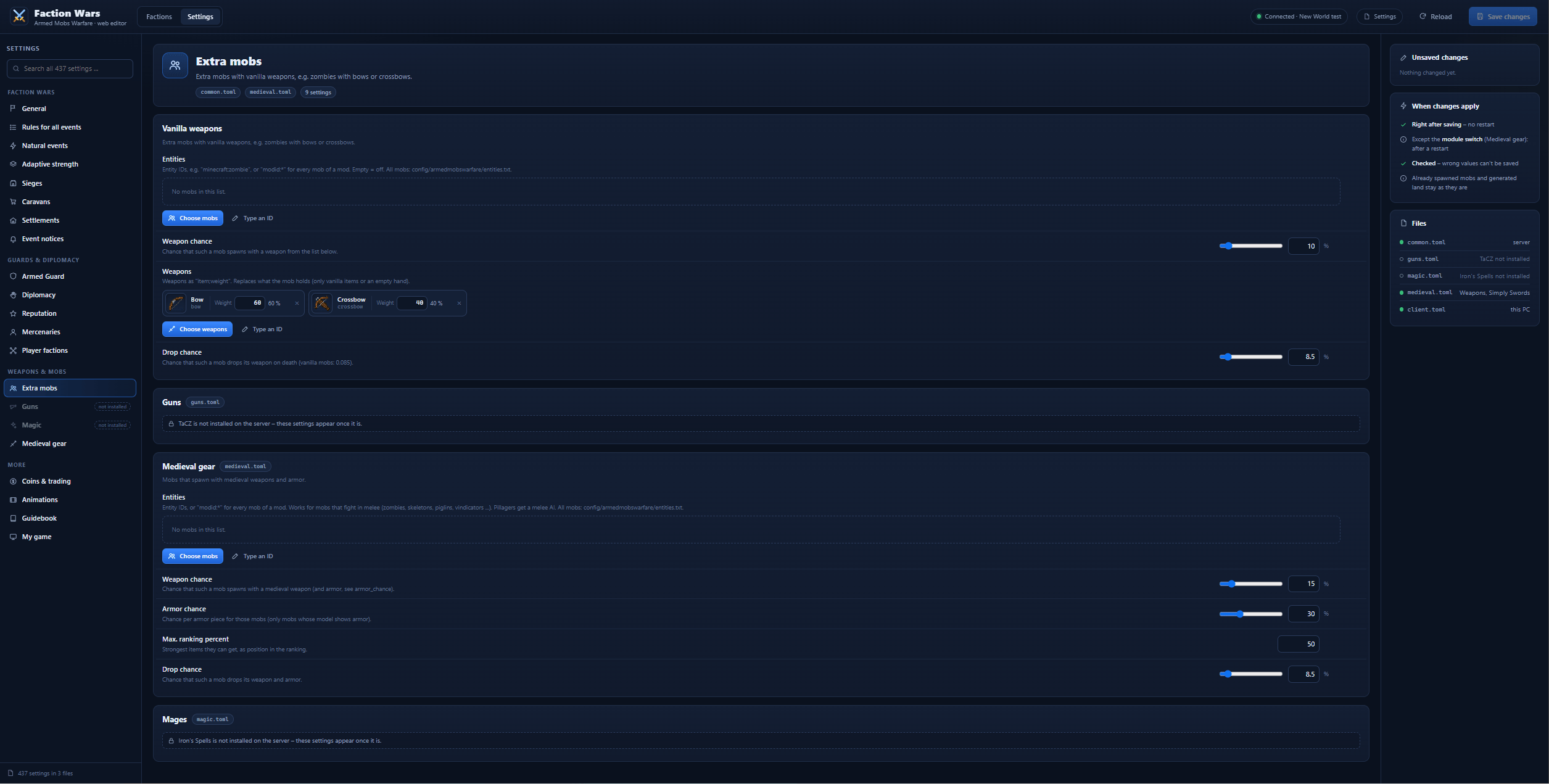
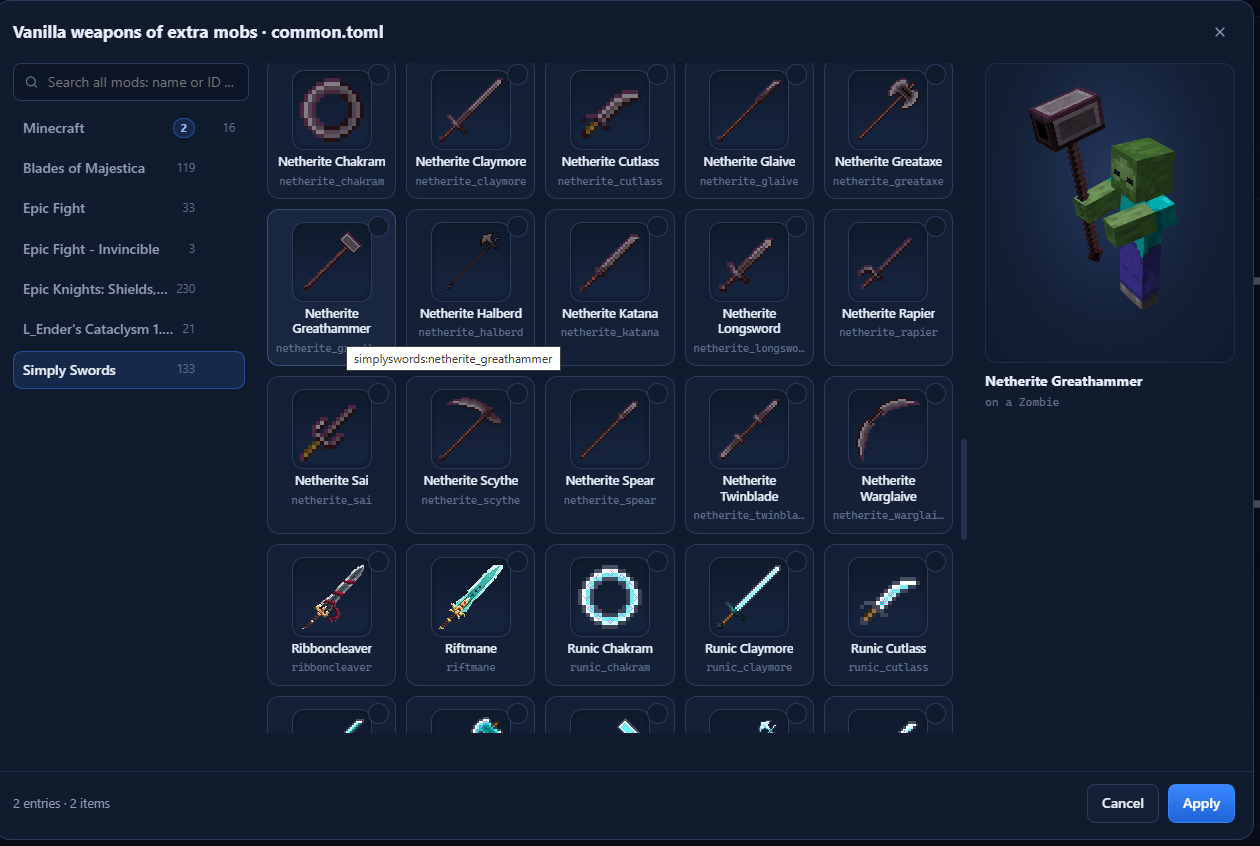
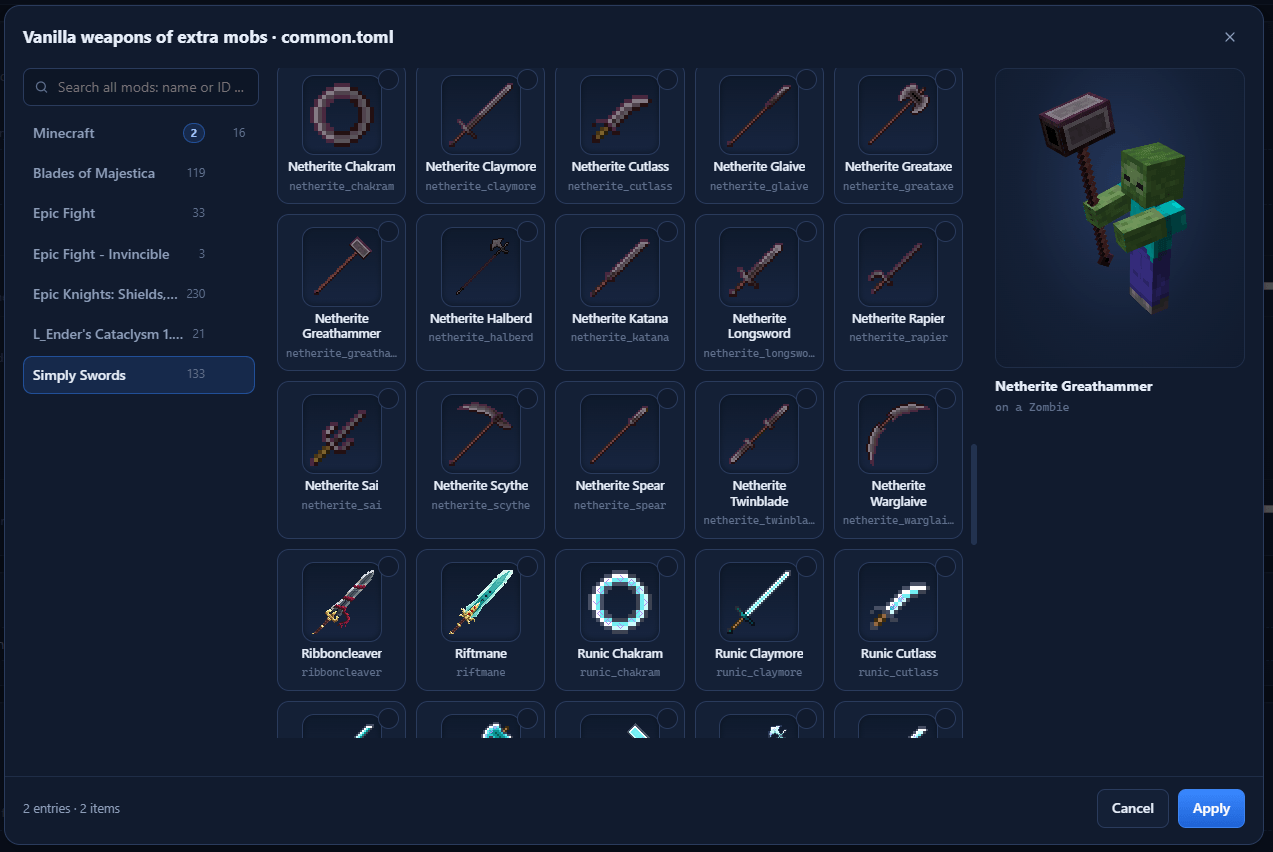
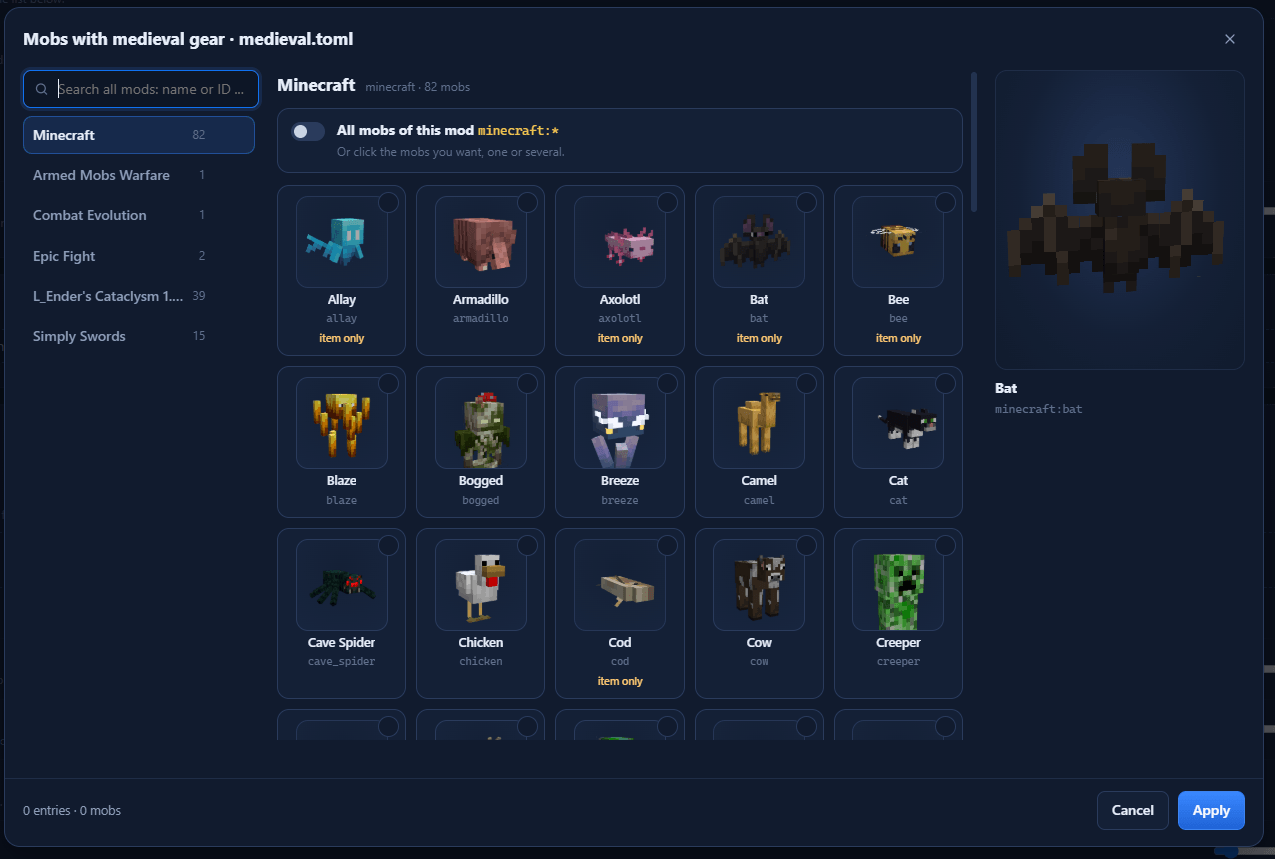
Type /armedmobs settings as an operator and your browser opens an editor for every faction and every setting of the mod. Mobs are shown as 3D models and weapons and armor as in your inventory, drawn by your own game: vanilla, other mods and your resource packs. You pick them with a click and save. Nothing to look up, nothing to type.
Want to change factions, their mobs or their gear? Use the editor instead of editing the files by hand. You don’t need to know a single ID, a typo can’t break anything, and your changes work at once.
Why the editor is better than the files
- You see what you pick. Mobs as 3D models you can turn and zoom, items as in your inventory, one tab per mod or gun pack, with a search over everything. A whole mod is one switch, an armor set is one card.
- Nothing breaks. The server checks everything before it is saved: wrong values are marked red and nothing is written, a broken
factions.jsoncan’t be saved. The old file stays asfactions.json.bak, the config files keep their comments. - It works at once. Saved factions are reloaded on the spot, settings apply without a restart (only the medieval module switch needs one). Mobs that are already in the world keep their gear, the next event uses the new one.
- It explains itself. Every setting shows its description and the right field (switch, number with its unit, choice, list), sorted by topic instead of by file. Hints warn you when a gear list leaves mobs unarmed or armor slots empty.
- No file access needed. On a rented server you don’t need FTP or the host’s file manager: the editor talks to the server through your normal game connection, no extra port.
- Safe. The page only runs on your own PC (127.0.0.1, with a one-time key in the link), the server checks operator rights on every request and logs who changed what. If someone else changed something in the meantime, the editor asks before it overwrites.
How to use it
- Join the world as an operator: in single player a world with cheats (or LAN with cheats), on a server with operator rights. Armed Mobs Warfare has to be installed on your PC too, not only on the server.
- Type
/armedmobs settings. The editor opens in your browser, and the chat has an [Open again] link. - At the top choose Factions or Settings. Factions: pick a faction on the left (or create one with New faction) and change it in its tabs. Settings: every other option, sorted by topic.
- Click Save changes. Done.
Leaving the world or the server ends the session. Next time, just type the command again.
Example: the Grave Legion in chainmail with iron swords. Factions › Grave Legion › Gear. Under Armor pick Fixed list and click Chainmail (or Choose armor for the armor of any mod). Under Weapons pick Whitelist, click Choose weapons, pick the Iron Sword and Apply. Then Save changes. From the next event on, its skeletons and zombies come in chainmail with iron swords, however strong you are.
Faction editor
Every faction has these tabs:
- General: name, color, family, required mods (the faction only exists when they are installed) and the build block of its engineers.
- Mobs: the members, picked from a list with their 3D models, also mobs of other mods. Per mob: spawn weight (the editor shows the resulting chance), role, guns (auto, yes or no), the events it joins and whether it can be the leader (siege leader, wanted boss, settlement warlord). A leader with spawn weight 0 only ever shows up as the leader.
- Gear: the weapons and armor of the faction, with own lists for its leaders.
- Weapons: Automatic (by gear score), a Whitelist (only these, stronger players meet the stronger ones) or a Blacklist (never these, everything else stays automatic).
- Armor: By gear score or a Fixed list (always this armor, however strong the player is).
- Entries are items, guns of your gun mods (TaCZ gun packs, Iron’s Arms ‘n Artifice), whole mods, armor sets or item tags, all picked as pictures. A 3D preview shows a mob of the faction wearing them.
- Events: where the faction shows up: battles, hunts, ambushes, sieges of player bases, attacks on settlements, caravans, wanted camps, new settlements and as mercenaries. For example a faction that hunts and ambushes you but never besieges your base.
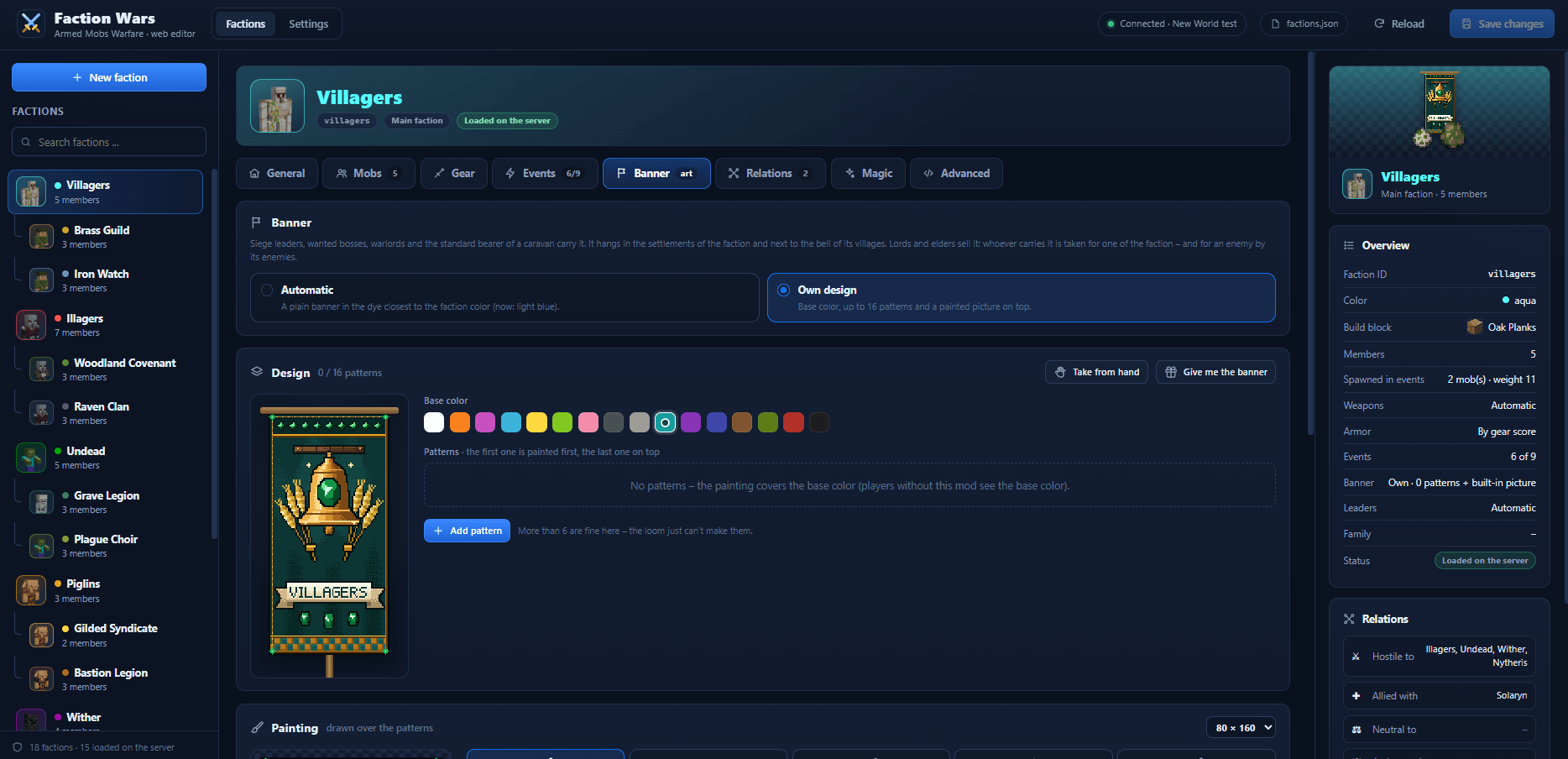
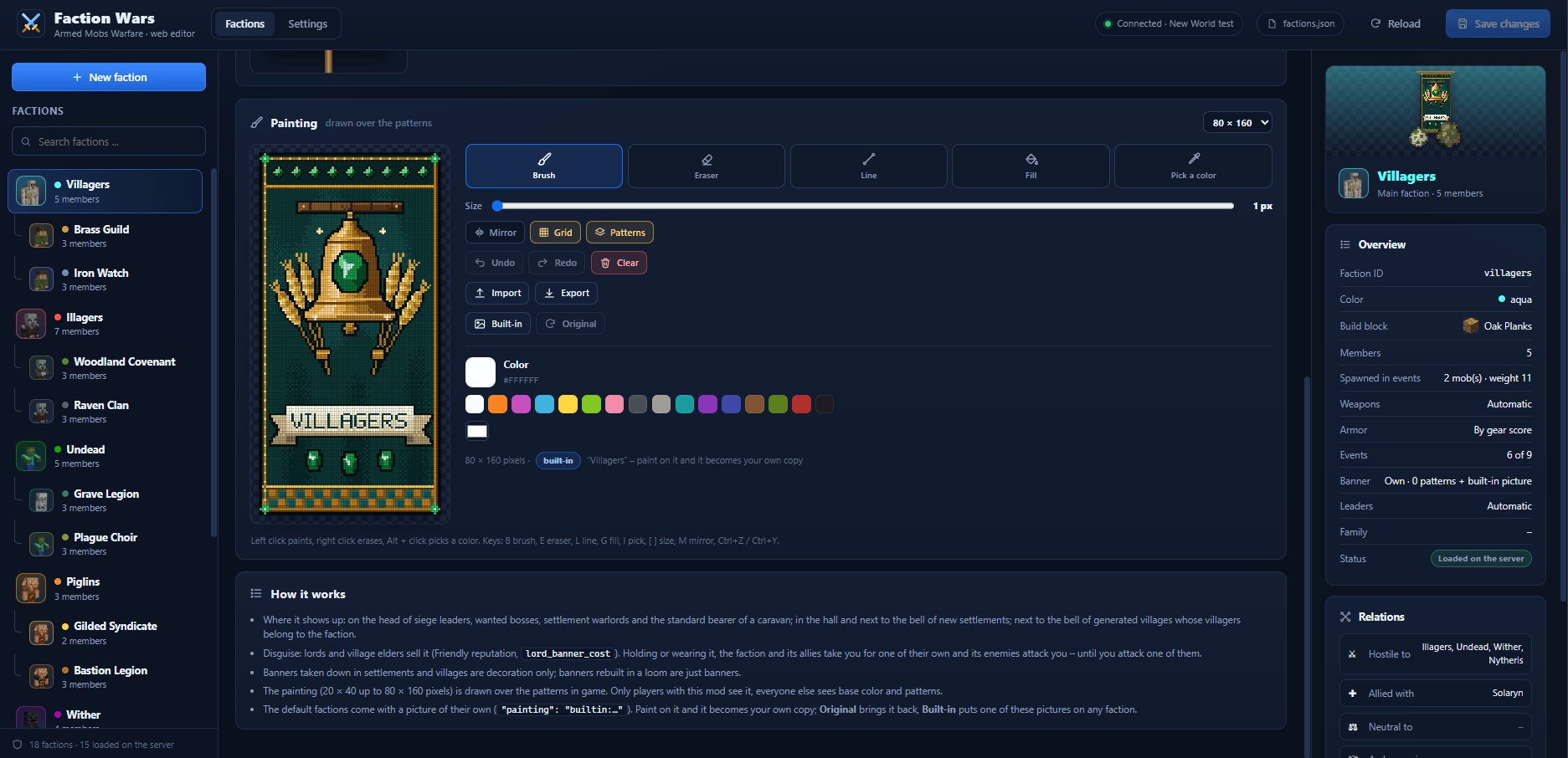
- Banner: base color, up to 16 patterns and a paint tool for a picture on the banner. Copy the banner in your hand or get the faction’s banner into your inventory. Every default faction comes with its own painted banner.
- Relations: hostile, allied, neutral and arch enemies.
- Magic: spell schools (Iron’s Spells). Advanced: the JSON of the faction, for everything else.
Renaming a faction updates every reference to it. The preview on the right shows the faction at a glance with its banner, and the editor lists the server’s warnings for each faction (e.g. an unknown mob).
Faction banners in the game: they are worn by siege leaders, wanted bosses, settlement warlords and the standard bearer of every caravan, and stand next to the bell of settlements and villages. Buy a faction’s banner from its lord (Friendly reputation) to pass as one of them, but its enemies will attack you.
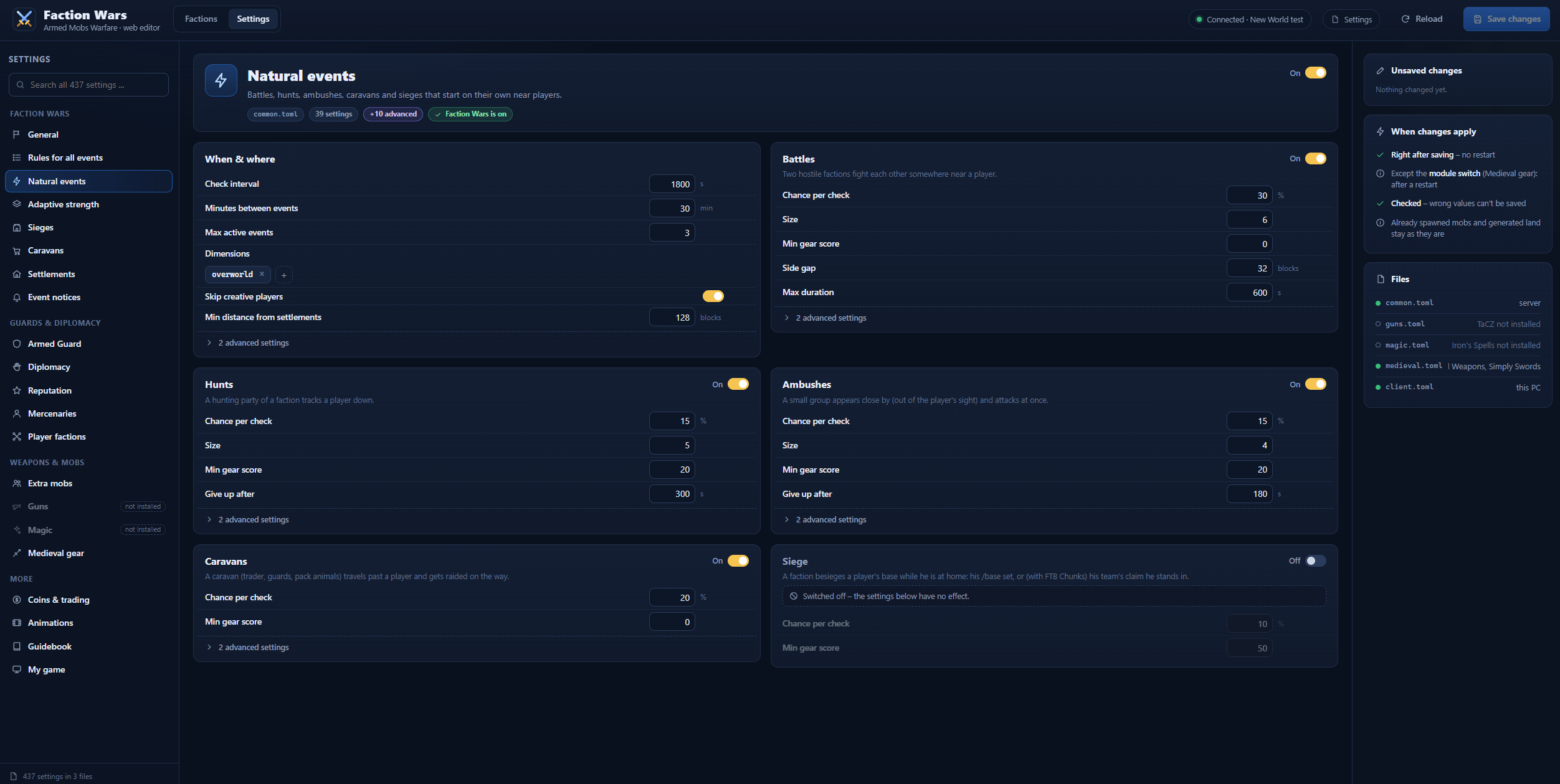
Settings
- Every setting of
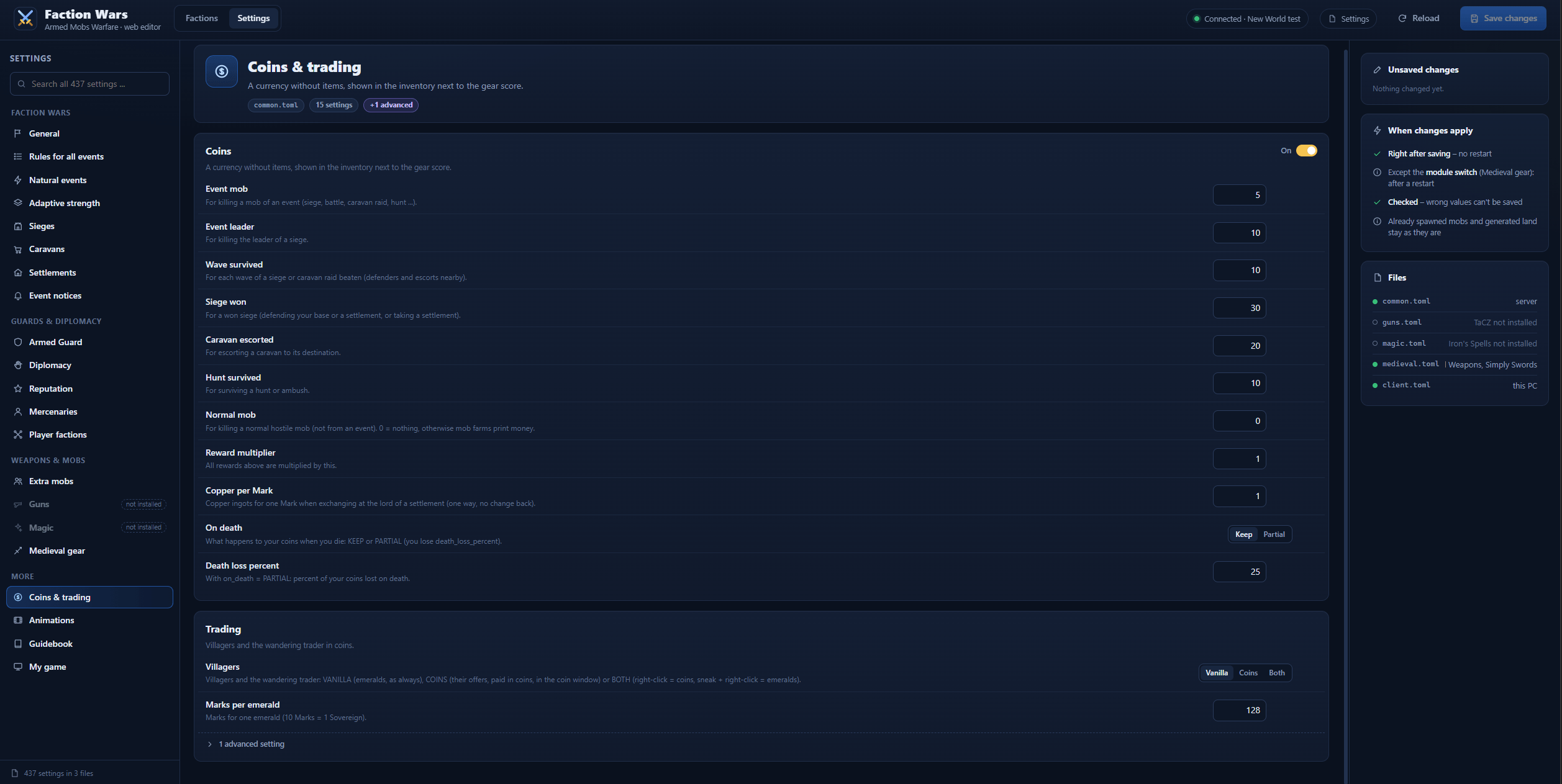
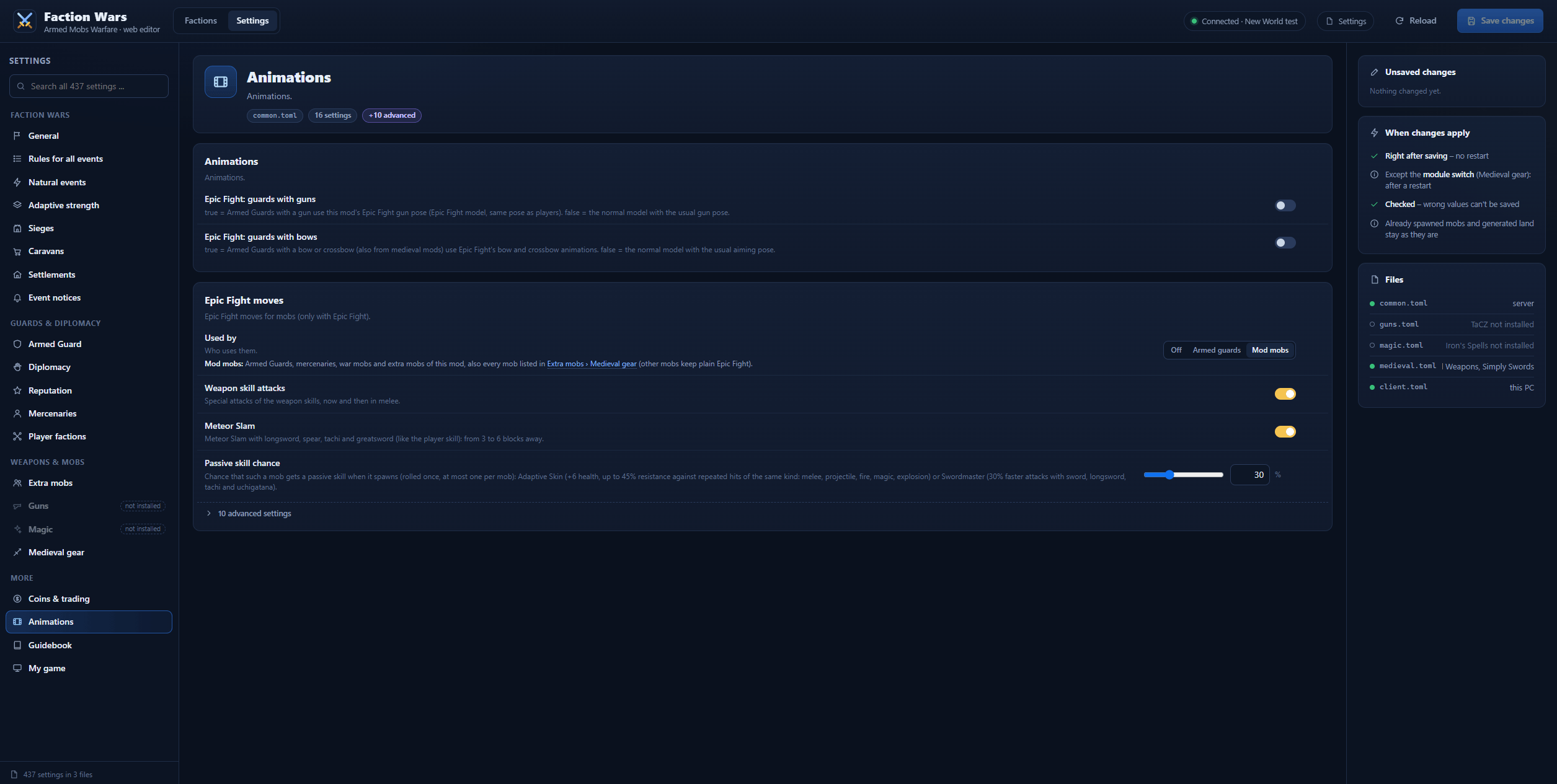
common.toml,guns.toml,magic.tomlandmedieval.toml(on the server) and your ownclient.toml(on your PC), sorted by topic: Faction Wars, Guards & diplomacy, Weapons & mobs, Coins & trading and more, with a search over everything. - The right field for every setting, its description, a list of unsaved changes (old → new, undo one or all) and a button back to the default.
- Lists as pictures: extra mobs by their 3D model (a whole mod with one switch), and the weapons of extra mobs, the fallback weapons of the Armed Guard, the white flag items and the gun whitelist and blacklist by their inventory pictures.
Also new in 1.2.0
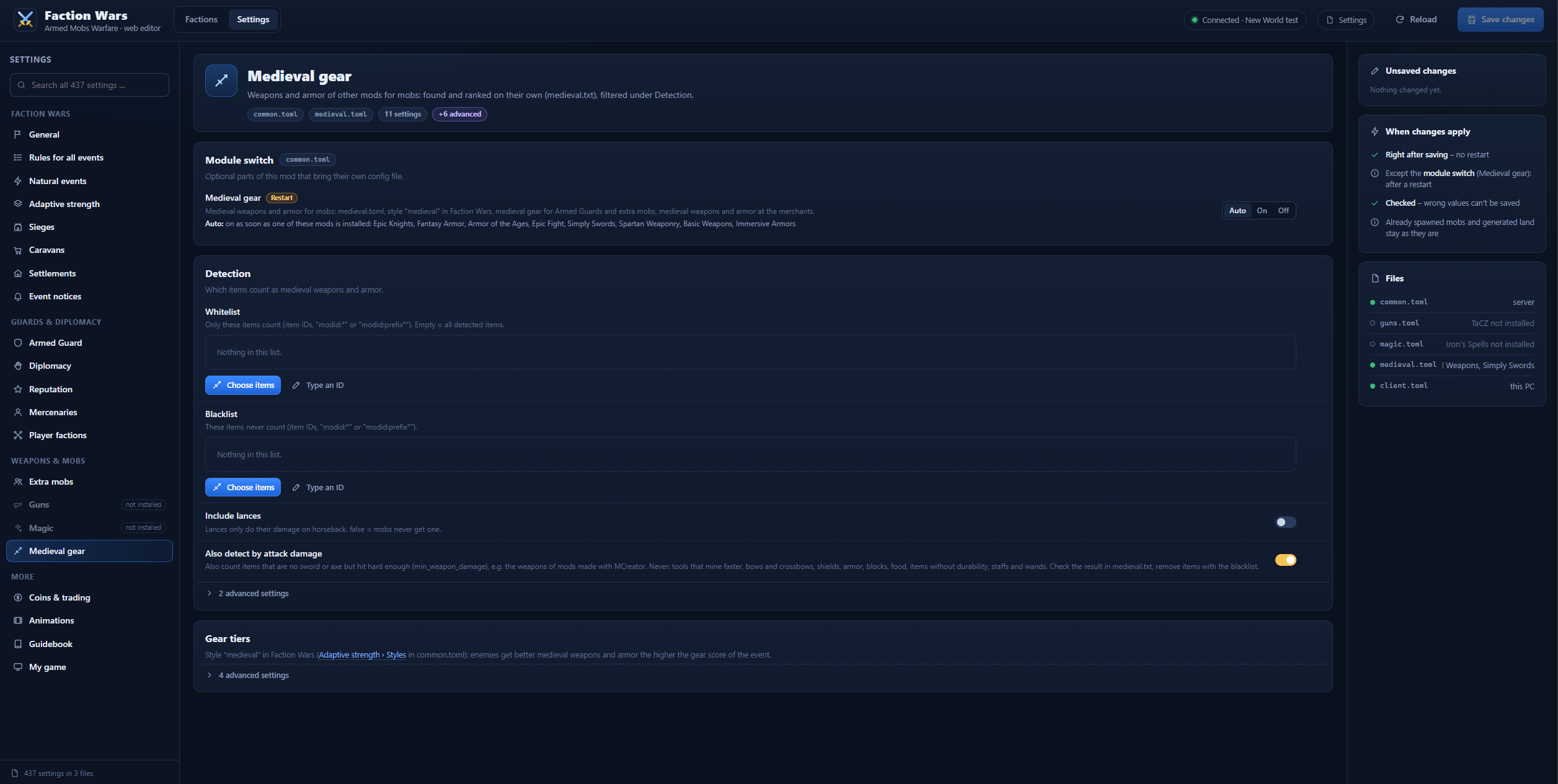
- Medieval gear switch (
[modules] medieval):Auto,OnorOff.Ongives mobs the swords, axes and armor of all your other mods, even without a known medieval mod. Weapons that are no sword or axe (e.g. of MCreator mods) are found by their damage. - RPG mods in the gear score: Spell Power, the Ranged Weapon API and Critical Strike count.
- Fewer, clearer settings. Your values move along automatically.
- Guard Villagers: its guards are no longer armed on their own. Add
guardvillagers:guardto an extra mob list (Settings › Weapons & mobs › Extra mobs) and they get guns, magic or medieval gear with this mod’s AI and walk to the bell for ammo. They still count as village guards.
Settlements
Castle towns and palisade villages generate with the world, each one owned by a faction, with residents, guards, merchants and a lord. Defend them, besiege them, trade with them or take on their quests.
Castle towns and villages
- Castle town: stone curtain wall with battlements and round towers, a gatehouse with portcullis, main street, market square, half-timbered houses, smithy, tavern, fields outside the wall and a keep with throne hall on the highest point. It follows the terrain instead of flattening it.
- Palisade village: wooden wall, watchtowers and houses around a square.
- Generated with the world in every overworld biome where the ground fits, about as rare as vanilla villages, never right next to them or the world spawn.
/locate structure armedmobswarfare:castle(orvillage) finds them. - The faction follows the biome: illagers in dark forests, undead in swamps and badlands, villagers elsewhere. With Iron’s Spells the mage factions settle too.
- Protected: no breaking, building, fire or container looting inside, explosions destroy nothing, no monsters spawn inside.
Residents and guards
- Villagers (or soldiers of other factions), merchants, guards on walls and towers, and a lord, village elder or warlord.
- Residents don’t despawn, come back over time and leave you alone unless your reputation with them is Hostile or Hated, or you attack them.
- Guards always wear full armor and fight with at least iron weapons. The guard alarm sends the nearest guards after every enemy inside the walls.
- Heavy Knights hold the gates: best armor, a netherite longsword (with Epic Fight even Meteor Slam), and they parry melee hits from the front.
The lord
Right-click the lord to open his window:
- Upgrades for his settlement, paid in coins: stronger gates, better-armed guards with more Heavy Knights, and barracks that bring fallen guards back after every beaten wave of a siege.
- Shop: a mercenary contract for his friends.
- Quests (see below), and a copper exchange for coins.
Quests
Every lord offers three quests per player, new every 7 Minecraft days:
- Bounty: slay warriors of an enemy faction, anywhere.
- Delivery: bring a load of goods the settlement needs.
- Wanted: hunt down the leader of an enemy gang in his camp 250 to 500 blocks away. He glows, is much tougher than his gang and armed for your gear. Bring his Wanted Poster back as proof.
Rewards are coins and reputation, so even Hostile players can win a faction back (carry a white flag to get past the guards). Your quests are in the Quests button below the inventory, and the quest compass above the hotbar points the way: red to a wanted leader’s camp, green back to the lord.
Coins and merchants
- Coins are a currency without items: Marks, Sovereigns, Elder Sigils and Ancient Relics, shown above your inventory. Earned in events: enemies, waves, sieges, escorts and hunts.
- Merchants in every settlement, each with a name and a job (“Morgrin the Bonesmith”, “Vexmar the Hexer”). Their goods follow the job, including trades other mods add. With TaCZ or Iron’s Arms ‘n Artifice, castles have a gunsmith; weaponsmiths and armorers also sell weapons and armor of installed medieval mods.
- Orders: bring the goods a merchant asks for at about twice the price.
- Market day: every 7 days new merchants with new goods move into every stall.
- Villagers and the wandering trader can trade in coins too (off by default).
Sieges
For settlements and for your own base.
- 5 waves: scouts, vanguard, main force, elite troops, then the leader with his escort.
- Engineers blow open gates, put ladders on walls and dig their way in. In a castle there are three gates in a row.
- Settlement sieges: the bell rings, the gates close, villagers hide and the lord commands the defense. Players nearby choose in the chat: defend, attack or stay out. If the lord falls, the attackers take over the settlement. Afterwards the map repairs itself.
- Supplies after every beaten wave: health, food, ammo or arrows, repaired gear.
- War chest: spend coins between waves on watchfires, caltrops, boiling oil, gate repairs, militia, sellswords, allied banners, a court mage and more.
- Siege perks: after each wave every defender picks one of three perks, from Thick Skin and Steady Aim up to epic ones like Last Stand, Berserker or Thunderclap.
- No friendly fire between defenders, residents, mercenaries and summons.
Faction Wars
Factions
- 15 factions in 5 families: Villagers, Illagers, Undead, Piglins and Wither, each with two sub-factions. With Iron’s Spells three mage factions join.
- Every faction has its own allies, enemies and arch enemies, and they fight each other in the open world too.
- Make them your own in the web editor: add mobs of other mods, give a faction the weapons and armor of your modpack, change relations, events and banners, or create new factions. Everything is stored in
factions.json.
Events around you
- Battles between hostile factions. You’re a spectator until you pick a side.
- Hunts and ambushes by factions that don’t like you.
- Sieges of your base (set with
/base set, or FTB Chunks claims). - Adaptive: your Gear Score (shown in the inventory) scales event size and gear, so new players get small fights and veterans get wars.
- At most one event every 30 minutes, never two at once, never next to a settlement.
Caravans
- Traders with guards and pack animals for every faction, some only at night as smugglers.
- Escort them for a reward or raid them in waves. Trade with them for faction goods and mercenary contracts.
Reputation
- Every faction has an opinion of you, from Hated to Allied.
- Hostile factions attack you on sight and refuse to trade. Friendly ones give discounts, leave you alone in the wild and sell mercenaries. Allied ones send help in sieges.
- Warnings before guards open fire, a white flag to surrender or pass, a disguise with an ominous banner or a faction’s banner, and a fixer to buy your reputation back.
- No damage by accident: sweeps, stray arrows and splash potions don’t start a war.
Mercenaries
- Hire soldiers of any faction that likes you, up to 15 per player, with their own window for gear, name and orders.
- Orders: follow (even through portals), wait, guard an area or work: farming, breeding and slaughtering animals, or crafting up to 9 recipes with stock targets.
- Day or night shifts, they sleep in beds and fetch ammo from your chests. Death is final.
Player factions
- Found your own team with
/faction create, invite friends, pick a name and color. With FTB Teams your party is your faction. - Shared reputation, shared bases, no friendly fire, mercenaries protect the whole team.
Armed Guards and combat AI
- Armed Guards: this mod’s own guards with a player model, spawning in villages. Custom skins from
config/armedmobswarfare/skins/. - Without any weapon mod guards, mercenaries and war mobs fight with swords, bows and crossbows.
- Guard pouch with reserve food and ammo (sneak + right-click), guards eat when hurt and restock at the village bell.
Optional mods
| Mod | What it adds |
|---|---|
| TaCZ (Forge 1.20.1) / TaCZ NeoForge Port (1.21.1) | Guns from every loaded gunpack with a tactical AI: aiming, real reloads, bursts, combat profiles per weapon type, distance keeping, friendly-fire checks, suppressive fire. A gunsmith in every castle. Pick the guns of each faction in the web editor. |
| Iron’s Arms ‘n Artifice (NeoForge 1.21.1 and 26.1.2) | Flintlocks, muskets, revolvers, the blunderbuss and the clockwork rifle with the same tactical AI as TaCZ guns (or Iron’s own AI), reloads with real bullets and random gun modifiers. With TaCZ installed too, you set how often each mod’s guns are handed out. |
| Iron’s Spells ‘n Spellbooks | Battle mages with a spell AI and mana, three mage factions (Solaryn, Nytheris, Drakaryn), give your mercenary a spellbook. |
| Epic Fight | Animations for Armed Guards, weapon skills for mobs (Sweeping Edge, Guillotine, Heartpiercer …), Meteor Slam, passive skills. |
| Better Combat with Better Mob Combat: Reimagined (NeoForge 1.21.1) | Faction mobs and Armed Guards swing their weapons with Better Combat’s animations. Nothing to set up. |
| Medieval mods (Epic Knights, Fantasy Armor, Armor of the Ages, Simply Swords, Spartan Weaponry …) | Weapons and armor are detected and ranked automatically and used by war mobs, guards and merchants. Simply Swords weapons get Epic Fight movesets. Give a faction a fixed armor set or only certain weapons in the web editor. |
| Blades of Majestica | Its weapons for leaders, Heavy Knights, guards and event mobs, and which mobs may use their specials and area attacks, per group. Its area attacks spare your allies. |
| Guard Villagers | Its guards count as village guards and, through the extra mob lists, get guns, magic or medieval gear with this mod’s AI. |
| Patchouli | The in-game guidebook. |
| FTB Chunks / FTB Teams | Claims count as bases, parties count as player factions. |
Pick what you want
Everything can be switched off on its own, in the web editor (Settings) or in config/armedmobswarfare/common.toml:
[faction_wars] enabled = false: no factions, events, settlements, sieges or quests. The mod becomes a pure armed-guards mod.[faction_wars.settlements] enabled = false: Faction Wars without settlements.[coins] enabled = false: no coins (balances are kept).[modules] medieval = OFF: no medieval gear, even with medieval mods installed.- Quests, merchants, perks, war chest, mercenaries and reputation each have their own switch too.
Configuration
The easy way is the web editor (/armedmobs settings, both versions, see above). It edits the same files, checks every value and applies your changes at once (only the medieval module switch needs a restart). Use it whenever you change factions, their mobs or their gear.
The files live in config/armedmobswarfare/, and every option is explained in the file itself. On NeoForge (1.21.1 and 26.1.2) the settings are also in-game (Mods > Armed Mobs Warfare > Config). Modpack makers: set everything up in the editor, then ship the files from config/armedmobswarfare/ with your pack.
| File | What’s in it | In the web editor |
|---|---|---|
common.toml |
All main settings: guards, AI, diplomacy, coins, Faction Wars, settlements, sieges | Settings |
guns.toml |
Gun settings (only with TaCZ or Iron’s Arms ‘n Artifice): which mobs get guns, whitelist and blacklist, ammo, profiles, how often each gun mod is picked, Iron’s Arms options | Settings |
magic.toml |
Spell settings (only with Iron’s Spells) | Settings |
medieval.toml |
Medieval gear settings (only with a medieval mod or the switch on) | Settings |
majestica.toml |
Blades of Majestica (only with that mod): who spawns with its weapons, which mobs may use their abilities | Settings › Blades of Majestica (extra mobs: Settings › Weapons & mobs › Extra mobs) |
client.toml |
Your own PC: gear score display, quest compass position, how the editor shows mobs and items | Settings › My game |
factions.json |
Factions: their mobs, relations, gear, events, leaders, caravans and banners | Factions |
caravan_trades.json |
Caravan prices, fixer fines, contract prices | No, file only |
Coming from TaCZ Armed Mobs
Armed Mobs Warfare replaces TaCZ Armed Mobs (no longer updated). Remove the old taczarmedmobs jar and start the game: your settings, wars, bases, reputation, mercenaries and Armed Guards are taken over automatically. The old files stay untouched. The command is now /armedmobs.
Version differences
Differences on NeoForge 26.1.2: TaCZ, Iron’s Spells ‘n Spellbooks and Epic Fight have no version for 26.1 yet. Guns come from Iron’s Arms ‘n Artifice, and there are no mage factions or spells and no Epic Fight moves until these mods arrive.
Differences on Forge 1.20.1: no in-game config screen (use /armedmobs settings or edit the files), no Mace support (the Mace doesn’t exist in 1.20.1) and no Iron’s Arms ‘n Artifice (yet).
Debugging
Commands for operators:
/armedmobs debug: stand next to a guard to see every condition of its AI./armedmobs war inspect: look at a faction mob for its faction, relations and target./armedmobs event status: event timers and cooldowns./armedmobs settlement info: the settlement you’re standing in./armedmobs extra list: the extra mob lists and the gun mods in use (with the reason if one is switched off)./armedmobs majestica: the nearest mob with a weapon of Blades of Majestica, its group and what it may use.
Found a bug? Leave a comment with your log (upload it to pastes.io).
FAQ
Which file do I need? Files ending in +26.1.2-neoforge are for NeoForge 26.1.2, +1.21.1-neoforge for NeoForge 1.21.1, +1.20.1-forge for Forge 1.20.1.
I don’t find any settlements. They only generate in newly generated chunks. Explore new land or use /locate structure armedmobswarfare:castle.
Events don’t happen. Check that Faction Wars is on, that you’re outside your base and away from settlements, and that the difficulty isn’t Peaceful. /armedmobs event status shows when the next check is due.
How do I open the web editor? Type /armedmobs settings as an operator (in single player: a world with cheats, or LAN with cheats). Armed Mobs Warfare has to be installed on your client too. The page opens in your browser; the chat has a link to open it again. It runs in your game, so it only works on the PC you play on (not from the server console) and ends when you leave the server.
Do I still need the config files? No. Everything can be changed in the web editor, except the caravan prices (caravan_trades.json) and the skins of the Armed Guards (skins/). The files still work as before, e.g. to copy a setup to another server or into a modpack. After editing factions.json by hand, /armedmobs war reload loads it.
The 3D models or item pictures in the editor look wrong. Switch them off in the editor under Settings › My game › Web editor (“3D models of the mobs” / “Items as in the inventory”). Then the spawn eggs and flat textures come back.
Does it work with Better Combat? Yes, on NeoForge 1.21.1: install Better Mob Combat: Reimagined next to Better Combat, and faction mobs and Armed Guards fight with Better Combat’s animations. Nothing to set up.
Can I use this in my modpack? Yes.
Roadmap & ideas
Nothing is promised, but this is where things are heading:
- Balancing and polish of settlements and sieges, based on your feedback
- More for the lord: new specials and services
- More to buy with coins: an own shop instead of villager trades, trading with other NPCs, jobs
- Building styles per faction, settlements in the Nether and the End
- More weapon mods (Point Blank, Scorched Guns)
- Mobs using the abilities of other mods that normally only players can use
- An optional RPG layer for 2.0, off by default
What would you like to see? Leave a comment, suggestions really do end up on this list.
Credits
Friendly-fire and repositioning logic inspired by Guard Villagers TACZ Support by denialpan (MIT). Guard Villagers integration for Guard Villagers by tallestegg.
常见问题
Armed Mobs Warfare: Across the Ages 支持哪些 Minecraft 版本?
Armed Mobs Warfare: Across the Ages 支持 Minecraft Java 版 1.20.1–26.1.2,共 3 个版本,可用的加载器:Forge / NeoForge。下载时注意选择和你游戏版本一致的文件。
Armed Mobs Warfare: Across the Ages 怎么安装?
先用 PCL2 或 HMCL 启动器安装对应版本的 Forge / NeoForge,再把下载的 .jar 文件放进游戏目录的 mods 文件夹,重新启动游戏即可。开启了版本隔离的,mods 文件夹在 versions/版本名 下面。
xxXShindaXxx 的其他作品
查看全部 →
TaCZ Armed Mobs Warfare Discontinued: continued as Armed Mobs Warfare: Across the Ages
一切皆可选:持枪守卫、拿霰弹枪的僵尸、带狙击枪的掠夺者,还有 Iron's Spells 的法师。任意 TaCZ 枪包、战术 AI、交战派系:攻城、商队以及既战斗又耕作的雇佣兵。NeoForge 1.21.1 和 Forge 1.20.1。
[BoM] Majestic : Epic Fight Weapons
Turns the 3D weapons of Eftann's Blades of Majestica resource pack into real Epic Fight weapons with stats, passive abilities, charged specials and weapon skills. Requires the pack.
评论
登录后评论和评分