
Apothic Filter Compat
Mirrors Apotheosis affix rarity to top-level NBT so filter mods like Pipez and Refined Storage can read it.
截图
介绍
What it does
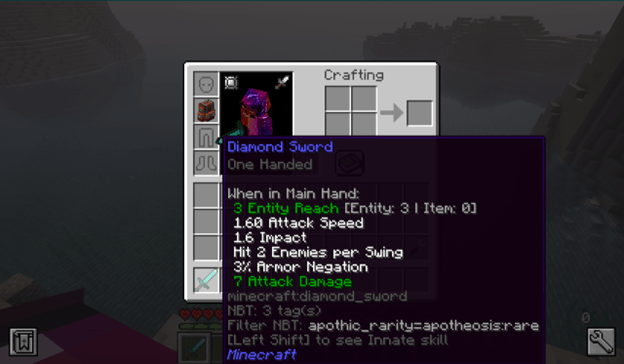
Apotheosis stores affix item rarity in nested NBT at affix_data.rarity. Most filter mods only read first-level NBT, which means players cannot filter affixed gear by rarity in storage and pipe systems. This has been a known pain point across many GitHub issues for years.
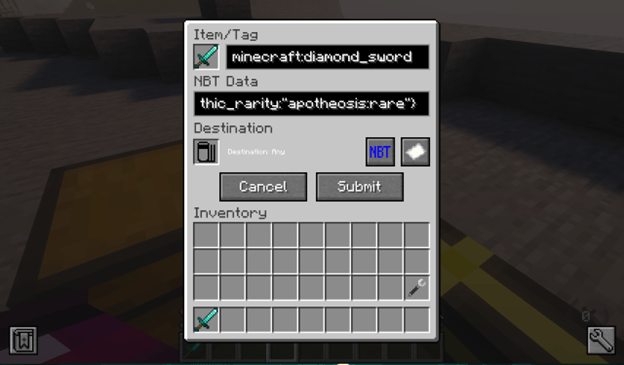
This mod copies the rarity value to a top-level NBT key called apothic_rarity. Once mirrored, any filter mod that reads top-level NBT can match items by rarity:
{apothic_rarity:"apotheosis:rare"}
A tooltip on affix items shows the value to make filter setup easier (toggleable in config).
Compatibility
Works with: Pipez, Refined Storage, Applied Energistics 2, XNet, Mekanism logistical transporters, EnderIO conduits, Functional Storage NBT lock, and any other filter mod that reads top-level NBT paths.
Does not work with: Sophisticated Backpacks or Sophisticated Storage. Their filter system requires full NBT match rather than path-based matching, which is a limitation of those mods.
Usage
- Install Apotheosis and its dependencies (Placebo, Patchouli, Apothic Attributes).
- Drop this jar into your mods folder.
- Pick up or generate any affixed item. Within one second it will have
apothic_rarityset at the top level of its NBT. - In your filter mod, set the NBT match to
{apothic_rarity:"apotheosis:rare"}(or any rarity ID:apotheosis:common,apotheosis:uncommon,apotheosis:rare,apotheosis:epic,apotheosis:mythic).
Config
Located at config/apothic_filter_compat-common.toml.
enabled: master switch, default truenbtKey: top-level NBT key, defaultapothic_raritytickInterval: how often to sweep inventory in ticks, default 20showTooltip: show the rarity value on tooltips, default true
Source
GitHub: https://github.com/nightwielder23/apothic-filter-compat
License
MIT.
常见问题
Apothic Filter Compat 支持哪些 Minecraft 版本?
Apothic Filter Compat 支持 Minecraft Java 版 1.20.1,可用的加载器:Forge。下载时注意选择和你游戏版本一致的文件。
Apothic Filter Compat 怎么安装?
先用 PCL2 或 HMCL 启动器安装对应版本的 Forge,再把下载的 .jar 文件放进游戏目录的 mods 文件夹,重新启动游戏即可。开启了版本隔离的,mods 文件夹在 versions/版本名 下面。
Nightwielder23 的其他作品
查看全部 →
Apothic Staff Rarities
将 Fallen Gems & Affixes 的法杖词缀扩展到 Apotheotic Additions 的稀有度。数据包驱动且可配置,支持按稀有度缩放和按类别开关。软依赖,仅服务端。

BIC Shield Compat
Makes shield-disabling weapons work against Born in Chaos's Skeleton Thrasher and Door Knight by intercepting their fake Resistance IV block mechanic.

Apothic Renaming
An Apotheosis addon that lets you rename affixed items in an anvil without needing the Sigil of Unnaming.
评论
登录后评论和评分