Apocalypse Inventory
Replaces the vanilla inventory with a full-screen survival layout for gear, Curios, backpacks and containers.
截图
介绍
# Apocalypse Inventory
**A full-screen survival inventory built for zombie-apocalypse and survival modpacks.**
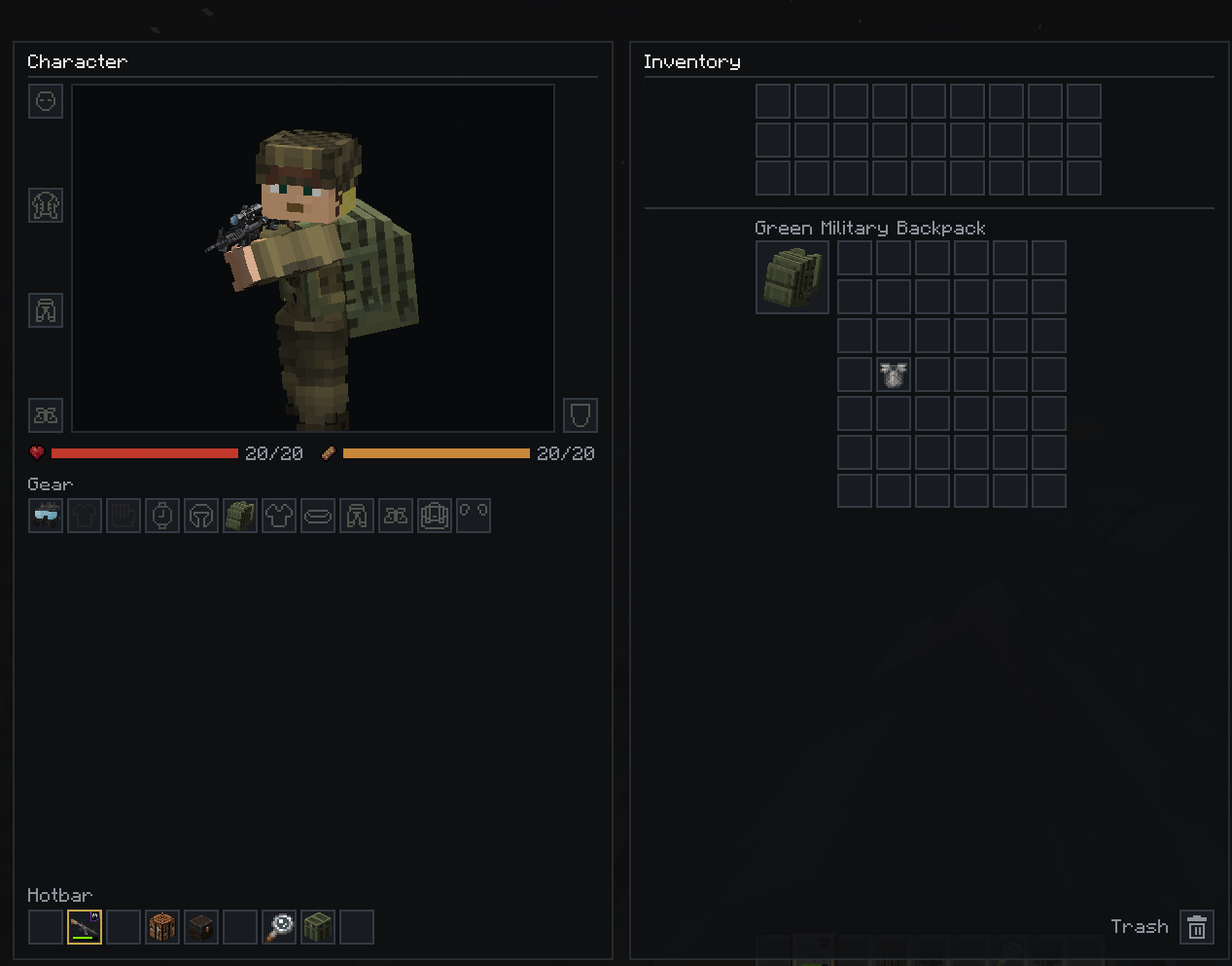
Apocalypse Inventory replaces the vanilla inventory with a three-column layout. Your character and gear are on the left, your inventory and worn storage in the middle, and whatever you opened (a chest, a furnace, a crafting table) on the right. Everything is on one screen, so you can loot, equip and craft without switching menus.
—
## Features
### Character panel (left)
– A large **player render** that follows your mouse, like vanilla.
– **Armor slots** (head, chest, legs, feet) placed along the side of your character, with the offhand next to it.
– **Health and hunger** shown as values (e.g. `17/20`).
– Every **Curios** slot in a compact grid.
– The **hotbar** at the bottom, with the selected slot highlighted.
### Inventory panel (middle)
– All **27 main inventory slots**.
– **Worn storage shows up automatically.** With Survivor’s Arsenal, each equipped backpack, vest or jacket pocket, and pants pocket gets its own section, with the item’s icon and name. Sections appear when you equip the gear and disappear when you take it off. The area scrolls if you carry a lot.
– A **trash box** for destroying the item on your cursor.
### Container panel (right)
– **Storage containers** (chests, barrels, ender chests, shulker boxes, dispensers, droppers, hoppers, lootr chests, Survivor’s Arsenal loot containers and modded menus built on them) open here as an evenly spaced grid that matches your inventory.
– **Crafting table, furnaces, anvil, smithing table, enchanting table, brewing stand, stonecutter, loom, grindstone, cartography table, beacon and villager trading** show their own UI here, scaled to fit. Buttons, recipe lists, progress arrows and the anvil name box all work.
– **Drag items directly** between the container and your inventory, hotbar, armor, offhand, Curios slots, pockets and backpack.
### Quality of life
– **Shift-click into Curios.** Shift-clicking a Curios item equips it in the first free matching slot. Shift-clicking it again moves it back to your inventory.
– **Smart container shift-click.** Loot goes to your main inventory first, then your hotbar, then your pockets and backpack.
– **Creative support.** The “Survival Inventory” tab in creative opens this screen. Press E to go back to the item tabs.
– **Close button** in the top-right corner, and E or Escape also work.
– Scales to your screen and GUI scale.
—
## Requirements
– **Minecraft 1.20.1** with **Forge 47.x**
– **[Curios API](https://www.curseforge.com/minecraft/mc-mods/curios)** (required)
– **Survivor’s Arsenal** (optional, for backpack and pocket integration)
Install the mod on **both the client and the server**.
—
## Configuration
Settings are in `serverconfig/apocinv-server.toml` in your world folder (or `defaultconfigs/` for modpacks). They are synced to clients automatically.
| Option | What it does |
|—|—|
| `hiddenCurioSlots` | Hides Curios slots whose ID contains any of these entries (default: `ammo`). With advanced tooltips on (F3+H), hovering an empty Curios slot shows its ID. |
| `autoDetectStorageMenus` | Opens all chest-like storage menus in the right panel (default: on). |
| `containerMenus` | Extra storage menu IDs to show as a slot grid. |
| `embeddedMenus` | Menu IDs whose own UI is drawn in the right panel (crafting table, furnace, …). |
| `excludedContainerMenus` | Menu IDs that always keep their own screen. |
—
## Compatibility notes
– **Not compatible with Savaru Inv** or other mods that rewrite the player inventory slots.
– In the embedded crafting and furnace UIs, items are moved by **clicking**, not by dragging across panels.
– If a recipe book is open when you open a crafting table or furnace, it is closed so the UI fits. Its button still works.
– Modded machines keep their own screens unless you add them to `embeddedMenus`.
—
## FAQ
**Can I use this in my modpack?**
Yes, go ahead. A link back to this page is appreciated.
**A Curios slot I don’t want is showing up.**
Add part of its ID to `hiddenCurioSlots`. Press F3+H and hover the empty slot to see the ID.
**A modded container opens in a weird way.**
Add its menu ID to `excludedContainerMenus`, and please report it in the issue tracker.
—
## Credits
– **Curios API** by TheIllusiveC4
– Built for use with **Survivor’s Arsenal**
常见问题
Apocalypse Inventory 支持哪些 Minecraft 版本?
Apocalypse Inventory 支持 Minecraft Java 版 1.20.1,可用的加载器:Forge。下载时注意选择和你游戏版本一致的文件。
Apocalypse Inventory 怎么安装?
先用 PCL2 或 HMCL 启动器安装对应版本的 Forge,再把下载的 .jar 文件放进游戏目录的 mods 文件夹,重新启动游戏即可。开启了版本隔离的,mods 文件夹在 versions/版本名 下面。
feuerdrache0 的其他作品
查看全部 →
TACZ – BATTLEGROUNDS 3
这是一款 Minecraft 服务器,旨在借助 Timeless and Classics Zero 和许多其他模组,为玩家带来类似 Decimation 的射击体验!

Star Wars Fleet Assault
一个使用 Valkyrien Skies 在 Minecraft 中带来舰队战斗的服务器!

Energy Turrets
Color-coded energy turrets for Aeronautics ships — blue, green, and red, each with its own sound, configurable fire rate, and wrench-adjustable aim.

Space War Thruster Config
Mod that adds config for max thruster output for each type of thruster from Space War Aeronautics!
评论
登录后评论和评分