介绍

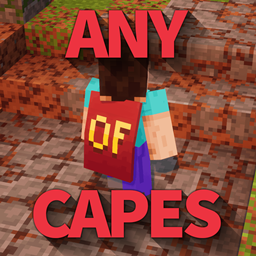
Got tired of not being able to use AnyCapes on 1.18 even though someone had provided a working and updated version for 1.18.1 (full credit to them (https://github.com/PepperCode1/AnyCapes/pull/8)) So just provided this on CurseForge for people to use until the official mod updates to 1.18+

Original Description
Original Mod Here
Overview
AnyCapes is a highly configurable cape mod that retrieves capes from any cape API. “Any Cape API” really is that – this mod even works with user created cape APIs. View the configuration information for more details.
If possible, please report bugs on the issue tracker or Discord server. Other feedback or requests are also welcome.
Information
I do not plan on making a Forge version for this mod.
AnyCapes:
- depends on the Fabric API.
- is client-side only.
Configuration
To access the mod’s config, install Mod Menu and Cloth Config API.
The main part of the configuration is the list of URLs. Whenever a player skin is requested by Minecraft, AnyCapes iterates through the list of URLs, top to bottom, and tries to download a cape image to be used for the player. Once a URL is valid and returns any 200 HTTP response code, the image will be downloaded and further URLs will be ignored. If all URLs are invalid or there are no URLs, the player will have no cape.
The caching option makes it so that when a cape image is downloaded, it is saved to a file. This means that if a player’s cape has already been downloaded and saved, the saved image will be used instead of trying to download images from the URL list. This is more efficient, but if the URL list or cape image for a certain URL changes, the saved image will not update.
These APIs are in the default configuration, meaning you will see capes from these without ever configuring the mod. These are also not API URLs, so entering these exact strings into the configuration will not work. If the configuration is changed and you want to set it back to the default, press the reset button.
1. Mojang
2. Optifine
3. MinecraftCapes
4. LabyMod
URL List Placeholders
Placeholders in URLs will be replaced with appropriate player information when the URL is used for downloading a cape.
{mojang} -> The Mojang cape URL, if it exists. If it doesn’t exist, the whole URL is skipped.
{username} -> The player’s username.
{uuid} -> The player’s UUID, without dashes.
{uuid-dash} -> The player’s UUID, with dashes.
常见问题
AnyCapes: Refabricated 支持哪些 Minecraft 版本?
AnyCapes: Refabricated 支持 Minecraft Java 版 1.18–1.19.1,共 5 个版本,可用的加载器:Fabric。下载时注意选择和你游戏版本一致的文件。
AnyCapes: Refabricated 怎么安装?
先用 PCL2 或 HMCL 启动器安装对应版本的 Fabric,再把下载的 .jar 文件放进游戏目录的 mods 文件夹,重新启动游戏即可。开启了版本隔离的,mods 文件夹在 versions/版本名 下面。
SirOMGitsYOU 的其他作品
查看全部 →
Yet Another Recipe Conflict Fixer (YARCF)
这个模组添加了一个简单的按钮,方便你切换同一配方的其他制作方式。

Starlight x Create (1.16.5)
Starlight 1.16.5 兼容机械动力!
Zoomer Zoom [Forge]
终极 Forge 缩放模组!
ABOE 3 – A Bit of Everything 3
终极整合包,真的能满足所有玩家的喜好。
评论
登录后评论和评分