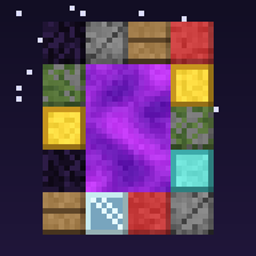
Any block portal
Choose which blocks can build nether portal frames. Mix several, or remove obsidian entirely, from the in-game config screen. Defaults to vanilla obsidian; changes apply instantly.
介绍
Any Portal Block
Choose which blocks can build a nether portal frame.
By default, nothing changes: only obsidian works, just like vanilla. Open the config and add any blocks you like, such as cobblestone, planks, wool, glass or gold. Mix several in one frame, or remove obsidian entirely.
How to use
- Open Mods → Any Block Portal → Config
- Edit Portal Frame Blocks: click + and type a block ID, e.g.
minecraft:cobblestone - Build the usual portal rectangle out of any of your listed blocks
- Light it with flint and steel or a fire charge
Changes apply instantly, with no restart needed.
Features
- Pick any number of frame blocks, and mix them freely in one frame
- Remove obsidian if you want portals to need something else
- An empty list disables nether portals completely
- Same portal sizes as vanilla (2–21 wide, 3–21 tall inside)
- Everything else stays vanilla: Nether travel, linked portals, particles, sounds, zombified piglins
- A misspelled block ID is skipped with a log warning instead of crashing
Config file
The setting is also stored in config/anyportal-common.toml:
portalFrameBlocks = ["minecraft:obsidian", "minecraft:cobblestone"]Notes
- If you remove a block from the list, existing portals built with it break the next time a neighboring block changes, just like vanilla when a frame becomes invalid.
- Air, fluids, fire and portal blocks can never be used as frame blocks.
- Install on both client and server. The config screen is client-side, and the portal logic runs on the server.
Requires: NeoForge for Minecraft 1.21.1
常见问题
Any block portal 支持哪些 Minecraft 版本?
Any block portal 支持 Minecraft Java 版 1.21–26.3,共 15 个版本,可用的加载器:NeoForge。下载时注意选择和你游戏版本一致的文件。
Any block portal 怎么安装?
先用 PCL2 或 HMCL 启动器安装对应版本的 NeoForge,再把下载的 .jar 文件放进游戏目录的 mods 文件夹,重新启动游戏即可。开启了版本隔离的,mods 文件夹在 versions/版本名 下面。
评论
登录后评论和评分