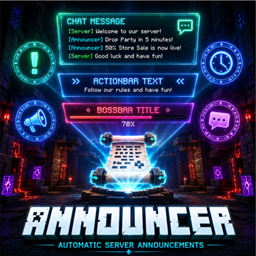
Announcer – Automatic Server Announcements
Automated chat, actionbar and bossbar announcements for Minecraft servers. JSON configurable, color support, ordered or random rotation, and fully server-side with no client installation required.
介绍
Announcer
Automatic Chat, ActionBar and BossBar Announcements for Minecraft Servers
Announcer is a lightweight, server-side mod designed to automatically broadcast scheduled messages to players in a clean and highly configurable way.
It allows server administrators to keep players informed at all times with rotating announcements displayed in chat, action bar, or boss bars — all fully controlled via a simple JSON configuration file.
Perfect for server rules, Discord promotion, events, rewards, tips, and system notifications.
✨ Features
💬 Chat Announcements
Send full messages or multi-line announcements directly in chat.
Use cases:
- Server rules
- Discord links
- Event announcements
- Gameplay tips
- Welcome messages
Supports Minecraft color codes using & formatting.
⚡ ActionBar Announcements
Display lightweight notifications above the hotbar without interrupting gameplay.
Perfect for:
- Reminders
- Event timers
- Short alerts
- Reward notifications
👑 BossBar Announcements
Highly visible top-screen announcements using Minecraft boss bars.
Features:
- Custom title
- Custom color
- Configurable duration
- Temporary display system
Ideal for:
- Server events
- Maintenance alerts
- PvP warnings
- Important system messages
🎨 Color Support
Full support for Minecraft formatting codes using &.
Example:
&a - Green | &b - Blue | &c - Red | &e - Yellow
常见问题
Announcer – Automatic Server Announcements 支持哪些 Minecraft 版本?
Announcer – Automatic Server Announcements 支持 Minecraft Java 版 1.20.1–1.21.1,共 2 个版本,可用的加载器:Fabric / Forge / NeoForge。下载时注意选择和你游戏版本一致的文件。
Announcer – Automatic Server Announcements 怎么安装?
先用 PCL2 或 HMCL 启动器安装对应版本的 Fabric / Forge / NeoForge,再把下载的 .jar 文件放进游戏目录的 mods 文件夹,重新启动游戏即可。开启了版本隔离的,mods 文件夹在 versions/版本名 下面。
Zonoikk 的其他作品
查看全部 →
Teleport Requests (TPA System)
适用于 Minecraft 服务器的简易 /tpa 和 /tpaccept 系统,可快速发起和配置玩家间的传送请求。

SimpleAuth: Server Login System
为 Minecraft 服务器提供轻量级身份验证和登录系统,支持安全的玩家验证和可配置的访问控制。

LimitedLives – Hardcore Lives & Respawn System
为 Minecraft 添加有限生命系统。玩家初始生命数可配置,死亡后会减少。生命耗尽后,服务器中会被封禁,单人游戏中则会删除世界。支持 HUD 显示、管理员命令、局域网和 Essential,并提供 4 种语言。

The Party System – RPG Parties
一个 1.20.1 模组,让玩家可以创建和管理队伍。功能包括邀请系统、实时生命值 HUD、PvP 开关、持久化数据和完整的网络支持。
评论
登录后评论和评分