
Allied: Teams
A mod re-imagining teams, an all in one mod with essential team features for fabric
截图


介绍
[!NOTE]
Forks and contributions to this mod are welcome.




Allied
A server-side team mod for Fabric. Create teams with tags, invite players, chat privately, share waypoints and storage, and control friendly fire, all from /allied.

Requirements
- Minecraft 26.2, Fabric Loader 0.19.5+
- Fabric API (required)
- Placeholder API (optional, see Placeholders)
- Server-side only. Players join with a normal vanilla client. The mod runs on dedicated servers, not in singleplayer or LAN worlds
Features
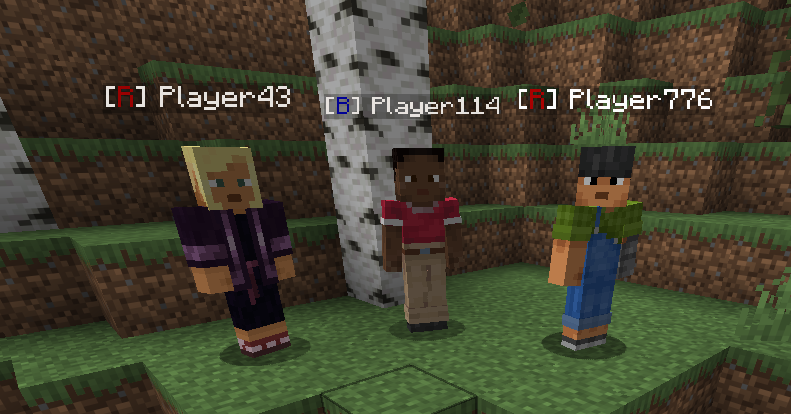
- Teams with tags: a coloured
[TAG]shows in chat, in the tab list and above players’ heads - Invites and join requests with clickable
[ACCEPT]/[DENY]buttons. Works for offline players, who see pending invites when they log in - Roles: one owner and any number of officers. Officers can invite, accept and deny requests, kick members and remove marks
- Ownership transfer, so a team isn’t stuck when its owner stops playing
- Team chat toggled with
/allied tm - Friendly fire toggle per team
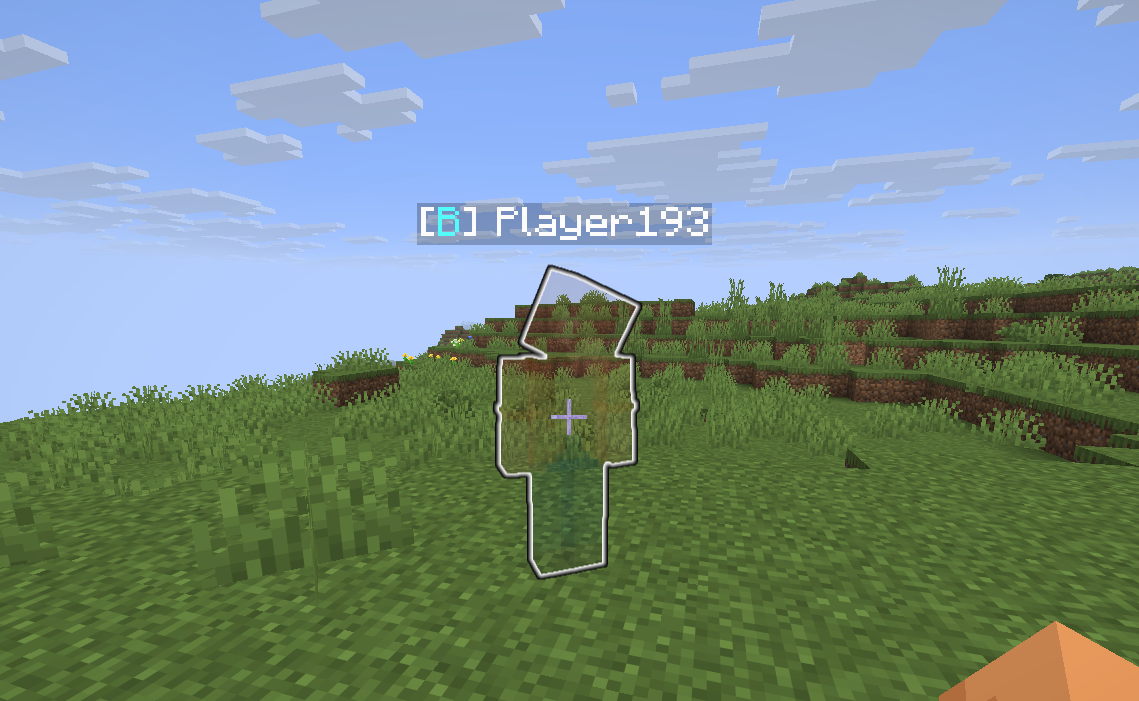
- Highlight: invisible teammates show as translucent with a glowing outline, visible only to your own team
- Death coordinates: when a teammate dies, your team sees where (click to copy)
- Marks: shared named coordinates for your team. Pure information, no teleporting
- Shared team storage: an 18-slot chest the whole team can use, one player at a time, safe against item duplication and fully logged
- Placeholder API support for chat, tab and scoreboard mods
Commands
Teams
/allied create <teamName> <teamTag>Create a new team and become its owner/allied infoShow your team’s name, tag, owner, officers and members (online players in green)/allied leaveLeave your current team/allied disbandDisband the team. Not allowed while the team storage has items in it (Owner)/allied set <name|tag|color> <value>Change the team’s name, tag or tag colour (Owner)/allied settingsShow the team settings with buttons to change them (Owner)/allied tmToggle team chat
Members
/allied invite <playerName>Invite a player, even if they’re offline (Owner/Officer)/allied invAccept <teamName>Accept an invite/allied invDeny <teamName>Deny an invite/allied join <teamName>Ask to join a team/allied accept <playerName>Accept a join request (Owner/Officer)/allied deny <playerName>Deny a join request (Owner/Officer)/allied kick <playerName>Kick a player, even if they’re offline. Officers can only kick members (Owner/Officer)
Roles
/allied promote <playerName>Make a member an officer (Owner)/allied demote <playerName>Remove a player’s officer rank (Owner)/allied transfer <playerName>Give the team to another member after a confirmation click. You become an officer (Owner)
Marks
/allied mark <name>Save your current position as a mark for your team/allied mark <name> <x> <y> <z>Save specific coordinates/allied marksList your team’s marks with coordinates, dimension and distance/allied unmark <name>Remove a mark (the player who set it, officers and the owner)
Each team can have up to 30 marks.
Storage
/allied storageOpen the shared team storage. It has to be enabled by an admin first
Team Settings
The owner changes these with /allied settings:
| Setting | Default | What it does |
|—|—|—|
| friendlyFire | off | Teammates can damage each other |
| highlight | off | Invisible teammates show with an outline, only to your team |
| allowRequests | on | Players can ask to join with /allied join |
| chatUseTag | on | Show the team tag in chat (off shows the full team name) |
| tabUseTag | on | Show the team tag in the tab list (off shows the full team name) |
| deathCoords | on | Send teammates’ death coordinates to the team |
Team Storage
An 18-slot shared chest for the team, opened with /allied storage. It uses a normal vanilla chest screen.
- One player at a time. If someone else has it open, you’re told who and can try again when they close it
- Can’t duplicate items. Contents are saved on every change, before every autosave and on close, together with the player’s inventory. Even if the server crashes, items can’t be duplicated
- Logged. Every open and close is written to
config/allied/storage/audit.logwith the time, player, and what was added and taken - Disabled by default. Admins enable it per team or for everyone (see below)
- A team can’t be disbanded while its storage has items in it
Admin Commands
Requires operator permission.
Teams
/alliedAdmin listList all teams on the server/alliedAdmin info <teamName>Show the info of any team/alliedAdmin modifySettings <teamName> [<setting> <boolean>]View or change any team’s settings/alliedAdmin blockSettings <teamName> <boolean>Stop a team’s owner from changing their settings/alliedAdmin transfer <teamName> <playerName>Give a team to one of its members, for teams whose owner stopped playing
Storage
/alliedAdmin storage <teamName> <boolean>Enable or disable team storage for one team/alliedAdmin storageAll <boolean>Enable or disable team storage for every team, and set whether new teams start with it
Server settings
/alliedAdmin memberCap <value>Maximum members per team, not counting the owner (default 5)/alliedAdmin maxTeamNameLength <value>Maximum team name length (default 16)/alliedAdmin maxTeamTagLength <value>Maximum team tag length (default 4)/alliedAdmin exportJson <boolean>Keepconfig/allied/teams.jsonupdated with every team, useful for showing teams on a website/alliedAdmin reset [<code>]Wipe all Allied data. Gives you a code that’s valid for 60 seconds to confirm
All admin commands except reset also work from the server console.
Placeholders
If Placeholder API is installed, Allied adds these placeholders (empty for players without a team):
%allied:team_name%The team’s name%allied:team_tag%The team’s tag%allied:team_color%The team’s colour%allied:team_prefix%The coloured[TAG]prefix used in the tab list%allied:team_members%Number of players in the team, owner included
Data Files
Everything is stored in config/allied/:
teams.datAll team data (NBT, saved safely so a crash can’t corrupt it). Older versions’ files are upgraded automaticallyteams.jsonReadable export of all teams, only whenexportJsonis onstorage/<team-id>.datEach team’s storage contentsstorage/audit.logStorage open/close log
This description is currently up to date with v2.0.0 of the mod
If you like the mod, please consider donating to support my development
Any issues, bugs or suggestions are to be put on the GitHub issue page
The mod’s inspiration came from there not being any up-to-date team mods for Fabric
Thank you for using my mod <3
常见问题
Allied: Teams 支持哪些 Minecraft 版本?
Allied: Teams 支持 Minecraft Java 版 1.21.11–26.2,共 3 个版本,可用的加载器:Fabric。下载时注意选择和你游戏版本一致的文件。
Allied: Teams 怎么安装?
先用 PCL2 或 HMCL 启动器安装对应版本的 Fabric,再把下载的 .jar 文件放进游戏目录的 mods 文件夹,重新启动游戏即可。开启了版本隔离的,mods 文件夹在 versions/版本名 下面。运行环境:仅服务端。

评论
登录后评论和评分