
All-Items
All-Items Mod find all Items in Minecraft also the difficult items(except all Items that need Admin Permissions)
截图

介绍
All-Items
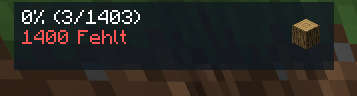
Track every item you find in survival Minecraft!
All-Items is a client-side Fabric mod that tracks which items you’ve discovered in survival mode. It displays a customizable HUD showing your progress, plays sounds on new discoveries, and provides a full GUI to browse your collection.
Features
HUD
- Progress display — percentage, found/total count, missing items
- Compact mode — all info on a single line
- Last item icon — shows the most recently found item with configurable scale
- Progress bar — solid or multi-stop gradient (horizontal, vertical, diagonal, radial, angled)
- Dimension & biome display — show current dimension and biome on the HUD
- Completion ETA — estimates time to 100% based on your current rate
- Fraction mode — show
found/totalinstead of percentage - HUD scaling & opacity — scale the entire HUD and adjust transparency
- Auto-hide — HUD hides automatically after a configurable idle time
- Fade animation — smooth fade-in effect when a new item is found
- Pulse effect — brief flash on new discoveries
- Separator line — optional line between HUD sections
- Move mode — reposition the HUD with arrow keys (Shift for fine-tuning)
Visual Customization
- Title text — alignment (left/center/right), scale, color, shadow toggle
- Missing text — custom color
- Background — toggle, color, corner radius, padding, blur effect
- Border — toggle, thickness, color, edge snapping in move mode
- Bar — height, gradient mode & colors (multi-stop editor with preview)
- Item — background behind item icon, glint effect on new finds
Notifications
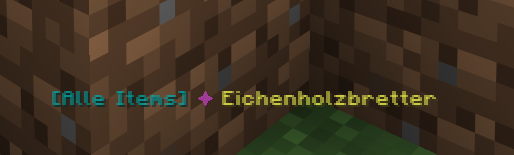
- Chat message — fully customizable template with rich text (§-codes), variables:
%item%,%count%,%total%,%percent%,%prefix% - ActionBar message — same template system
- Title overlay — big screen title on new finds
- Toast notification — Minecraft system toast
- Chat cooldown — prevents message spam
Sound
- 14 note block instruments — harp, bass, bell, chime, bit, banjo, pling, xylophone, iron xylophone, didgeridoo, guitar, snare, hat, cowbell
- Volume & pitch — fully adjustable
- Cooldown — prevents sound spam
- Master toggle — quick disable from settings
- Milestone sound — separate instrument/volume/pitch for milestone events
Tracking
- Automatic detection — scans your inventory for unobtained items
- Per-world saves — separate progress per singleplayer world or server
- Global tracking mode — progress shared across all worlds
- Session counter — tracks items found in the current play session
- Discovery time — records when each item was first found
- Item count — tracks how many times each item has been collected
- Recent finds — last 50 discoveries stored
- Milestones — special notifications at 10%, 25%, 50%, 75%, 90%, and 100%
- Pause tracking — temporarily pause discovery detection
- Blacklist/Whitelist — filter specific items by ID
- Auto-save — configurable interval (in ticks)
- Auto-backup — automatic save file backups
Survival-Only Filter
Items that cannot be obtained in vanilla survival are excluded:
- Creative-only blocks (barrier, bedrock, command blocks, etc.)
- Spawn eggs
- Technical blocks (spawners, portals, structure blocks, etc.)
- Test blocks, infested blocks
- Chorus plant, dirt path, farmland, frogspawn, suspicious blocks, calibrated sculk sensor, budding amethyst, player head
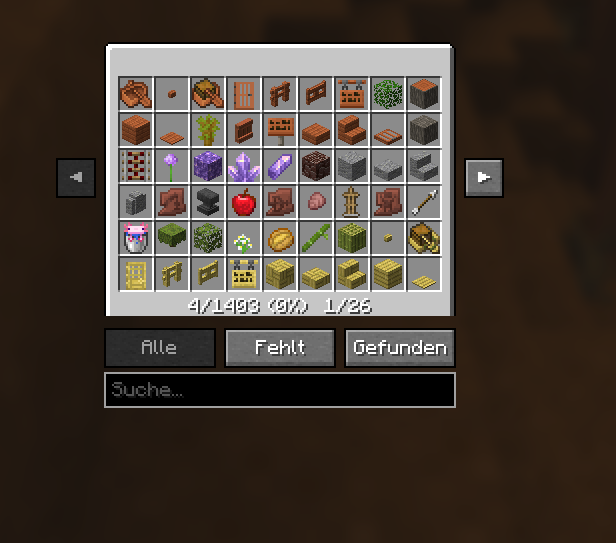
GUI (Chest Inventory)
- Grid view — browse all tracked items in a chest-style interface
- Color-coded slots — green for found, red for missing
- Filters — All / Missing / Found
- Search — filter by item name or ID
- Sort modes — A-Z, Found First, Recent, Count
- Tooltip on hover — shows item ID, status, count, discovery time
- Session counter — displayed in the progress bar area
Commands (/ai)
| Command | Description |
|———|————-|
| /ai | Show quick progress summary |
| /ai overlay | Toggle HUD on/off |
| /ai gui | Open item inventory |
| /ai settings | Open settings screen |
| /ai customize | Open HUD customization |
| /ai move | Enter HUD move mode |
| /ai stats | Show detailed statistics |
| /ai missing | List all missing items |
| /ai recent | Show recent finds |
| /ai export | Copy JSON export to clipboard |
| /ai pause | Pause/resume tracking |
| /ai compact | Toggle compact mode |
| /ai sound | Toggle sound on/off |
| /ai chat | Toggle chat messages |
| /ai actionbar | Toggle actionbar messages |
Keybinds
| Key | Action |
|—–|——–|
| R | Toggle HUD overlay |
| N | Toggle sound |
| G | Open items GUI |
| M | Open settings |
| P | Enter move mode |
| (unbound) | Pause tracking |
| (unbound) | Toggle compact mode |
Requirements
- Minecraft: 26.1.2
- Fabric Loader: 0.16+
- Fabric API: Required
Installation
- Install Fabric Loader
- Put Fabric API and All-Items in your
modsfolder - Launch the game — the mod activates automatically
All-Items 3.0 — Created by Monphd
常见问题
All-Items 支持哪些 Minecraft 版本?
All-Items 支持 Minecraft Java 版 26.1.2,可用的加载器:Fabric。下载时注意选择和你游戏版本一致的文件。
All-Items 怎么安装?
先用 PCL2 或 HMCL 启动器安装对应版本的 Fabric,再把下载的 .jar 文件放进游戏目录的 mods 文件夹,重新启动游戏即可。开启了版本隔离的,mods 文件夹在 versions/版本名 下面。运行环境:仅客户端。

评论
登录后评论和评分