
Albumize
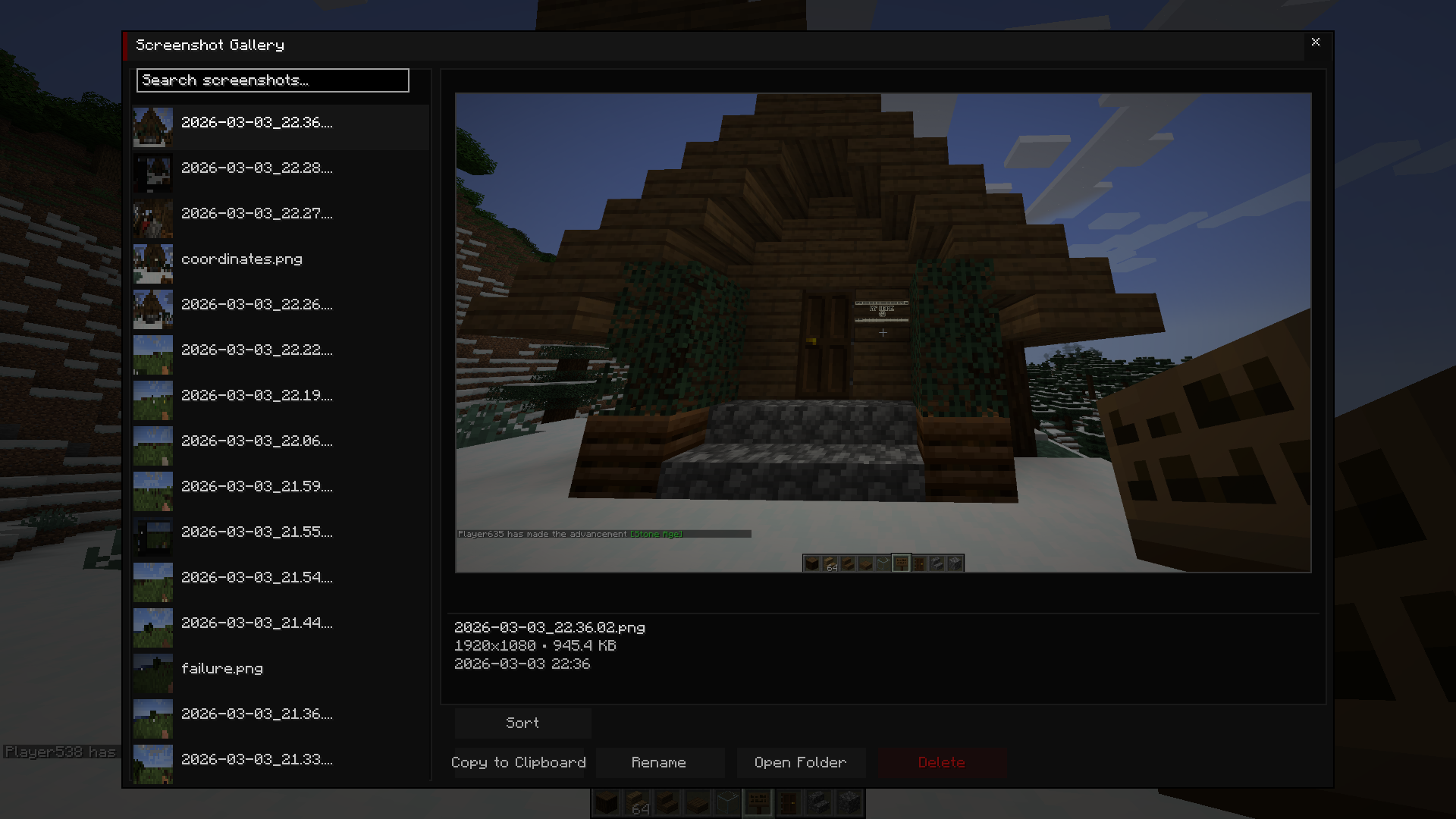
your screenshots, finally in their right place, easily accessible from the in-game gallery/library
截图
介绍
Albumize
A sleek, high-performance screenshot management suite for the modern explorer.



✨ Overview
Albumize completely transforms your Minecraft screenshot experience. No more digging through messy file directories. Albumize provides a high-performance, fully customizable in-game suite to view, tag, organize, and share your memories instantly.
📸 Powerful Gallery Features
- In-Game Viewer: Browse your entire collection without ever leaving the game.
- Full Preview Suite: High-fidelity preview area with a dedicated Fullscreen mode.
- Smart Meta Display: View file size, dimensions, and capture dates at a glance.
- Discord Ready: Copy the actual image data directly to your system clipboard for instant sharing.
🏷️ Advanced Organization
- Dynamic Tagging: Add custom tags to your shots for deep organization.
- Favorites System: Star your best moments (★) to keep them front and center.
- Auto-Sort: Automatically organizes new captures into Singleplayer and Multiplayer folders.
- Robust Search: Real-time search by filename with comprehensive filters for tags and favorites.
- History Tracking: Quick access to your last 50 viewed screenshots.
🎨 Fully Customizable UI
- Custom Accent Colors: Match the UI to your style with RGB sliders and preset color themes.
- Modern Dark Theme: A sleek, responsive interface designed for clarity and speed.
- Context Menus: Right-click any screenshot for a quick-action menu (Copy, Rename, Delete, Open).
- Toast Notifications: Real-time feedback for all actions like copying or file management.
🛠️ Controls & Navigation
Open your gallery by pressing the [G] key (configurable in controls).
| Feature | Action / Key |
| :— | :— |
| Navigate | Arrow Keys to browse / Scroll Wheel |
| Open Image | Enter or Double-Click to open in system viewer |
| Manage Tags | Open the dedicated Tags Dialog to bulk manage labels |
| Fast Copy | Click Copy Image or use the Context Menu |
| System Access | Click Open Folder to jump to the file location on your PC |
🧩 Compatibility & Technicals
- ✅ Cross-Platform: Full clipboard and file support for Windows, macOS, and Linux.
- ✅ Sodium & Iris: Optimized for high-performance rendering and shader screenshots.
- ✅ Mod Menu: Fully persistent configuration saved to
albumize.json. - ✅ Real-Time Detection: Automatically detects and organizes new screenshots as you take them.
🗨️ Community & Support
Need help? Found a bug? Join our community or report issues on our tracker!
常见问题
Albumize 支持哪些 Minecraft 版本?
Albumize 支持 Minecraft Java 版 1.21.1,可用的加载器:Fabric。下载时注意选择和你游戏版本一致的文件。
Albumize 怎么安装?
先用 PCL2 或 HMCL 启动器安装对应版本的 Fabric,再把下载的 .jar 文件放进游戏目录的 mods 文件夹,重新启动游戏即可。开启了版本隔离的,mods 文件夹在 versions/版本名 下面。运行环境:仅客户端。
评论
登录后评论和评分