
Airship Charts
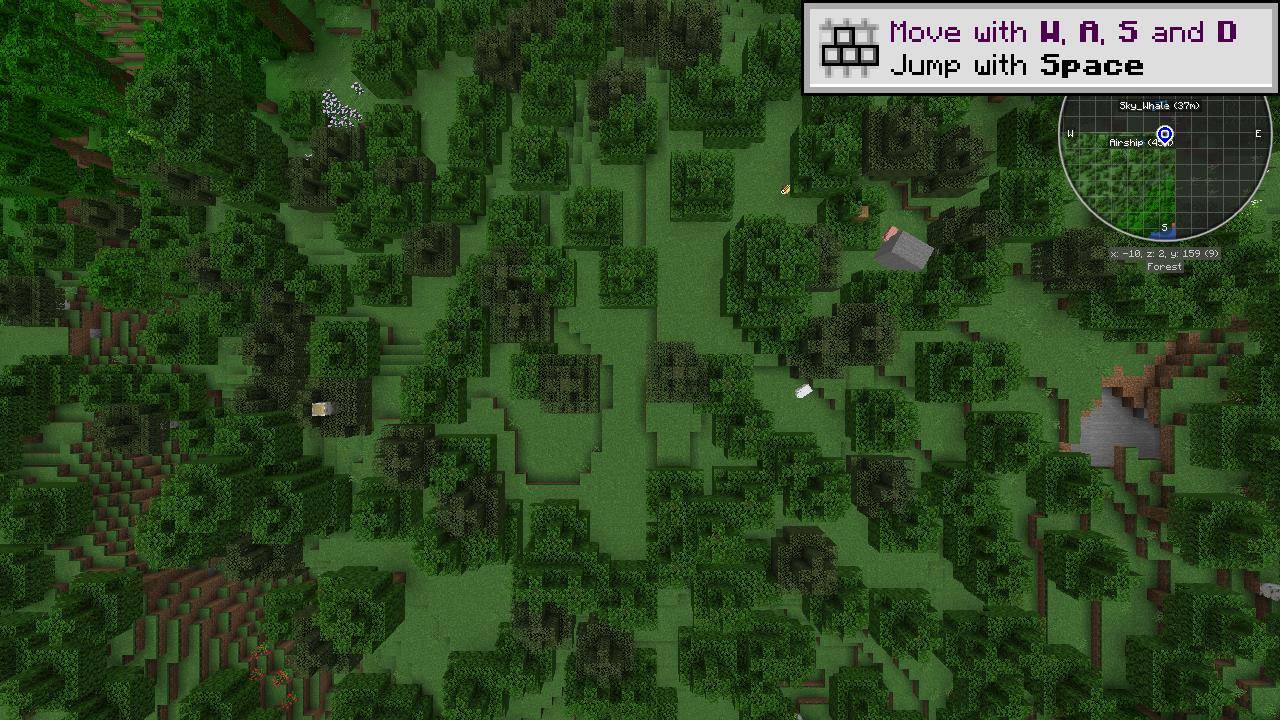
Shows Sable and Create: Aeronautics craft live on JourneyMap's minimap and fullscreen map.
截图
介绍
Airship Charts
See your airships on JourneyMap.
Airship Charts displays loaded Sable craft, including Create: Aeronautics airships, planes, cars and boats, on JourneyMap’s minimap and fullscreen map. This is a client-side map integration; it does not add vehicles.
Features
- Rotated top-down footprint based on each craft’s bounding boxes.
- A direction arrow while travelling, following actual movement.
- Name and distance labels; unnamed craft are labelled “Airship”.
- A last-seen marker for named craft that leave view, retained until logout.
- Connected sub-level parts grouped into a single craft.
- In-game settings for minimap/fullscreen visibility, color, opacity, arrow size, minimum craft size and update interval.
- A configurable toggle key, plus English and Korean translations.
Requirements
- Minecraft 1.21.1 and NeoForge.
- Sable 2.0.5 recommended (declared minimum 2.0.0).
- JourneyMap 6.x for NeoForge 1.21.1 with API v2.
Create: Aeronautics is optional. Install this mod on the client; no server installation is needed. Tested with NeoForge 21.1.248, Sable 2.0.5 and JourneyMap 6.0.7, with Create 6.0.10 and Aeronautics 1.3.2 present.
Getting started
- Install the required mods and put the Airship Charts JAR in your client’s mods folder.
- Join a world with Sable craft. Their overlays appear on JourneyMap.
- Open Mods → Airship Charts → Config to adjust the display.
- Bind “Show / hide airships on map” in Controls for a quick toggle.
Use an Aeronautics Nameplate to name a craft in survival, or use /sable name set @n Sky_Whale with command permission.
Notes
Footprints are convex outlines, not exact per-block silhouettes. A fallback grouping rule may combine smaller unnamed craft parked inside another craft’s bounds. Last-seen markers are session-only. Xaero’s map is not supported. MIT licensed; modpack inclusion is welcome.
한국어
Sable 기체를 JourneyMap에서 실시간으로 확인하세요.
Create: Aeronautics의 비행선·비행기·자동차·보트 등 Sable 기체를 미니맵과 전체 지도에 표시합니다. 회전한 선체 윤곽, 실제 이동 방향 화살표, 이름·거리, 마지막 목격 위치를 지원합니다. 기체 자체를 추가하는 모드는 아닙니다.
필수: Minecraft 1.21.1 · NeoForge · Sable · JourneyMap 6.x. 클라이언트에만 설치하면 됩니다. 모드 목록 → Airship Charts → 설정에서 표시 옵션을 바꾸고, 조작 설정에서 켜기/끄기 키를 지정하세요. 이름판 또는 /sable name set @n Sky_Whale로 이름을 붙일 수 있습니다.
常见问题
Airship Charts 支持哪些 Minecraft 版本?
Airship Charts 支持 Minecraft Java 版 1.21.1,可用的加载器:NeoForge。下载时注意选择和你游戏版本一致的文件。
Airship Charts 怎么安装?
先用 PCL2 或 HMCL 启动器安装对应版本的 NeoForge,再把下载的 .jar 文件放进游戏目录的 mods 文件夹,重新启动游戏即可。开启了版本隔离的,mods 文件夹在 versions/版本名 下面。
지나가는늅 的其他作品
查看全部 →
Sunlit AutoFish
自动完成星露谷钓鱼的抛竿、收线和迷你游戏,支持鱼、宝藏和组合优先级模式。

Key Command Client
Assign commands or chat messages to keyboard keys and run them once per press.
HoloGUI – Floating Menus
Keep in-game menus floating while you move, and look around by moving the cursor outside the interface.

Lead & Lasso
Spin the vanilla lead into a 3D lasso. Charge and throw up to 25 blocks, catch mobs, and rope from horseback.
评论
登录后评论和评分