
Air Strike Warfare
Air Strike Warfare adds a laser designator for calling in air strikes. Aim through a tactical HUD with zoom to mark a target, choose a missile strike or an A-10 gun run, then the strike hits it with explosions, shockwaves, and camera shake.
介绍


Air Strike Warfare
Air Strike Warfare brings laser-guided air support to Minecraft. Equip the Laser Designator, mark a target through a tactical targeting overlay, and call in a strike on the spot you painted — complete with a visible laser beam, inbound ordnance, and cinematic impact effects.
Features
- Laser Designator — a dedicated targeting tool. Hold use to raise the optic and paint a target in the world.
- Tactical HUD — a scope-style overlay with live telemetry: target coordinates, range, lock status, selected mode, and an animated reticle.
- Adjustable zoom — scroll to change magnification (1x–16x) with a matching field-of-view zoom while aiming.
- Two strike modes — switch between a Missile Strike and an A-10 Gun Run on the fly with the number keys.
- Visible laser beam — a real beam is drawn from the designator to the target, turning green on a valid lock and red when there is no target.
- Cinematic impacts — custom explosion bursts with an expanding ground shockwave, plus camera shake to sell the hit.
- Custom entities & audio — strike aircraft, the A-10, and missiles, backed by positional engine and impact sound.
- Localization — English and Arabic language support.
How to Use
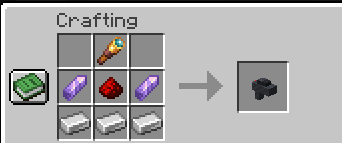
- Obtain the Laser Designator from the creative tab (or your usual means).
- Hold use to bring up the targeting HUD and aim at a location.
- Press 1 or 2 to choose Missile Strike or A-10 Gun Run.
- Scroll to adjust zoom, line up your lock, and the strike is delivered to the marked spot.
常见问题
Air Strike Warfare 支持哪些 Minecraft 版本?
Air Strike Warfare 支持 Minecraft Java 版 1.21.7–26.3,共 10 个版本,可用的加载器:Fabric / Forge / NeoForge。下载时注意选择和你游戏版本一致的文件。
Air Strike Warfare 怎么安装?
先用 PCL2 或 HMCL 启动器安装对应版本的 Fabric / Forge / NeoForge,再把下载的 .jar 文件放进游戏目录的 mods 文件夹,重新启动游戏即可。开启了版本隔离的,mods 文件夹在 versions/版本名 下面。
Haider_x 的其他作品
查看全部 →
Luna shader
Luna 光影:优化了水面反射,呈现深蓝色调,并为末地传送门加入独特的旋转黑洞效果。

Aetheria Shaders
Aetheria Shaders 是 Complementary Reimagined 的一款华丽奇幻改版光影。拥有自定义维度氛围、发光的青绿色水体、银河主题的下界传送门、流动的熔岩,以及体积化的末地龙卷风。性能表现有保障。

Quanta Shader
快速呈现精美的《Minecraft》画面。柔和的阴影、动态云朵、波光粼粼的水面和绚丽天空,同时优化性能,畅玩高帧率游戏。

Vanilla Rebuild
保留 Minecraft 的经典风格,同时增强光照效果,呈现逼真的天空、体积云、柔和阴影,以及各维度独具特色的浓郁氛围。
评论
登录后评论和评分