
截图
介绍
✦ AetherTune — Sodium Auto-Optimizer
Client-only — Works on any vanilla/Paper server. All tuning happens on the client.
AetherTune automatically tunes every Sodium and vanilla optimization to your RAM. No more guessing what to disable.
Profiles
- 4 GB — Patata · 6 chunks · 60 FPS · minimal particles
- 8 GB — Equilibrado · 10 chunks · 120 FPS
- 12 GB — Fluido · 16 chunks · 144 FPS
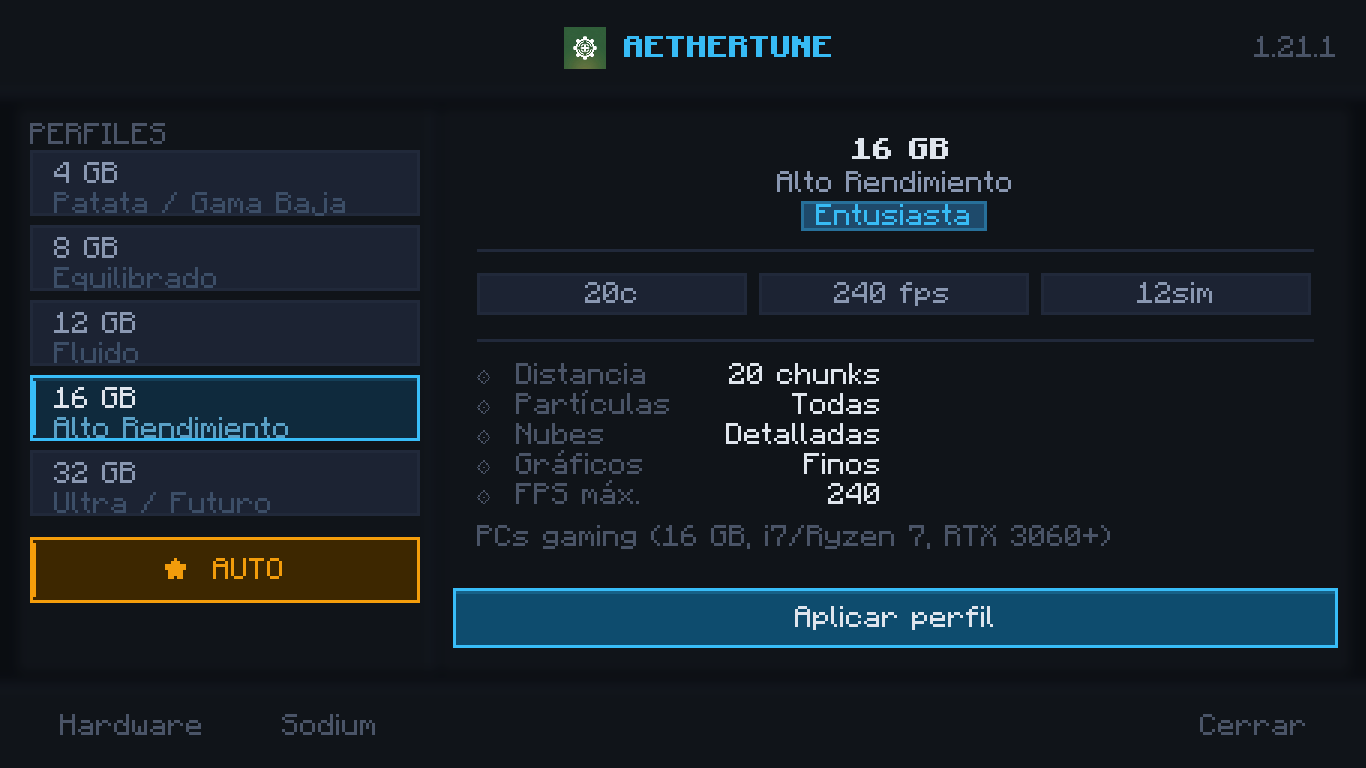
- 16 GB — Entusiasta · 20 chunks · 240 FPS
- 32 GB — Ultra · 32 chunks · 260 FPS
- ★ AUTO — Detects real RAM/CPU/GPU and picks the ideal profile
Each profile sets: render/simulation distance, max FPS, all particles, clouds, graphics mode, biome blend, smooth lighting, VSync, entity distance/shadows and every Sodium 0.8.x flag — Performance (threads, defer ALWAYS/ONE_FRAME/ZERO, quad splitting, culling, no-error GL), Quality (leaves/weather, vignette), Advanced (staging, render-ahead).
Hardware-aware
Detects total/available RAM, JVM -Xmx, CPU model/cores and GPU via HardwareInfo. Saved to config/aethertune.json and auto-restored.
Professional dark UI
Custom dark theme (aethertune:textures/gui/*) — no vanilla stone buttons. Left list 4/8/12/16/32/AUTO, right panel Recomendado para · Qué modifica · Cómo funciona in plain language, Aplicar top-right. ✦ AetherTune button injected into Sodium’s Video Settings and vanilla VideoOptionsScreen + ModMenu.
Requirements
Minecraft 1.21.1 · Fabric Loader >=0.15.0 · Fabric API 0.116.15 · Sodium 0.8.13+mc1.21.1 · Java 21
Optional: Cloth Config, ModMenu
常见问题
AetherTune 支持哪些 Minecraft 版本?
AetherTune 支持 Minecraft Java 版 1.21–26.3,共 17 个版本,可用的加载器:Fabric。下载时注意选择和你游戏版本一致的文件。
AetherTune 怎么安装?
先用 PCL2 或 HMCL 启动器安装对应版本的 Fabric,再把下载的 .jar 文件放进游戏目录的 mods 文件夹,重新启动游戏即可。开启了版本隔离的,mods 文件夹在 versions/版本名 下面。运行环境:仅客户端。
评论
登录后评论和评分