
AE2 Search Optimization
A mod for AE2UEL, improving the smoothness of AE2 terminal search and adding a handy recent search history feature
截图
介绍
AE2 Search Optimization
A Minecraft 1.12.2 client-side optimization mod for AE2UEL, improving the smoothness of AE2 terminal search and adding a handy recent search history feature.
Features
🔍 Search Performance Optimization
This mod optimizes the lag that occurs when searching in AE2 terminals with a large number of items while the Tooltip search feature is enabled, from two angles:
-
Tooltip Search Index
When AE2’s "Search Tooltips" option is enabled, the mod builds a tooltip text index for all items, allowing searches to match tooltip content quickly. Index generation is split into small per-tick time slices (at most 10ms per tick by default), avoiding the noticeable lag caused by a full tooltip scan in a single GUI refresh. Search results refresh automatically once the index is updated. -
Search Query Cache
Caches the repeated regex compilation and string splitting operations performed during a search, avoiding the expensive compilation overhead for every item and further reducing search latency. -
Benchmark
Tested in an AE terminal with 3.4k+ item types.
Before optimization: the first search after opening a terminal froze for 1-2s; with "Standard Search" kept enabled, opening the terminal itself froze for 1-2s.
After optimization: both freezes become nearly imperceptible. The trade-off is that, since tooltips need to be cached, the first search after opening a terminal gradually reveals tooltip search results within 1-2s (name search and subsequent searches are unaffected).
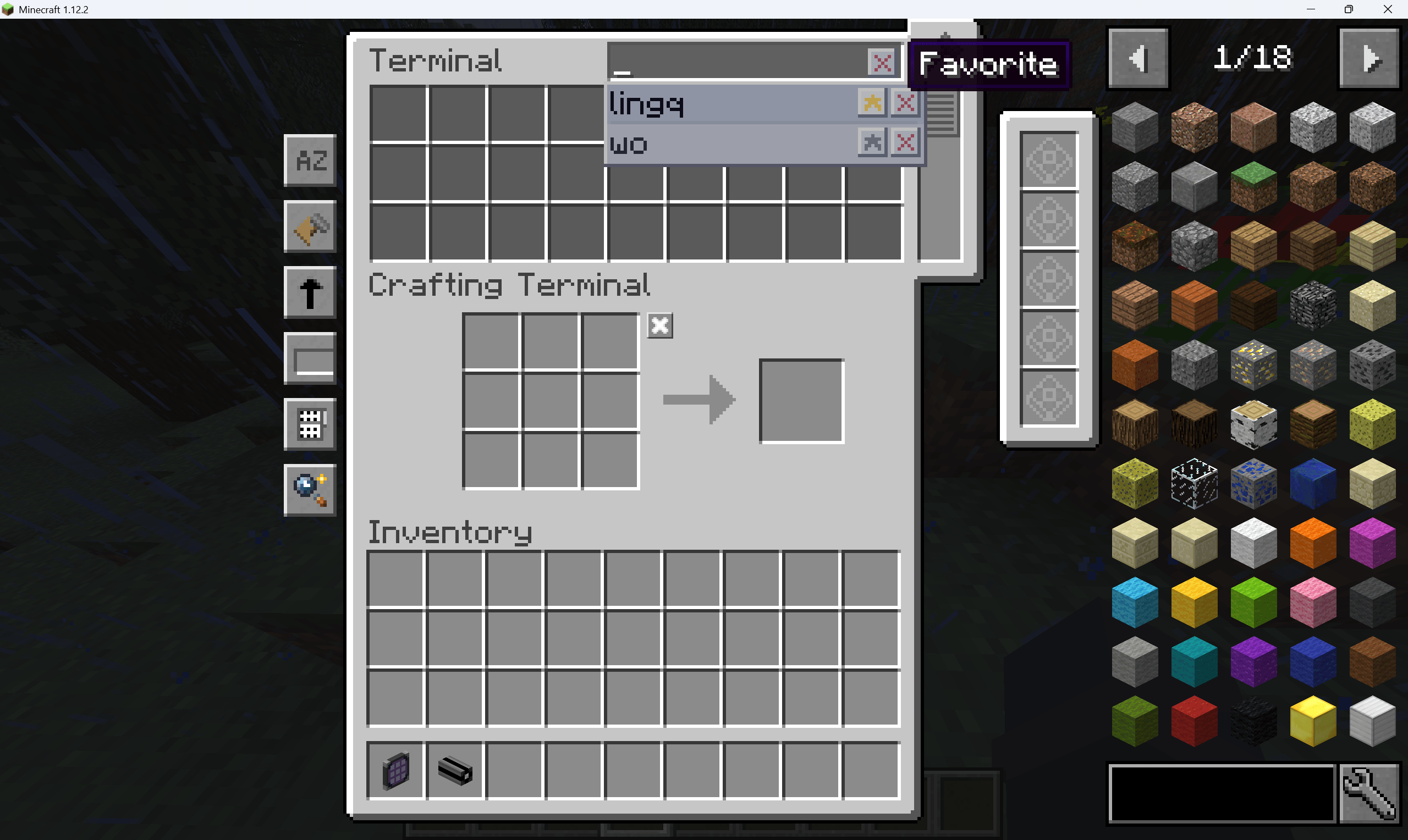
🕘 Recent Search History
Displays a recent search dropdown below the search box in AE2 terminals, making it easy to quickly reuse previous search terms. This feature is ported from AE2 Recent Search (MIT License, Copyright (c) 2026 zh5112).
- Favorites: Pin frequently used search terms to the top for priority display.
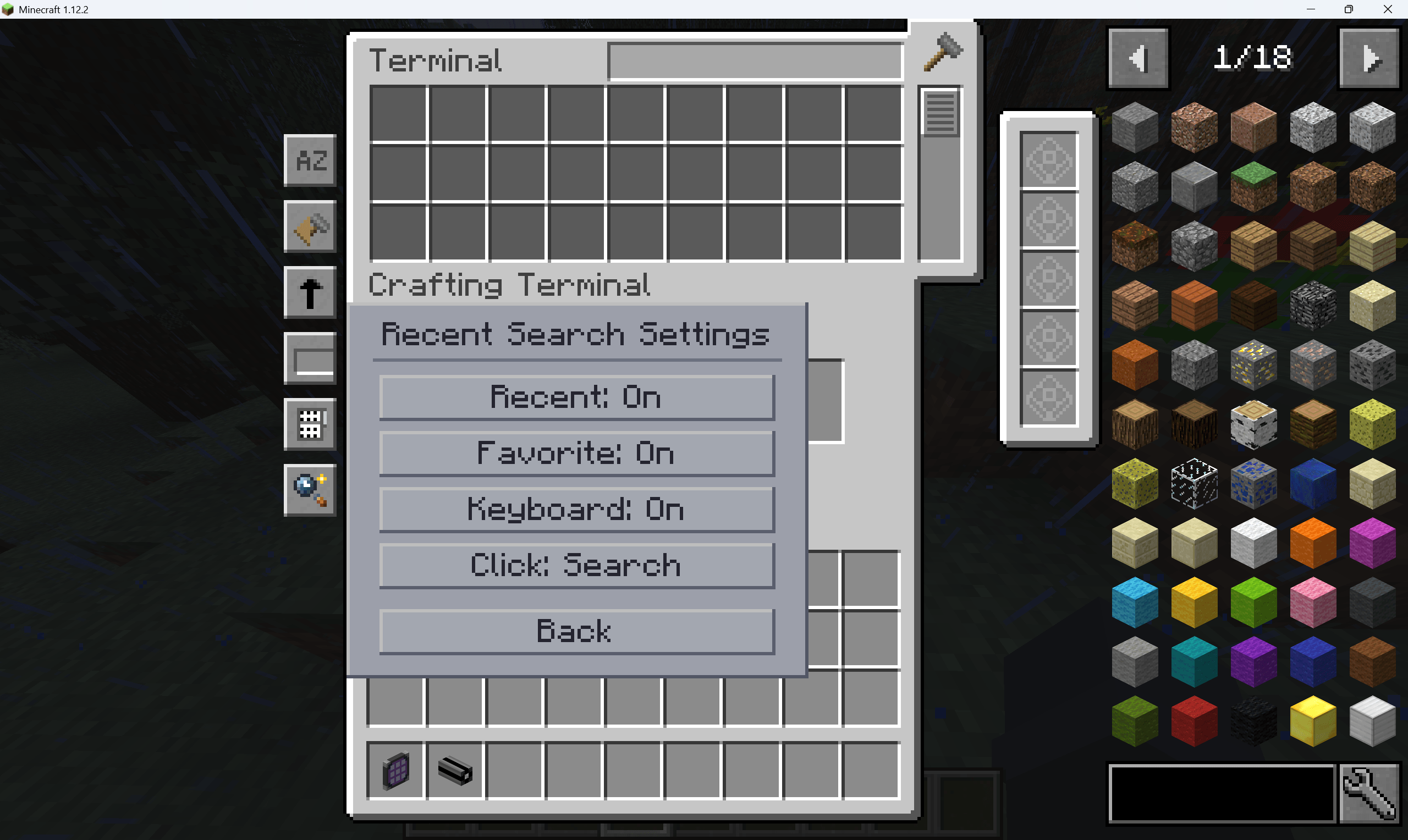
- Keyboard Navigation: Use the up/down arrow keys to quickly select between history entries.
- Apply on Click: Click a history entry to apply that search term directly.
- Delete Single / Clear All: Remove individual entries, or clear the entire history at once.
- Built-in Settings Panel: Open the settings page directly inside the AE2 container.
- Per-Player Storage: History is saved separately for each player, without interference.
- External Search Sync: Supports syncing with JEI.
Configuration
The config file is located at config/ae2searchoptimization.cfg and can be edited in-game or manually.
| Category | Option | Default | Description |
|---|---|---|---|
performance |
searchOptimizationEnabled |
true |
Whether search performance optimization is enabled |
performance |
tooltipIndexBudgetMillis |
10 |
Maximum milliseconds spent generating the tooltip index per tick (range 1 ~ 1000). Higher values build the index faster but may cause slight lag. |
recentSearch |
maxVisibleEntries |
10 |
Maximum number of entries shown in the recent search dropdown. |
License
- The search optimization part of this mod is original code.
- The recent search history feature is ported from AE2 Recent Search and is licensed under the MIT License (Copyright (c) 2026 zh5112).
常见问题
AE2 Search Optimization 支持哪些 Minecraft 版本?
AE2 Search Optimization 支持 Minecraft Java 版 1.12.2,可用的加载器:Forge。下载时注意选择和你游戏版本一致的文件。
AE2 Search Optimization 怎么安装?
先用 PCL2 或 HMCL 启动器安装对应版本的 Forge,再把下载的 .jar 文件放进游戏目录的 mods 文件夹,重新启动游戏即可。开启了版本隔离的,mods 文件夹在 versions/版本名 下面。
Shiver211 的其他作品
查看全部 →
Digital Miner Filter
A Forge mod for Minecraft 1.12.2 that adds a "Filter Card" item to Mekanism CEU's Digital Mining Machine, facilitating players to save and quickly apply filter configurations.

ModularMachinery Terminal
A powerful remote terminal GUI to monitor and interact with all Modular Machinery multiblock machines

Thaumcraft6 Research Helper
Helps players trace the unlock path of Thaumcraft 6 research and its addons.

Together Forever Unofficial
Unofficial version of Together Forever
评论
登录后评论和评分