
AE2 & RS2 Pattern Converter
Convert autocrafting patterns between Refined Storage and Applied Energistics 2, both ways: crafting, processing, stonecutter and smithing
介绍
AE2 & RS2 Pattern Converter
I encountered this problem myself, so I decided to create a mod to fix it.
How it works
- Put encoded patterns (from either mod) in the input grid.
- Put blank patterns of the other mod in the supply slot on the left.
- Converted patterns appear in the output grid; the emptied originals come back as blanks in the return slot on the right. Nothing is created or destroyed: one encoded pattern + one blank in, one converted pattern + one blank out.
The direction is detected per pattern, so a mixed batch just works. Click the arrow to lock a direction for deliberate runs.
Recipe
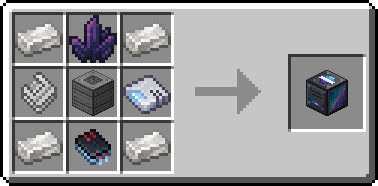
Other
Found a bug? The bug button next to the Machine Inteface opens the issue tracker:
1.21.1 – https://github.com/iA7MD-7/AE2-RS2-Pattern-Converter/issues
26.1.2 – https://github.com/iA7MD-7/AE2-RS2-Pattern-Converter-26.1/issues
常见问题
AE2 & RS2 Pattern Converter 支持哪些 Minecraft 版本?
AE2 & RS2 Pattern Converter 支持 Minecraft Java 版 1.21.1–26.1.2,共 2 个版本,可用的加载器:NeoForge。下载时注意选择和你游戏版本一致的文件。
AE2 & RS2 Pattern Converter 怎么安装?
先用 PCL2 或 HMCL 启动器安装对应版本的 NeoForge,再把下载的 .jar 文件放进游戏目录的 mods 文件夹,重新启动游戏即可。开启了版本隔离的,mods 文件夹在 versions/版本名 下面。
iA7MD 的其他作品
查看全部 →
A7MD’s 3D Potions
3D POOOTIONS 更好的Minecraft药水

S3eed Experience
官方 S3eedxx Experience 整合包

Create: Superheated
为机械动力的热力系统添加终局自动化:酿造超热熔岩、精炼余烬晶簇和烈焰琥珀,并自动将烈焰人燃烧室推至机械动力的最高热度——灼热。

Better Arabic Font (Pixelated)
更改阿拉伯语字体。
评论
登录后评论和评分