
ae2-personal-me-system
provides a wearable personal terminal that replaces your inventory key
截图

介绍
AE2 Personal ME System
An AE2 addon that provides a wearable personal terminal to replace inventory and configurable virtual autocrafting recipes through a new communication_relay block.
Reason
Replacing the vanilla player inventory with an ME system in modpacks traditionally requires extensive configuration and workarounds. This mod streamlines the entire process: equip players with a Personal Terminal in their Curios slot (pre-linked or user-bindable), and they gain direct access to the ME system.
Created for the modpack Prepare to Dye 2.
Features
Personal Wireless Terminal
- Wearable wireless terminal (Curios slot or inventory)
- Press inventory key to open ME terminal instead of vanilla inventory
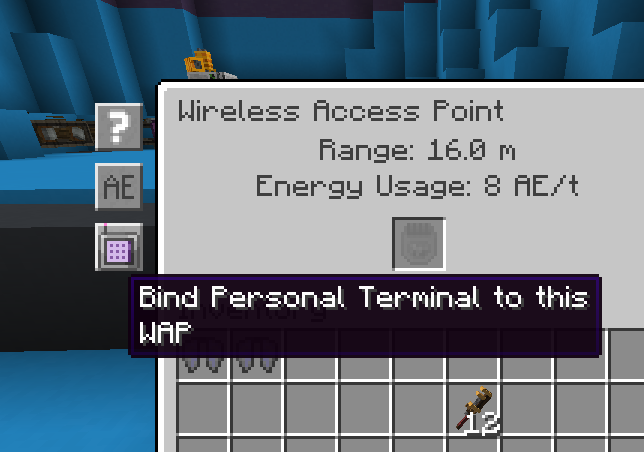
- Bind directly from Wireless Access Point GUI
- Infinite range when bound
Communication Relay
- Block that provides virtual crafting recipes to ME networks
- Recipes execute instantly without Crafting CPUs
- Configurable via NBT – perfect for modpack makers
- Supports item tags, NBT matching, and multi-input/output recipes
- Right-click to view configured recipes
Usage
Personal Terminal
- Obtain a Personal Wireless Terminal
- Equip in a Curios slot (or keep in inventory)
- Open a Wireless Access Point and click the bind button
- Press E – ME terminal opens instead of vanilla inventory
Communication Relay
Place the block and connect to an ME network. Recipes stored in the block’s NBT will appear as craftable patterns.
KubeJS Example
ServerEvents.commandRegistry(event => {
    event.register(
        event.commands.literal('giverelay')
            .requires(src => src.hasPermission(2))
            .executes(ctx => {
                ctx.source.player.give(Item.of('personalmesystem:communication_relay', {
                    BlockEntityTag: {
                        CustomName: '{"text":"Trading Post"}',
                        Description: ['{"text":"Exchange materials"}'],
                        virtual_recipes: [
                            {
                                inputs: [{ item: 'minecraft:cobblestone', count: 64 }],
                                outputs: [{ item: 'minecraft:diamond', count: 1 }]
                            },
                            {
                                inputs: [{ tag: 'forge:ingots/iron', count: 9 }],
                                outputs: [{ item: 'minecraft:iron_block', count: 1 }]
                            }
                        ]
                    }
                }))
                return 1
            })
    )
})
Recipe Format
{
  "inputs": [
    { "item": "minecraft:diamond", "count": 1 },
    { "tag": "forge:ingots/gold", "count": 4 }
  ],
  "outputs": [
    { "item": "minecraft:netherite_ingot", "count": 1 }
  ]
}
Configuration
Server Config (personalmesystem-server.toml)
powerUsage– AE power consumed per virtual craft (default: 0)
Client Config (personalmesystem-client.toml)
showRecipeTooltips– Show recipes in item tooltips (default: true)maxTooltipRecipes– Max recipes shown in tooltips (default: 3)
Dependencies
- Minecraft 1.20.1
- Forge 47.x
- Applied Energistics 2 (15.0.0+)
- Curios API (5.2.0+)
- FancyMenu (optional) – enables AE2 screen customization
License
MIT
常见问题
ae2-personal-me-system 支持哪些 Minecraft 版本?
ae2-personal-me-system 支持 Minecraft Java 版 1.20.1,可用的加载器:Forge。下载时注意选择和你游戏版本一致的文件。
ae2-personal-me-system 怎么安装?
先用 PCL2 或 HMCL 启动器安装对应版本的 Forge,再把下载的 .jar 文件放进游戏目录的 mods 文件夹,重新启动游戏即可。开启了版本隔离的,mods 文件夹在 versions/版本名 下面。运行环境:客户端和服务端都要装。
Yarden-zamir 的其他作品
查看全部 →
Create Prepare to Dye
一款对自动化玩法有独到见解的全新尝试
Ptdye Plus
Create: Prepare to Dye 整合包的模组

Item Converter
用于将物品转换成另一种物品的钥匙

Create Prepare to Dye-2
complex and interesting automation
评论
登录后评论和评分