
Advancements Tracker
Advancements Tracker is a Minecraft Forge Client Mod that simplifies the process of tracking and achieving advancements through an intuitive overlay with sorting and filtering options.
截图
介绍
Advancements Tracker and Overview


Advancements Tracker is a powerful Minecraft Forge Client Mod that enhances your gaming experience by providing you with an intuitive overlay. This overlay enables you to easily track your progress towards completing your selected advancements, making the process smoother and more enjoyable.
With Advancements Tracker, you can also access advanced sorting and filtering options, allowing you to gain a better overview of your advancements. This feature helps you identify which advancements to prioritize and which ones require more effort, making the overall gameplay experience more rewarding and meaningful.
Say goodbye to the frustration of trying to keep track of your advancements on your own. With Advancements Tracker, you’ll have all the information you need at your fingertips, making achieving your Minecraft goals a breeze.
Note: For Fabric please take a look at Advancement Info which offers similar functionality.

Example Video by PwrDown
🚀Features
- Client side only, but works with multiplayer servers.
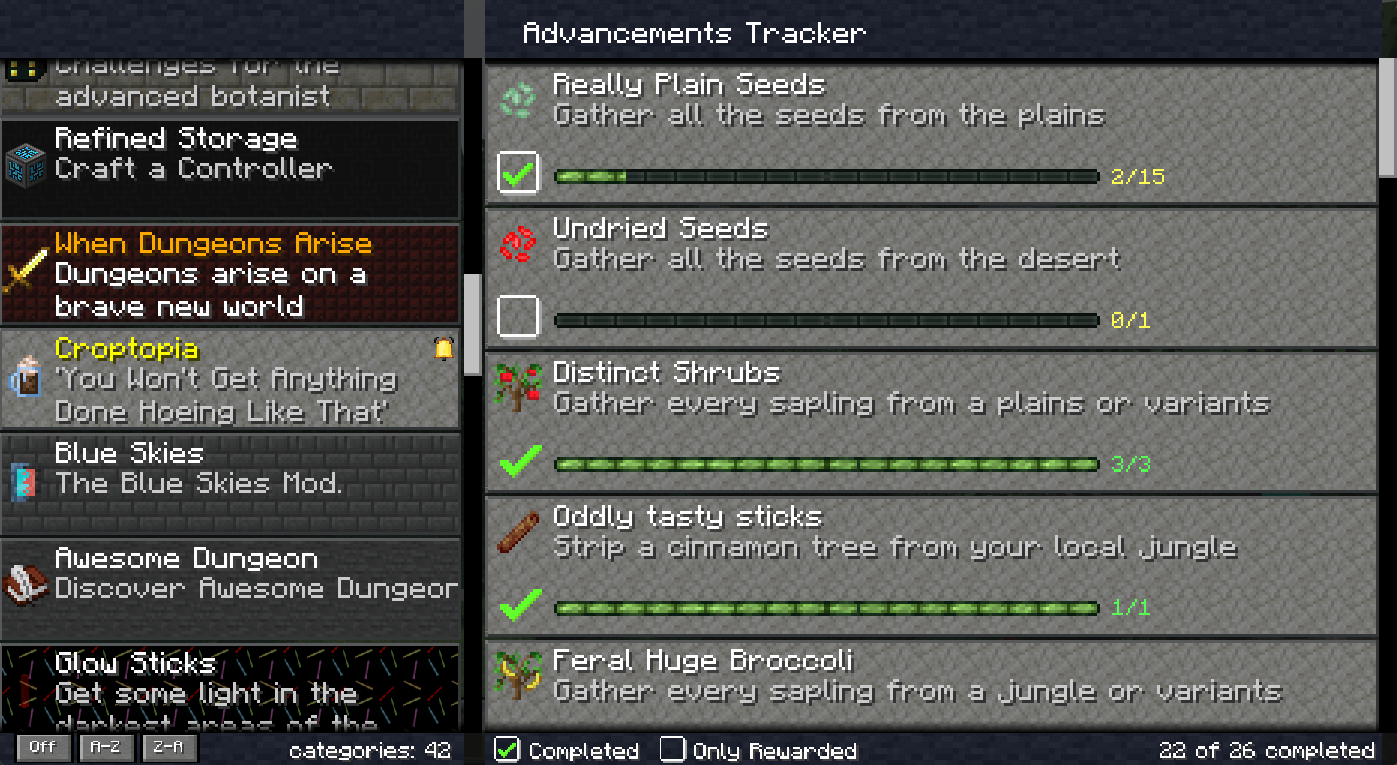
- List Overview of advancements with sorting and filter.
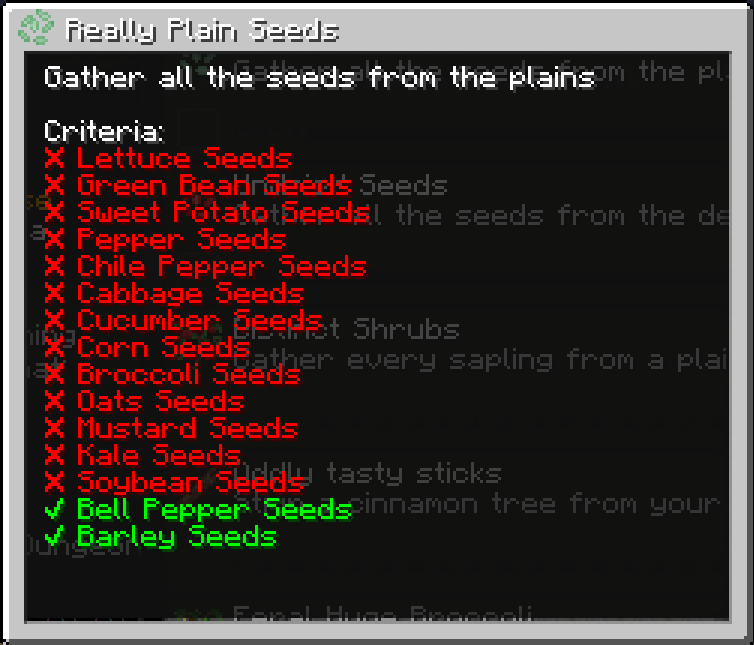
- Displaying of completed and missing criteria to make it easier to complete an advancement.
- Easy way to track specific advancements and their process.
- Most criteria will be translated to more meaningful names.
📜Advancements Overview
The overview could be open with CTRL + L and displays all current advancements and allow the tracking of single advancements.
🔎 Advancement Details
By clicking on the advancements inside the overview you will see the details about the completed and missing criteria and a list of rewards, if any.
🎯Advancements Widget
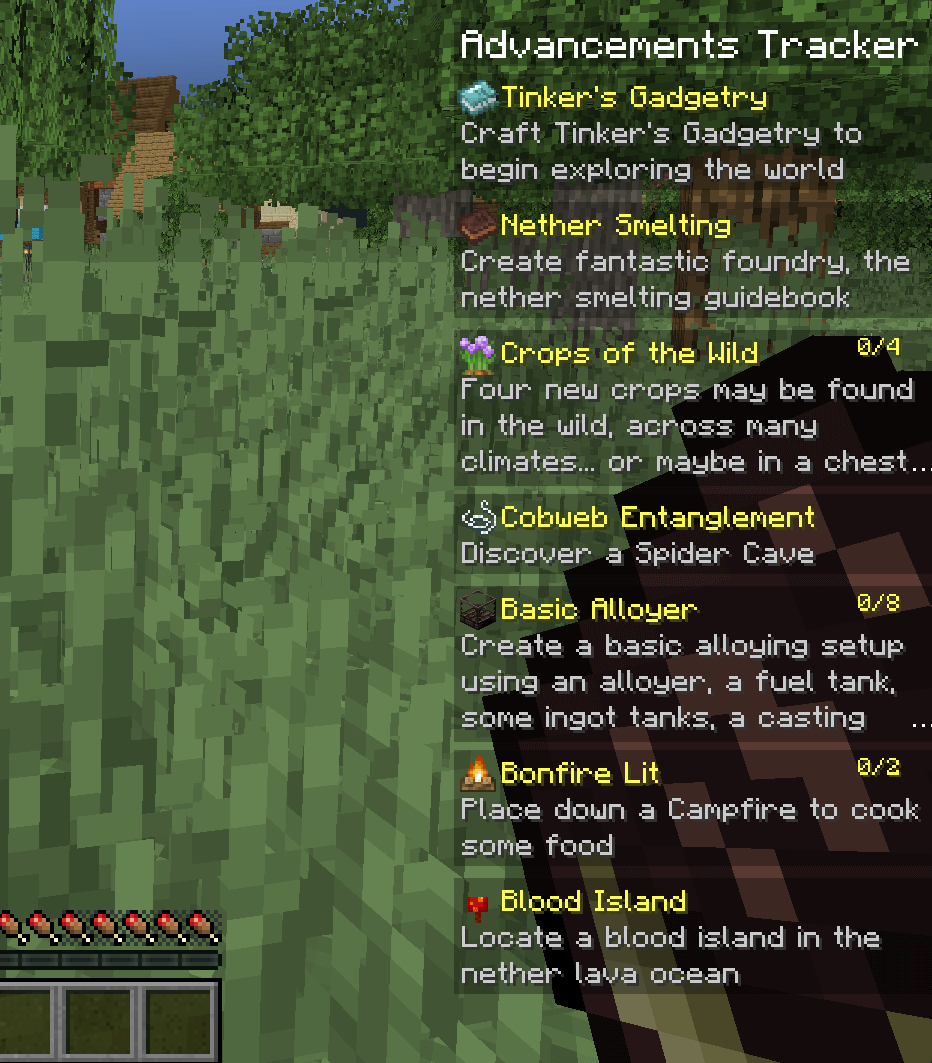
The widget could be show/hide with ALT + L and displays the currently tracked advancements and their progress.
💾Storing tracked advancements
The tracked advancements are stored directly in the client settings file and could be easily adjusted.
They are stored per server, so you can have different tracked advancements for each single server.
Local games (single-player) however sharing the same tracked advancements.
🌐 Criteria Translation Support
This mods adds support for criteria translation instead of having cryptic requirements like 1, 2, 3.
The translated text is added over language files and you will see a corresponding message in the client log for untranslated advancements like:
Unable to translate summoned (advancement.minecraft.nether.summon_wither.summoned) to a more meaningful name.
Example en_us.json entry for the former line:
"advancement.minecraft.nether.summon_wither.summoned": "Summon a Wither",
You can add the translation directly into your mods, mod packs or in this mod over a PR.
🗄️Setting file
The setting file allows you to disable / enable the overview or widget screen.
You could also adjust the position and size of the widget overlay.
🧳Mod pack Support
You could define tracked advancements over the settings file which should be displayed by default in a specific order.
This is helpful for mod packs so that the user gets first an tutorial advancement / tasks and later other pre-defined tasks.
If you are defining a pre-defined order you could disable the overview screen to make sure that the user is not un-tracking them by mistake.
🙋FAQ
Is this a server side / client side mod❓
Its a pure client side mode, but will not harm if it is installed on the server.
Does it work with data packs❓
If the data pack is not using a custom advancement system it should work out of the box.
I recommending the Expanded Advancement and Recipe Pack data pack which adds a plenty of advancements and recipes.
常见问题
Advancements Tracker 支持哪些 Minecraft 版本?
Advancements Tracker 支持 Minecraft Java 版 1.16.5–1.20.1,共 9 个版本,可用的加载器:Forge / NeoForge。下载时注意选择和你游戏版本一致的文件。
Advancements Tracker 怎么安装?
先用 PCL2 或 HMCL 启动器安装对应版本的 Forge / NeoForge,再把下载的 .jar 文件放进游戏目录的 mods 文件夹,重新启动游戏即可。开启了版本隔离的,mods 文件夹在 versions/版本名 下面。运行环境:仅客户端。
Kaworru 的其他作品
查看全部 →
APTweaks: Core (11.x Classic)
核心是所有自适应性能优化模块的必需前置,提供共享API、监控功能、事件和命令。
APTweaks: Items (11.x Classic)
物品聚拢(掉落方块、经验球等)与垃圾清理。

Easy NPC
轻松创建带有对话功能的 NPC,用于你的世界或模组。

Easy Mob Farm
The easy mob farm is a server friendly way to capture different kind of animals and mobs to gather their loot. This mod provides serval catching items and mob farms to make it more entertaining.
评论
登录后评论和评分