Advanced World Selection
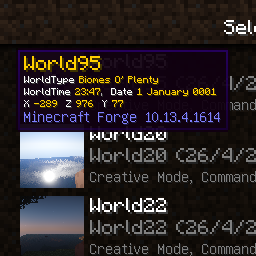
Advanced World Selection lets you see detailed tooltips about your worlds in Minecraft's World Selection screen.
介绍
Advanced World Selection
for Minecraft 1.7.10 to 1.12.2 by Sedridor
Ever forgot which mods or mod versions a world was saved with? Maybe you even want to know where in the world you were?
Advanced World Selection is a mod that lets you see detailed tooltips about your worlds in Minecraft’s World Selection screen.
This helps you preventing chunk walls by loading a world with missing or new biome generation mods. You can also see the world’s seed.
As a bonus, you will also have the new 1.9-style World Selection screen.


MinecraftForge required!
Installation
– Download and install Forge
– Move the mod’s jar file into the mods folder of Minecraft
Changelog
Version 1.12.2-01 [21-5-2018]
– Updated for 1.12.2
– Added option to hide coordinates
Version 1.11-01 [8-12-2016]
– Updated for 1.11
Version 1.9.4-02 [8-12-2016]
– Updated for latest Forge
Version 1.7.10-07 [21-5-2016]
– Added option to keep world icon updated when saving world
Version 1.9.4-01 [20-5-2016]
– Updated to 1.9.4
– Added option to keep world icon updated when saving world
Version 1.7.10-5 [30-4-2016]
– Fix translation
Version 1.7.10-4 [28-4-2016]
– Fix unicode font switching
Version 1.7.10-3 [28-4-2016]
– Fixed world icon related crash
– Prevent tooltips from going beyond screen edge
Version 1.7.10-2 [27-4-2016]
– Added option to hide unchanged (active) mods
– Improved version comparator
Version 1.7.10-1 [26-4-2016]
– First release
See minecraftforum thread for more information
常见问题
Advanced World Selection 支持哪些 Minecraft 版本?
Advanced World Selection 支持 Minecraft Java 版 1.7.10–1.12.2,共 8 个版本,可用的加载器:Forge。下载时注意选择和你游戏版本一致的文件。
Advanced World Selection 怎么安装?
先用 PCL2 或 HMCL 启动器安装对应版本的 Forge,再把下载的 .jar 文件放进游戏目录的 mods 文件夹,重新启动游戏即可。开启了版本隔离的,mods 文件夹在 versions/版本名 下面。
评论
登录后评论和评分