
Advanced Hoppers
Advanced Hoppers is a mod that adds hoppers that can transfer items and fluids faster than vanilla, and can filter items !
截图


介绍
Advanced Hoppers Mod
Take your item and fluid transfer to the next level with Advanced Hoppers, a mod designed to enhance automation in Minecraft. With new tiers of hoppers, a fluid-transfer flopper, and customizable configurations, you have more control than ever!
Support is Available in my Discord!
Hoppers
All numbers below are the default values and can be changed in the config. Speeds are in game ticks: 20 ticks is one second, and a vanilla hopper moves 1 item every 8 ticks.
Tiered hoppers
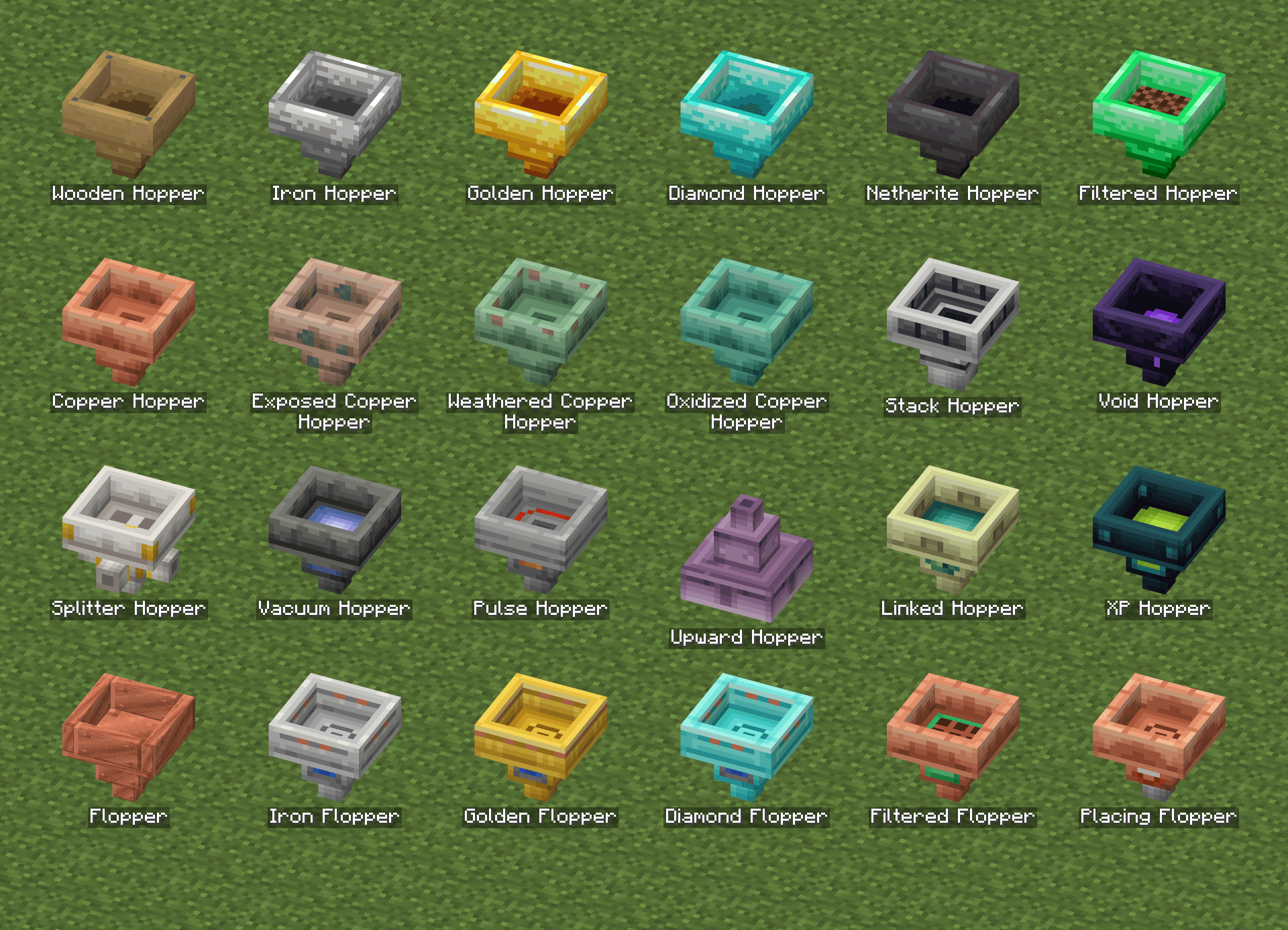
 Wooden Hopper: a cheap early-game hopper. Moves 1 item every 20 ticks.
 Iron Hopper: moves 1 item every 6 ticks.
 Golden Hopper: moves 1 item every 4 ticks.
 Diamond Hopper: moves 1 item every 2 ticks.
 Netherite Hopper: moves 1 item every tick.
Copper hoppers
 Copper Hopper: moves 1 item every 10 ticks. Like copper blocks, it slowly oxidizes over time and gets slower at each stage.
 Exposed Copper Hopper: moves 1 item every 12 ticks.
 Weathered Copper Hopper: moves 1 item every 14 ticks.
 Oxidized Copper Hopper: moves 1 item every 16 ticks.
Use honeycomb on a copper hopper to wax it and stop it from aging. Use an axe to remove the wax or scrape off one stage of oxidation. Items inside are kept when it changes stage.
Special hoppers
 Filtered Hopper: moves 1 item every 2 ticks, but only the items you allow. It has 5 filter slots and three toggles: whitelist or blacklist, match any item that shares a tag with a listed item, and match exact data (enchantments, names and so on). With an empty filter it lets everything through.
 Stack Hopper: moves a whole stack, up to 64 items, every 8 ticks.
 Void Hopper: destroys items instead of storing them. This covers items dropped on it, items in a container above it, and items other hoppers push into it. Its 5 filter slots decide what gets destroyed: either only the listed items (everything when the filter is empty) or everything except the listed items.
 Splitter Hopper: hands items out in turn to every container around it, below and on all four sides. Moves 1 item every 4 ticks.
 Vacuum Hopper: pulls in dropped items from around it. The range is set in its screen, from 1 to 8 blocks.
 Pulse Hopper: collects items like a normal hopper but only sends them on when it receives a redstone pulse. The amount sent per pulse is set in its screen, from 1 to 64 items.
 Upward Hopper: works upside down. It pulls items from the container below it and pushes them up, or to the side it faces.
 Linked Hopper: sends items wirelessly to another Linked Hopper up to 64 blocks away in the same dimension. Use a Hopper Linker
 on the sending hopper, then on the receiving one. Sneak and use the linker on a hopper to unlink it. Its screen shows where it sends items to and where it receives them from. When it is not linked it works like a normal hopper.
 XP Hopper: collects experience orbs that land on it and stores the experience. Open it to take 1 level, 10 levels, or everything stored. A redstone signal stops it from collecting.
Floppers (fluid hoppers)
Floppers move fluids instead of items. They drain source blocks and tanks above them and fill the tank they point into. You can also use a bucket on them to fill or empty them.
 Flopper: holds 8,000 mB and moves 50 mB per tick.
 Iron Flopper: holds 16,000 mB and moves 100 mB per tick.
 Golden Flopper: holds 32,000 mB and moves 250 mB per tick.
 Diamond Flopper: holds 64,000 mB and moves 1,000 mB per tick.
 Filtered Flopper: only accepts one fluid. Set the filter by putting a filled bucket or other fluid container in the filter slot of its screen, and click the slot with an empty hand to clear it. Holds 8,000 mB and moves 50 mB per tick.
 Placing Flopper: places its fluid into the world as a source block where its spout points, one every 8 ticks while it holds at least 1,000 mB. Holds 8,000 mB.
If you’d like to support me and the development of my mods, I recommend trying out BisectHosting. Use code “project8gbderam” to get 25% off your first month of a gaming server for new customers. They offer 24/7 support and lightning-fast response times, ensuring you’re in great hands and providing exceptional assistance for all your gaming needs.
https://www.bisecthosting.com/project8gbderam

常见问题
Advanced Hoppers 支持哪些 Minecraft 版本?
Advanced Hoppers 支持 Minecraft Java 版 1.21.1–26.1.2,共 2 个版本,可用的加载器:Fabric / NeoForge。下载时注意选择和你游戏版本一致的文件。
Advanced Hoppers 怎么安装?
先用 PCL2 或 HMCL 启动器安装对应版本的 Fabric / NeoForge,再把下载的 .jar 文件放进游戏目录的 mods 文件夹,重新启动游戏即可。开启了版本隔离的,mods 文件夹在 versions/版本名 下面。
Project8gbDeRam 的其他作品
查看全部 →
Leaderboards
恢复了 FTB Utilities 的经典排行榜,现在功能更丰富!

Replication RS2 Bridge
为 Replication 和精致存储 2 添加联动。

Chisel Modern
建筑党的最佳伙伴。支持现代版本!
MooFluids Modern
会流体的牛!
评论
登录后评论和评分