
Admin Utilities
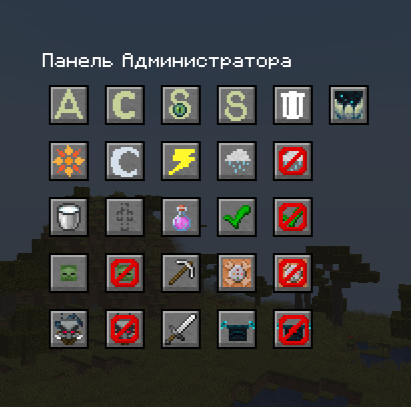
Admin Panel is a user—friendly mod for administrators with a graphical interface. By pressing Z (or the designated key), you can change the game mode, time, clear inventory, or adjust world settings.
截图
介绍



EN
Admin Panel is an indispensable mod for those who manage Minecraft servers or often play in creative mode. It simplifies and speeds up routine administrative tasks by replacing text commands with a user-friendly interface with icons.
Main advantages:
- Simple interface. The panel is accessed by pressing a single key (default is
Z). - Full setup. The key to open the panel is easy to change in the Minecraft control settings.
- Security. The mod’s functions are only available to players with access level 4 (operator/administrator).
- All in one place. The panel brings together dozens of useful commands, divided into groups: time management, weather, game modes, inventory, and world rules.
- Saving time. Instant execution of actions with one click without risk of typos.
Who is this mod for:
- Server owners and administrators.
- Builders in creative mode.
- Map makers.
- Anyone who is tired of constantly typing the same commands.
Description of functionality and buttons
The mod adds a convenient panel with several groups of buttons:
Time management:
- Daytime. Sets the time to 1000 days.
- Night time. Sets the time to 13000 – night.
Inventory and effects management:
- Inventory cleaning. Instantly removes all items from the inventory and quick access toolbar.
- Invisibility (without particles). Provides an invisibility effect without annoying particles.
- Super pickaxe. Gives out a pickaxe with the maximum enchantment level (Effectiveness, Durability, Luck, etc.).
- Super Sword. Gives out a sword with the maximum enchantment level (Sharpness, Durability, etc.).
- Removing effects. Instantly removes all positive and negative effects.
- Restoring health. Completely restores health and satiety.
Game mode management:
- Adventure mode. Sets the
Adventuregame mode. - Creative mode. Sets the
Creativegame mode. - Observer mode. Sets the
Spectatorgame mode. - Survival mode. Sets the
Survivalgame mode.
Weather management:
- Rainy/snowy weather. Sets the weather for rain or snow in cold biomes.
- Clear weather. Stops rain and thunderstorms, sets clear weather.
- Stormy weather. Triggers a lightning storm.
World Rules Management (Game Rules):
- Disabling command output of the command block. Sets the
commandBlockOutputrule tofalse. - Enabling command output of the command block. Sets the
commandBlockOutputrule totrue. - Disabling the appearance of mobs. Sets the
doMobSpawningrule tofalse. - Enabling the appearance of mobs. Sets the
doMobSpawningrule totrue. - Saving inventory after death. Sets the
keepInventoryrule totrue. - Non-preservation of inventory after death. Sets the
keepInventoryrule tofalse. - Turning off village raids. Sets the
disableRaidsrule totrue. - Enabling village raids. Sets the
disableRaidsrule tofalse.
RU
Admin Panel – незаменимый мод для тех, кто управляет Minecraft-серверами или часто играет в творческом режиме. Он упрощает и ускоряет выполнение рутинных административных задач, заменяя ввод текстовых команд на удобный интерфейс с иконками.
Основные преимущества:
- Простой интерфейс. Доступ к панели осуществляется нажатием одной клавиши (по умолчанию –
Z). - Полная настройка. Клавишу для открытия панели легко изменить в настройках управления Minecraft.
- Безопасность. Функции мода доступны только игрокам с уровнем доступа 4 (оператор/администратор).
- Все в одном месте. Панель объединяет десятки полезных команд, разбитых на группы: управление временем, погодой, режимами игры, инвентарем и правилами мира.
- Экономия времени. Мгновенное выполнение действий одним кликом без риска опечаток.
Для кого этот мод:
- Владельцы и администраторы серверов.
- Строители в творческом режиме.
- Создатели карт.
- Все, кому надоело постоянно вводить одни и те же команды.
Описание функционала и кнопок
Мод добавляет удобную панель с несколькими группами кнопок:
Управление временем:
- Дневное время. Устанавливает время на 1000 – день.
- Ночное время. Устанавливает время на 13000 – ночь.
Управление инвентарем и эффектами:
- Очистка инвентаря. Мгновенно удаляет все предметы из инвентаря и панели быстрого доступа.
- Невидимость (без частиц). Выдает эффект невидимости без надоедливых частиц.
- Супер кирка. Выдает кирку с максимальным уровнем зачарований (Эффективность , Прочность, Удача и т.д.).
- Супер меч. Выдает меч с максимальным уровнем зачарований (Острота , Прочность и т.д.).
- Снятие эффектов. Мгновенно убирает все положительные и отрицательные эффекты.
- Восстановление здоровья. Полностью восстанавливает здоровье и насыщение.
Управление режимами игры:
- Режим приключений. Устанавливает игровой режим
Adventure. - Творческий режим. Устанавливает игровой режим
Creative. - Режим наблюдателя. Устанавливает игровой режим
Spectator. - Режим выживания. Устанавливает игровой режим
Survival.
Управление погодой:
- Дождливая/снежная погода. Устанавливает погоду на дождь или снег в холодных биомах.
- Ясная погода. Останавливает дождь и грозу, устанавливает ясную погоду.
- Грозовая погода. Запускает грозу с молниями.
Управление правилами мира (Game Rules):
- Выключение вывода команд командного блока. Устанавливает правило
commandBlockOutputвfalse. - Включение вывода команд командного блока. Устанавливает правило
commandBlockOutputвtrue. - Выключение появления мобов. Устанавливает правило
doMobSpawningвfalse. - Включение появления мобов. Устанавливает правило
doMobSpawningвtrue. - Сохранение инвентаря после смерти. Устанавливает правило
keepInventoryвtrue. - Несохранение инвентаря после смерти. Устанавливает правило
keepInventoryвfalse. - Выключение набегов на деревню. Устанавливает правило
disableRaidsвtrue. - Включение набегов на деревню. Устанавливает правило
disableRaidsвfalse.
常见问题
Admin Utilities 支持哪些 Minecraft 版本?
Admin Utilities 支持 Minecraft Java 版 1.14.4–1.21.8,共 10 个版本,可用的加载器:Fabric / Forge / NeoForge。下载时注意选择和你游戏版本一致的文件。
Admin Utilities 怎么安装?
先用 PCL2 或 HMCL 启动器安装对应版本的 Fabric / Forge / NeoForge,再把下载的 .jar 文件放进游戏目录的 mods 文件夹,重新启动游戏即可。开启了版本隔离的,mods 文件夹在 versions/版本名 下面。运行环境:客户端 / 服务端。
Gospi 的其他作品
查看全部 →
1.21 update | Tricky Trials
In this modification, I'm moving the 1.21 update to 1.20.1 Tricky Trials

Nautilus & Spears | Mounts of Mayhem
This is a mod in which I added drop Mounts of Mayhem to the old versions of minecraft

Plants vs Zombies:Gospi Edition ( PvZ:GE )
This is my modification that adds plants and zombies in forge 47.2.0

Goblin and Depths
This is my idea of the new update 1.22
评论
登录后评论和评分