
AartBars
作者:aaddrick
Customizable Minecraft HUD mod featuring a speedometer, thermometer, stuck arrows display, and block tracker.
截图
介绍
中文介绍正在准备中,下面暂时显示原文。
AartBars – HUD Components
=========================
A lightweight Minecraft mod that adds various HUD components.

Features
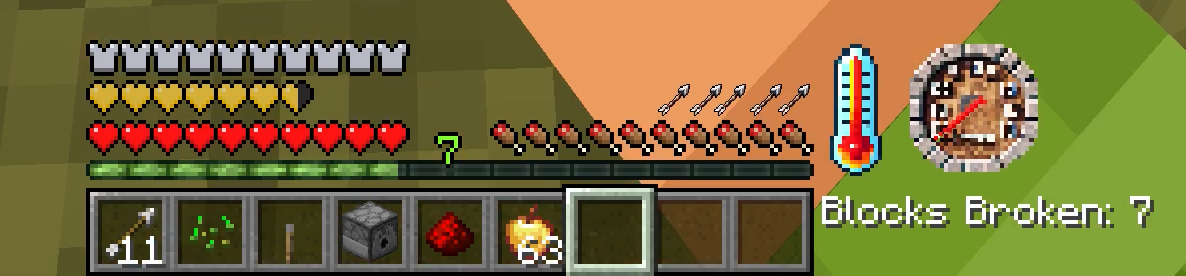
Broken Block Tracker
- Tracks and displays the number of blocks broken by the player
- Simple text-based display
- Customizable position (right-aligned with experience bar by default)
- Counter persists across game sessions
Stuck Arrows
- Displays the number of arrows stuck in your player
- Arrow icon rendering
- Customizable position (right-aligned with food bar by default)
- Basic animation when arrow count changes
Speedometer
- Measures player movement speed
- Analog gauge display
- Customizable position (left of center by default)
- Smooth interpolation between speed changes
- Uses position history for accurate speed calculation
Thermometer
- Displays current biome temperature
- Graphical thermometer display
- Customizable position (left-aligned with health bar by default)
- Temperature range from -0.5 to 1.5
- Updates based on player’s current biome
Options
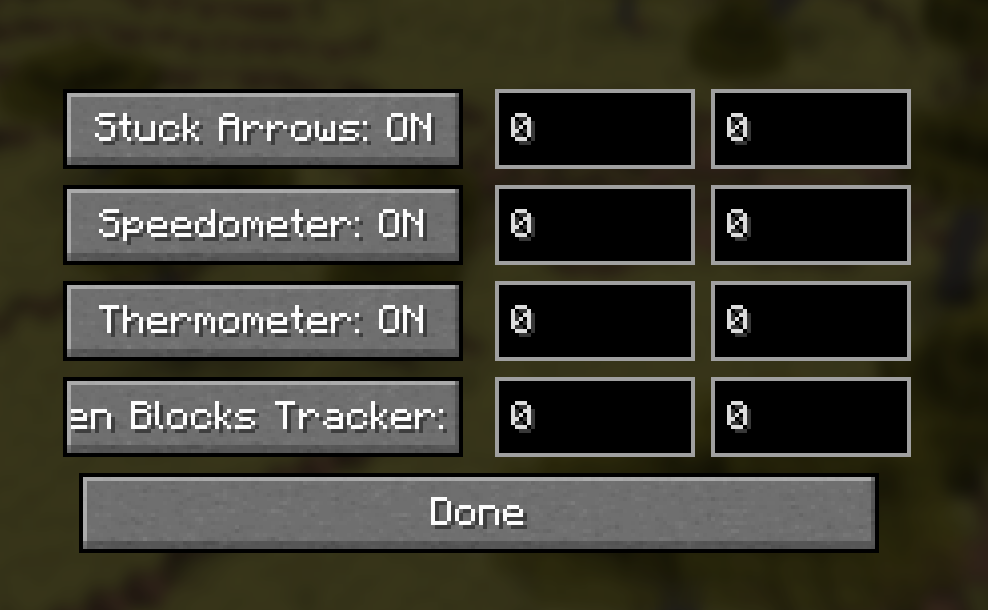
Adjust visibility and X/Y position offset. Menu hotkey needs to be bound.
Compatibility
- Works with Fabric API
- Client-side only – no server installation needed
Credits
- Technical Director: Aart
- Developer: aaddrick
- Special Thanks: Squeek from Appleskin fame, from whom I shamelessly stole the bones of this mode from.
License
This mod is released under the Unlicense, meaning you’re free to use, modify, and distribute it however you like!
常见问题
AartBars 支持哪些 Minecraft 版本?
AartBars 支持 Minecraft Java 版 1.21.4,可用的加载器:Fabric。下载时注意选择和你游戏版本一致的文件。
AartBars 怎么安装?
先用 PCL2 或 HMCL 启动器安装对应版本的 Fabric,再把下载的 .jar 文件放进游戏目录的 mods 文件夹,重新启动游戏即可。开启了版本隔离的,mods 文件夹在 versions/版本名 下面。运行环境:仅客户端。

评论
登录后评论和评分