介绍
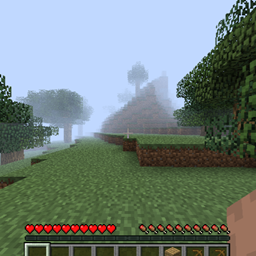
This Project Brings Original Herobrine’s Sighting World Into Modern Minecraft Versions.
Download The World From The Download List For The Required Version, Extract The Files To A Folder And Move It To Location %appdata% > .minecraft > saves
Launch Minecraft, Join The World, The Player Is Default Positioned To The Coordinates, Where The Original ScreenShot Was Taken. If The Player’s Position Has Reset To Spawn You Can Go Back To These Coordinates
Coordinates: X=5.16 Y=71 Z=-298.53
Camera Angle: RX=93.75 RY=-1.2
Note:
- World Is Ported With Least Of Corruption But It Will Still Be There, Any New Chunks Above Version Beta 1.7.3 or Release 1.0.0 Will Tranform To Newer Chunks As Of Modern Terrain Generation Of Game.
- Some Third Party Rendering Mods Might Break Some Things When Loading Chunks Into Modern Versions, Or Straight Up Crash The World. Use It With Caution Or Any Other Helper Mod
- I Personally Don’t Recommend Shaders Especially On Some Release Versions
- You Can Use Environmental Mods To Get Alpha Fog And Aesthetic Into Your Game
- If You Want To Generate Old Chunks, Download Release 1.0.0 Version Of The Game And Generate Chunks There Then Load It Into Newer Versions
Load Order:
Release 1.0 ➡ Release 1.2 ➡ Release 1.8.9 ➡ Release 1.12.2
Enjoy The World With Your Friends Without Any Hassle Of Converting Old World To Specific Versions With Chunk Corruption.
常见问题
Herobrine Original Map 支持哪些 Minecraft 版本?
Herobrine Original Map 支持 Minecraft Java 版 1.2.1–1.21.3,共 90 个版本。下载时注意选择和你游戏版本一致的文件。
Herobrine Original Map 怎么安装?
解压下载的文件,把里面的存档文件夹放进游戏目录的 saves 文件夹(开启了版本隔离的在 versions/版本名/saves),重新打开游戏就能在「单人游戏」里看到。请用 1.2.1–1.21.3 版本打开,版本不对可能导致地图损坏。

评论
登录后评论和评分